


Q1: Why Do 80% of Indian HRMS Rollouts Slip, and What Timeline Should You Actually Budget by Company Size?
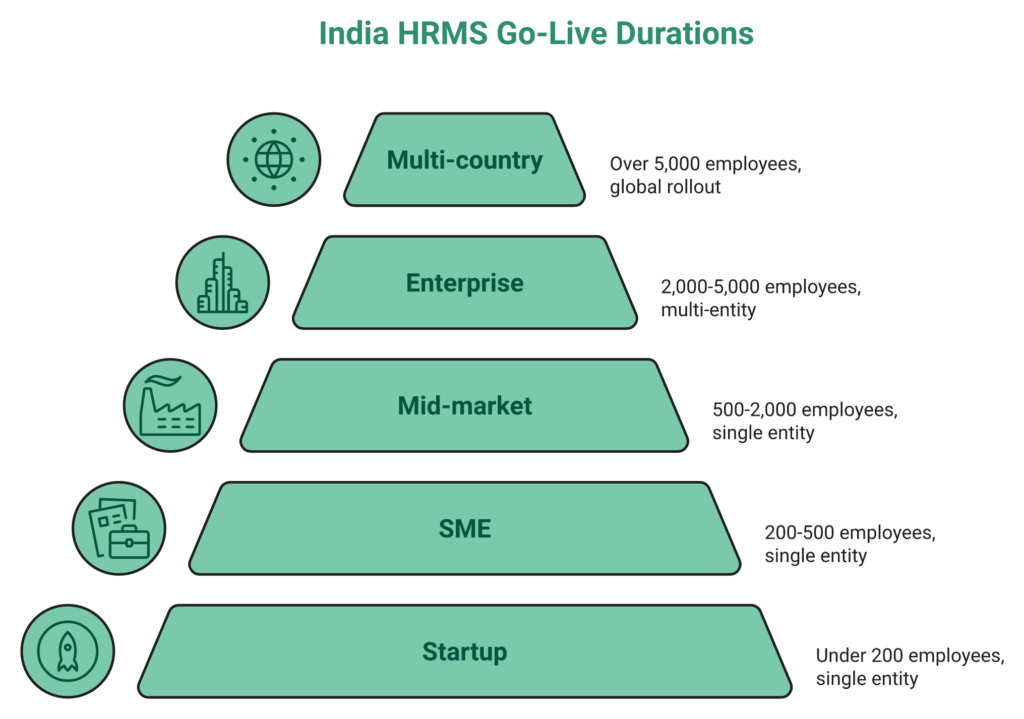
Here is the honest India-realistic answer before any vendor pitch colours it: startups (under 200) go live in 3 to 6 weeks; SMEs (200 to 500) in 6 to 10 weeks; mid-market (500 to 2,000) in 4 to 6 months; enterprises (2,000 to 5,000) in 6 to 9 months; multi-country rollouts in 9 to 12 months. Vendor-promised timelines slip 60% to 80% of the time, and the reasons are almost never the software. They are dirty master data, state Professional Tax gaps, scope creep, and a billing model that incentivises vendors to keep the meter running. A strong starting point for recalibrating expectations is this how to choose HRIS HRMS software guide.
The timeline matrix you should budget against
| Size Band | Discovery | Configuration | Data Migration | Parallel Payroll | Hypercare | Total |
|---|---|---|---|---|---|---|
| Startup (under 200, single entity) | 3 to 5 days | 1 to 2 weeks | 3 to 5 days | 1 cycle | 1 cycle | 3 to 6 weeks |
| SME (200 to 500) | 1 week | 2 to 3 weeks | 1 week | 1 cycle | 2 cycles | 6 to 10 weeks |
| Mid-market (500 to 2,000) | 2 to 3 weeks | 4 to 6 weeks | 2 to 3 weeks | 1 to 2 cycles | 2 to 3 cycles | 4 to 6 months |
| Enterprise (2,000 to 5,000, multi-entity) | 3 to 4 weeks | 8 to 10 weeks | 4 to 6 weeks | 2 cycles | 3 cycles | 6 to 9 months |
| Multi-country | 4 to 6 weeks | 12 to 16 weeks | 6 to 8 weeks | 2 to 3 cycles | 3+ cycles | 9 to 12 months |
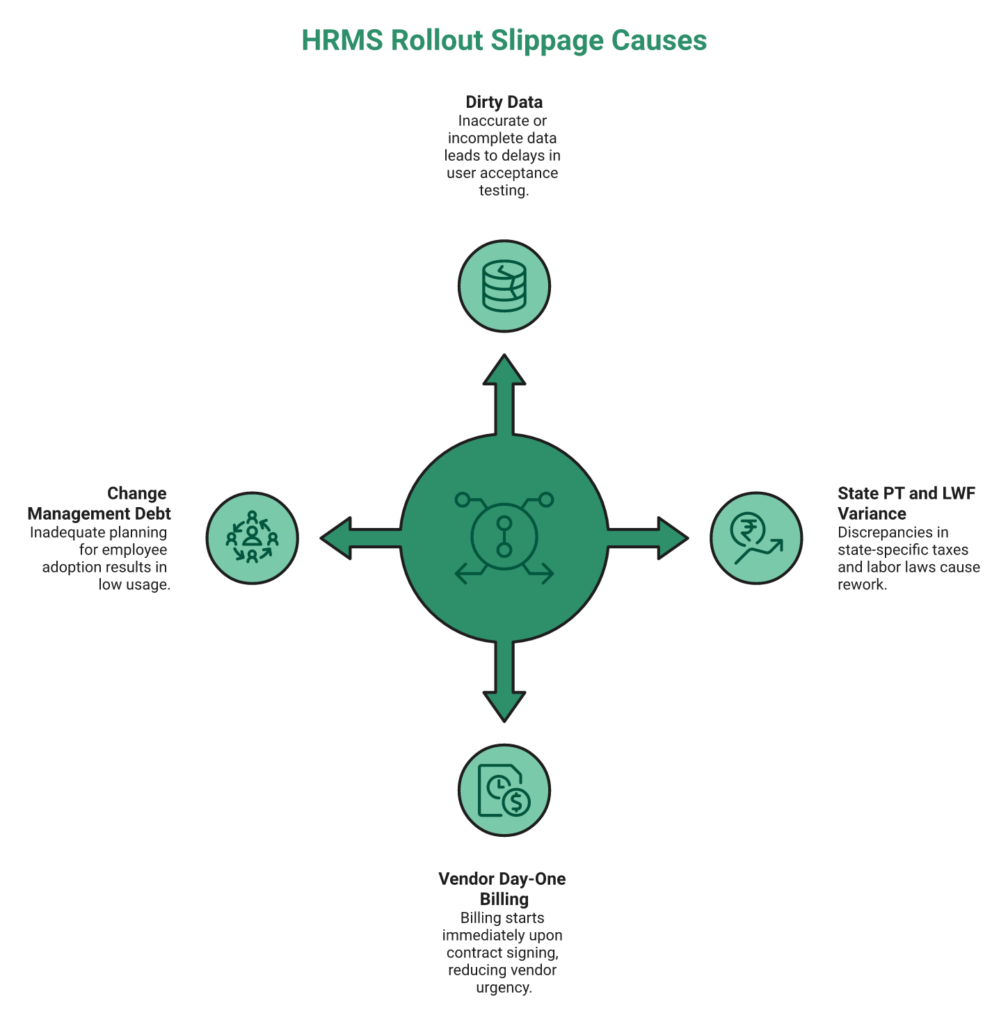
The four structural causes of slippage
❌ Dirty master data. PAN mismatches, UAN gaps, date-format inconsistencies, and manager hierarchy holes surface in Week 4 and push UAT by two weeks.
❌ State-PT variance. A satellite office in West Bengal or Tamil Nadu missed during discovery adds 2 to 3 weeks of rework, statutory resubmissions included. A quick refresher on professional tax slab rates helps catch this at discovery.
❌ Vendor day-one billing. When the subscription meter starts on contract signature, nobody inside the vendor’s org has a financial incentive to close the implementation fast. Compare this with HROne’s transparent pricing model.
❌ Change-management debt. Treating rollout as a training event rather than a 90-day behavioural shift is why manufacturing and field-workforce adoption routinely stalls below 50%.
What a realistic Gantt looks like
For anything above SME scale, the plan needs a Gantt with a RACI overlay, not a Google Sheet with dates. Vendor selection, data cleansing, and integration scoping must run in parallel from Week 1. Configuration to UAT is sequential, and training overlaps with UAT from Week 7. The floor benchmark worth anchoring on: MR DIY India went live on HROne in 30 days, a full-stack mid-market retail rollout, not a stripped-down pilot. Read the full MRDIY case study for specifics.
⏰ How HROne structurally removes three of the four slippage causes
This is where HROne’s commercial and operating model changes the math. Billing meters only from go-live, which means our onboarding team has the same incentive the buyer does. Every implementation runs through a prior-HR onboarding SPOC (not a technical PM reading a checklist), carrying a 9.8 NPS on post-implementation surveys. The 127 pre-built hire-to-retire workflows mean configuration starts from roughly 70% pre-loaded, not a blank canvas that takes eight weeks to fill. Dirty data is the only slippage cause that remains on the buyer’s side of the table, which is exactly where Phase 0 readiness should catch it.
Q2: What Is the India HRMS Implementation Complexity Index, and How Do You Score Your Rollout 0 to 100 Before Kickoff?
Before you accept any vendor’s timeline, score your own complexity. The India HRMS Implementation Complexity Index (ICI) rates a rollout 0 to 100 across six weighted dimensions: legal-entity count, operating-state count (PT/LWF variance), headcount and workforce mix, integration surface, data maturity, and change-management debt. Scores of 70 and above unlock 30 to 45 day go-lives; 40 to 70 demand 90 to 120 days; below 40 signals a 6+ month runway. For deeper context, see this HRIS buyer pitfalls breakdown.
The decision dilemma most CHROs walk into
Most CHROs accept the vendor’s generic timeline without ever quantifying their own complexity, and then absorb the blame in month three when it slips. The conversation inside the buying committee is almost always about the vendor’s capability, rarely about the company’s own readiness. That asymmetry is how a 1,500-employee manufacturer with 11 plants across seven states ends up on the same “90-day standard implementation” slide as a 400-person single-office IT services firm. Purpose-built platforms like CHRO solutions exist to reframe exactly this conversation.
❌ The wrong way to pick a timeline
Headcount alone. A 500-person firm operating in 1 state and 1 entity is fundamentally different from a 500-person firm in 6 states and 3 entities.
Vendor brand. “Darwinbox does 90 days, so we’ll do 90 days” ignores your state-PT, biometric, and ERP integration reality.
“What our peer group did.” Peer anecdotes compress two rollouts with radically different complexity into the same number.
✅ The right evaluation framework
Score each dimension out of the weight shown, total to 100:
| # | Dimension | What to measure | Weight |
|---|---|---|---|
| 1 | Legal-entity count | 1 entity = full marks; every additional entity deducts | 20 |
| 2 | Operating-state count | PT/LWF slab variance; Shops & Establishments registrations | 15 |
| 3 | Headcount + workforce mix | % WFH, field, shop-floor, shift-based | 20 |
| 4 | Integration surface | Biometric OEMs, ERP (Tally/SAP/Zoho), SSO, BGV, LMS | 15 |
| 5 | Data maturity | Master cleanliness: PAN, UAN, CTC, manager hierarchy | 20 |
| 6 | Change-management debt | Previous HRMS attempts, union presence, comms cadence | 10 |
Threshold interpretation
⭐ 70 to 100. A 30 to 45 day go-live is realistic. Compress parallel payroll to one cycle, run training in parallel with UAT.
⚠️ 40 to 69. Budget 90 to 120 days. Two parallel cycles, sequential training, and dedicated change champions.
❌ Below 40. Commit to 6+ months. Phase modules, run three parallel cycles, and invest in pre-project data cleansing before Week 1.
💰 Where HROne raises the achievable score 15 to 20 points pre-kickoff
The scoring rubric is vendor-neutral by design, but the floor of what’s achievable shifts based on how much of the work is pre-loaded. HROne’s Policy Engine lets HR users configure leave, attendance, and payroll rules from the front-end without developer tickets. HRV Studio handles visitor, seating, and vendor apps as low-code modules instead of separate developer sprints. The India-compliance engine ships PF, ESI, multi-state PT, LWF, FBP, CTC-revision, and new wage-code FFS as native logic, not plugin add-ons that have to be configured state by state. Explore the payroll software stack for the full native-logic surface. That combination routinely adds 15 to 20 points to the achievable ICI before Week 1 starts.
The meta-insight the rubric forces: the real question isn’t how long the vendor takes. It’s how complex your reality is before you pick a vendor. Score yours first, then invite proposals.
Q3: What Does the Complete Phase-by-Phase Implementation Plan Look Like From Phase 0 Pre-Readiness to Phase 11 Post-Go-Live Audit?
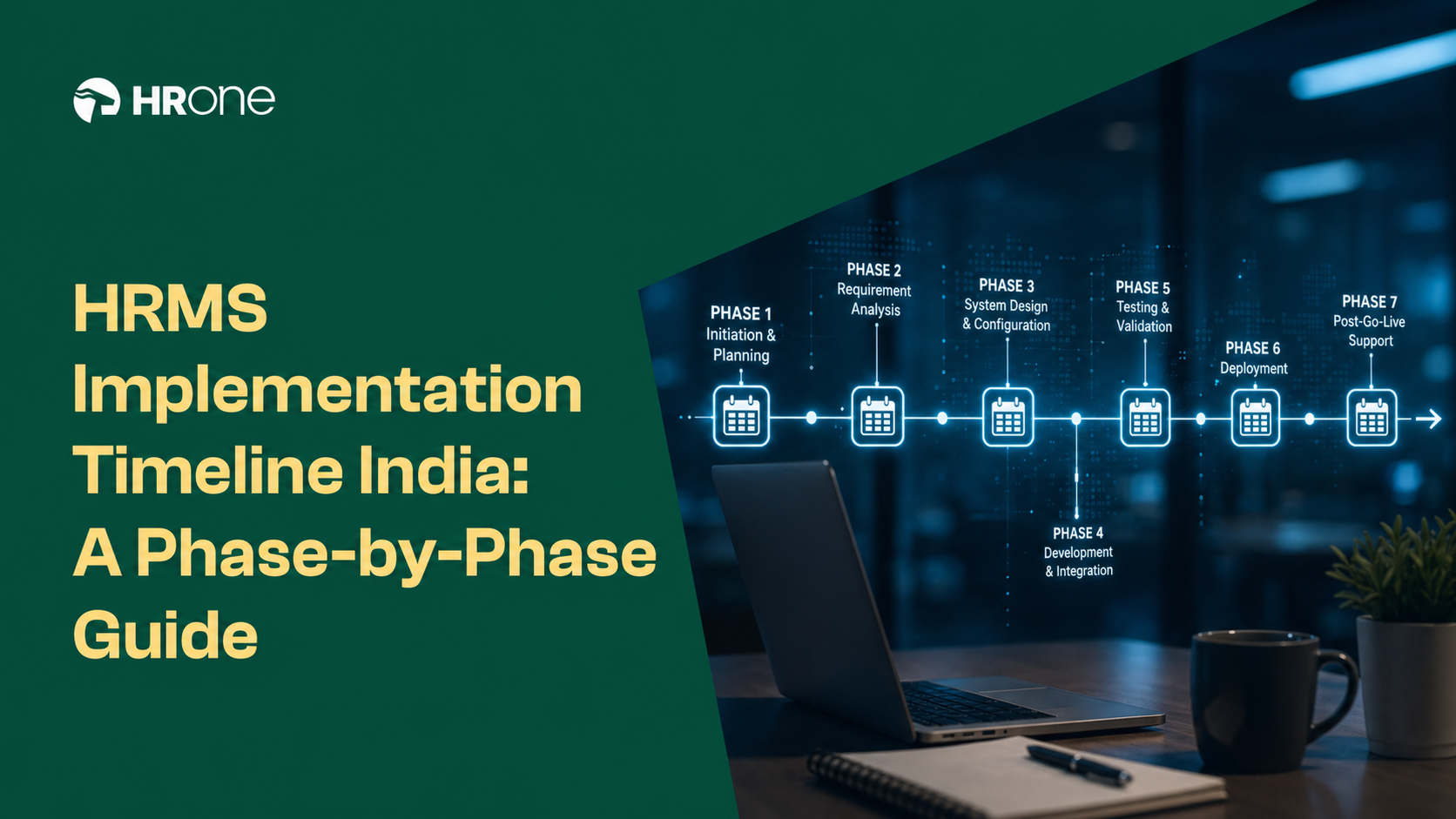
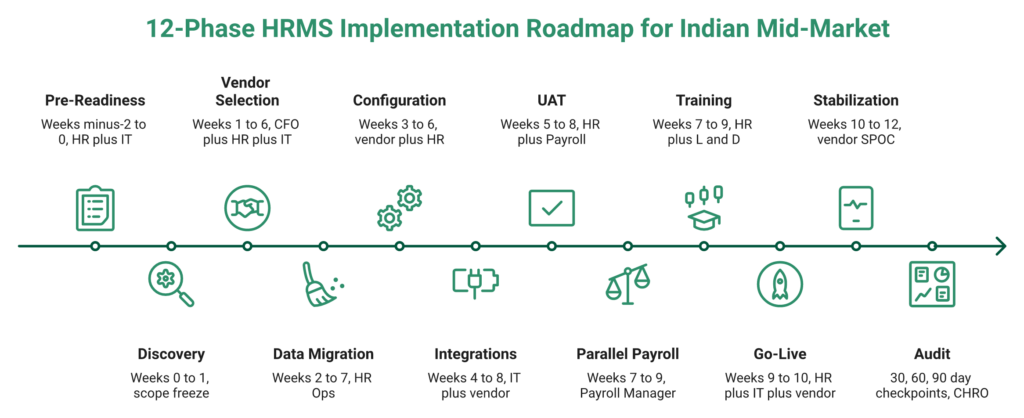
The full India-realistic implementation has 12 phases across 12 weeks for a standard mid-market rollout: Phase 0 Pre-Readiness (W-2 to 0), Phase 1 Discovery & Scope Freeze (W0 to 1), Phase 2 Vendor Selection (W1 to 6, parallelizable), Phase 3 Data Audit & Migration (W2 to 7), Phase 4 Configuration & Workflows (W3 to 6), Phase 5 Integrations (W4 to 8), Phase 6 UAT (W5 to 8), Phase 7 Parallel Payroll (W7 to 9), Phase 8 Training Cascade (W7 to 9), Phase 9 Go-Live & Cutover (W9 to 10), Phase 10 Stabilization (W10 to 12), Phase 11 30/60/90 Audit. For a deeper breakdown of automation touchpoints, see payroll automation complete guide.
The phase-by-phase deliverables matrix
| Phase | Weeks | Objective | Key Deliverables | Owner | Exit Criteria |
|---|---|---|---|---|---|
| 0 Pre-Readiness | W-2 to 0 | Audit readiness | Data readiness score, stakeholder map, charter | HR + IT | Readiness of 80 or higher |
| 1 Discovery | W0 to 1 | Freeze scope | Module priority, source-of-truth map, policy freeze | HR + Vendor SPOC | Signed scope doc |
| 2 Vendor Selection | W1 to 6 | Pick + contract | RFP scorecard, SOW red-flag check | CFO + HR + IT | SOW signed |
| 3 Data Migration | W2 to 7 | Clean + migrate | 12-col master template, YTD vs opening-balance call | HR Ops | 99% master accuracy |
| 4 Configuration | W3 to 6 | Set rules | Approval chains, maker-checker, audit trail | HR + Vendor | Policy sign-off |
| 5 Integrations | W4 to 8 | Connect stack | Biometric OEM matrix, Tally/Zoho/SAP GL, SSO | IT + Vendor | Handshake test passed |
| 6 UAT | W5 to 8 | Validate | UAT template, India statutory test cases | HR + Payroll | Zero P0/P1 defects |
| 7 Parallel Payroll | W7 to 9 | De-risk payout | 1/2/3-cycle decision, reconciliation of plus or minus ₹1 | Payroll Manager | Variance closed |
| 8 Training | W7 to 9 | Enable users | Train-the-trainer, champion network | HR + L&D | 80% certified |
| 9 Go-Live | W9 to 10 | Cutover | Cutover checklist, rollback plan | HR + IT + Vendor | Day-1 payroll clean |
| 10 Stabilization | W10 to 12 | Hypercare | SLA tracker, first month-end sprint | Vendor SPOC | Tickets in BAU |
| 11 Audit | 30/60/90 | Measure | Adoption %, accuracy %, ticket volume, ROI | CHRO | Board-ready report |
What runs in parallel vs what is strictly sequential
✅ Parallel from Week 1. Vendor selection, data cleansing, integration scoping, and change-comms plan.
❌ Strictly sequential. Configuration to UAT to parallel payroll to go-live. No shortcuts here; skipping UAT is the single largest source of Day-1 incidents.
⭐ Overlap-friendly. Training with UAT from Week 7, and hypercare documentation with stabilization.
⏰ The 30-day accelerated blueprint for 200 to 1,000 headcount, single-entity firms
When data is clean, scope is frozen pre-kickoff, and compliance is contained to two or three states, 30 days is viable. The sprint breakdown is below, and the onboarding process page maps day-by-day activities.
- Days 1 to 7. Discovery + employee master freeze + policy inventory.
- Days 8 to 15. Configuration of CTC, leave, attendance, PT, and ESI + data upload to sandbox.
- Days 16 to 22. Biometric + SSO + GL integration + UAT with India statutory test cases.
- Days 23 to 28. One full parallel payroll cycle + reconciliation at plus or minus ₹1 tolerance.
- Days 29 to 30. Cutover weekend + Day-1 hypercare.
Non-negotiables: scope freeze before Day 1, single payroll cutoff, one biometric OEM, manager hierarchy approved by Day 3, and statutory sign-off (PF/ESI/PT/TDS) by Day 22. Proof floor: MR DIY India went live on HROne in 30 days with full Core HR + Workforce + Time Office + Payroll.
✅ How HROne collapses Phases 1 to 4
HROne’s implementation model is designed to front-load the parts vendors usually stretch. The prior-HR onboarding SPOC runs discovery and configuration as a single workstream instead of two disconnected ones. 127 pre-built hire-to-retire workflows mean Phase 4 doesn’t start from zero, because roughly 70% of base configuration is pre-loaded for Indian mid-market reality. The front-end Policy Engine, available inside the core HCM, lets HR teams finalise rules themselves instead of waiting on developer tickets. Billing meters only from Phase 9 go-live, which keeps vendor and buyer incentives aligned through the entire plan.
Q4: Which India Compliance Milestones, PF, ESI, State PT, LWF, TDS, Gratuity, and Form 16 Continuity, Must Be Locked Into the Timeline, and When Should You Go Live?
Lock eight compliance milestones into the timeline before parallel payroll begins: PF/UAN mapping (W3), ESI wage-ceiling validation (W3), state-PT slab inventory across every operating location (W3 to 4), LWF state codes (W4), new wage-code two-day FFS engine (W5), TDS projections + Form 16 continuity from previous vendor (W5 to 6), gratuity rules (W6), and JV/GL statutory mapping (W7). Go live on April 1 for the cleanest TDS reset and Form 16 continuity. Otherwise, align to the next pay-cycle boundary and avoid the 10-day window around appraisal communication or bonus disbursal. A quick primer on statutory compliance payroll helps teams stack these exit gates correctly.
The India compliance milestones matrix
| # | Milestone | Week | Owner | Exit Criteria | Common Failure Mode |
|---|---|---|---|---|---|
| 1 | PF / UAN mapping | W3 | Payroll Manager | 100% UAN match | Duplicate UANs across re-hires |
| 2 | ESI wage-ceiling validation | W3 | Payroll Manager | Ceiling applied correctly | Mid-year wage revisions missed |
| 3 | State PT slab inventory | W3 to 4 | HR Ops | Every state mapped | Satellite offices missed |
| 4 | LWF state codes | W4 | Payroll | Codes per state configured | Karnataka/Maharashtra confusion |
| 5 | New wage-code FFS (2 working days) | W5 | Payroll | FFS engine live | Manual Excel retrofits |
| 6 | TDS + Form 16 continuity | W5 to 6 | Payroll + Finance | YTD imported, projections matched | Previous-employer income skipped |
| 7 | Gratuity rules | W6 | Payroll + Legal | 5-year eligibility logic | Retrenchment edge cases |
| 8 | JV / GL statutory mapping | W7 | Finance + IT | Tally/SAP sync tested | Cost-centre mismatches |
State-PT, the milestone that trips most rollouts
India’s professional-tax landscape is state-wise, not national. A rollout in Maharashtra does not translate to Karnataka, and a company with offices in Maharashtra, Karnataka, West Bengal, Tamil Nadu, Gujarat, and Telangana is effectively running six parallel compliance configurations. Each state has its own slab structure, employer registration, and filing cadence. Shops & Establishments variance adds another layer for satellite branches. Before parallel payroll can begin, Form 24Q, PF ECR, and ESI challan generation must all pass readiness checks. These are non-negotiable exit gates, not nice-to-haves.
⏰ Fiscal Year Timing Decision Tree
| Go-Live Window | Pros | Cons | Best For |
|---|---|---|---|
| April 1 ✅ | Clean TDS reset, fresh Form 16, simplest YTD | Requires Q4 readiness sprint | Multi-entity, multi-state firms |
| Mid-year ⚠️ | Flexible scheduling, longer prep | 2-week YTD import, Section 80C carry-forward, previous-employer income | Single-entity, clean data |
| Next-FY (April of next year) 💰 | Longer parallel cushion, lowest risk | Higher soft cost of delay, continues on broken status quo | Complex enterprises, multi-country |
The recommendation matrix: 1,000 or more employees + multi-state, go live April 1; under 500 + single-entity, next pay-cycle boundary is acceptable; over 5,000 + multi-country, align with next fiscal year and front-load 10 weeks of data cleansing.
Why the new wage code changes the FFS calculus
Under the new wage code, Full & Final Settlement must be released within two working days of the employee’s last working day. Vendors without a native FFS engine retrofit this as a manual workflow post-go-live, which almost always triggers a grievance spiral. Employees compare release timelines, legal notices arrive from ex-employees, and CHROs firefight instead of plan. This is a non-negotiable architectural check during Phase 4 configuration, and the navigating labor laws resource stays current on the statute.
✅ Where HROne’s payroll engine carries India-native logic
HROne’s payroll engine ships PF, ESI, multi-state PT, LWF, FBP, CTC-revision, new wage-code FFS, Form 16, Form 24Q, PF ECR, and ESI challan generation as native engine logic, not plugin add-ons configured state by state. The Auto Scheduler runs compliance validation before every disbursal, and group payout validations catch statutory variances before they hit employees’ payslips. For multi-entity, multi-state operations, that architectural choice is the difference between a compliance milestone being a 2-week sprint and a 2-day configuration check. Teams can also book a demo to see the Auto Scheduler run end to end.
Q5: How Do You Handle Data Migration, Biometric Integration, and Payroll-Accounting GL Sync Without Derailing the Timeline?
Run data migration, biometric integration, and payroll-accounting GL sync as three parallel workstreams starting Week 2, not sequential dependencies. Freeze the employee master schema by Day 5, confirm biometric OEM firmware and API compatibility by Day 7, and make the API vs SFTP vs manual-export call for GL by Week 3. Each workstream fits inside a 2 to 5 day execution envelope if scoped early. It is almost always late scoping, not execution, that kills the timeline. For a broader view of connected-stack architecture, the integrations hub is a useful baseline.
Data migration playbook: the failure-mode catalogue
The employee master is where rollouts die quietly. Most failures trace back to a handful of predictable issues:
- PAN and UAN format mismatches, leading zeros stripped in Excel, and duplicate UANs from re-hires.
- Date-format variance, DD/MM/YYYY vs MM/DD/YYYY across offer letters, biometric exports, and payroll inputs.
- Leave-balance cutover date, opening balances pulled before the last legacy payroll closes.
- Gratuity opening balance, missing eligibility clocks for 5+ year employees.
- CTC and FBP structures, declarations not mapped to new component heads.
- Manager hierarchy gaps, skip-level managers missing, and approval chains broken.
- Document repository, offer letters, confirmation letters, and BGV records not tagged to the new employee ID.
Historical-payroll boundary decision:
| Size Band | Recommendation | Why |
|---|---|---|
| Startup / SME | YTD only | Simplest, fastest Form 16 stitching |
| Mid-market | YTD + opening balances | Balance between effort and audit trail |
| Enterprise / multi-country | Full 3-year migration | Compliance audits, PF transfer trails |
⏰ Biometric integration, the delay taxonomy by OEM
Biometric devices are the single most common reason a rollout slips by 2 to 4 weeks. The biometric workforce management reference outlines the families. The taxonomy, by OEM family:
- ESSL, Matrix, and Realtime, firmware versions below documented minimums break API push. Always validate before Week 2.
- ZKTeco, SDK vs push-API choice matters for multi-site sync reliability.
- Bio-Touch and regional OEMs, frequently need SFTP fallback over API.
For field workforces, geofencing and mobile punch replace physical devices. Low-connectivity zones need offline sync with automatic retry on network restore. Multi-site rollouts should sequence the most connected plant first, then cascade. Teams deploying across plants often lean on a geofencing attendance system for consistent field coverage.
Payroll-accounting GL sync, the API vs SFTP vs manual decision tree
| Accounting System | Preferred Mode | Scope Envelope |
|---|---|---|
| Tally | Native API / JV export | 2 to 3 days |
| Zoho Books | REST API | 2 days |
| SAP (S/4, B1) | SFTP or middleware | 4 to 5 days |
| Oracle Financials | SFTP + mapping layer | 5 days |
In parallel, SSO/SAML with Azure AD, Okta, or Google Workspace closes in 2 days. RBAC at OU and entity level takes another 2. BGV, LMS, and ERP marketplace connectors are each 2 to 5 day slots when sequenced early. The integrating payroll with HR guide lays out the sequencing in depth.
✅ How HROne collapses these three workstreams
HROne ships pre-built connectors for the major biometric OEMs (ESSL, Matrix, ZKTeco, and Realtime included), native Tally, Zoho Books, and SAP GL sync, SAML-based SSO, front-end configurable RBAC at OU and entity level, and an ERP/BGV/LMS marketplace with certified integrations. That architecture means these three workstreams don’t need separate developer sprints. They execute inside the standard implementation with the prior-HR SPOC coordinating, not a 3-party vendor triangulation adding two weeks to every handoff.
Q6: How Do You Run the Parallel Payroll Cycle and Go-Live Cutover Without a Single Incorrect Paycheque?
Run at least one full parallel payroll cycle with a plus or minus ₹1 reconciliation tolerance against the legacy system. Add a second cycle for multi-entity, shift-based, or 3+ state-PT operations, and add a third only for multi-country or highly complex FBP structures. The cutover weekend must lock employee-master writes, freeze attendance, disable the legacy system’s write-path, and pre-generate Form 16, Form 24Q, PF ECR, and ESI challan readiness before Monday morning. A practical pre-flight is the payroll audit checklist.
⚠️ The contextual reality of month-end in Indian mid-market HR
Payroll teams at 500 to 2,000 employee Indian firms still treat parallel payroll as a spreadsheet diff. They export legacy, export new, reconcile in Excel, and circulate variances on WhatsApp. Month-end becomes a three-day firefight of arrears, overtime mismatches, LOP disputes, and PT variances that, when they miss, land directly in employees’ payslips as grievances. The HR inbox fills with escalations the first week of the new month, and the payroll cycle that was supposed to be 5 days balloons back to 10. Teams benchmarking against better practice use hassle-free payroll processing steps as a reference.
❌ Where the industry approach breaks down
Most HRMS platforms ship competent computation engines but stage parallel payroll as a detached QA step rather than a data-propagation audit. Attendance still lives in a biometric portal, leave sits in a separate module, CTC revisions arrive over email, and someone stitches them together into a payroll input sheet each month. The patterns show up plainly in the field:
“What was supposed to be a seamless solution for our HR needs has turned into a time-wasting ordeal… the lack of a clear, structured implementation plan have left us unable to fully integrate the software into our operations.”
— Divya P. Keka, G2 Verified Review
“The system acts as per its own whims and gives error reports. We have to spend time manually to find errors. Not one month has passed where we have not raised ticket.”
— Maheshkumar J. greytHR, G2 Verified Review
Better computation on fragmented data just produces faster wrong answers. Darwinbox, for all its module breadth, also stretches the parallel window across months while billing from day one, compounding the financial pain with the operational one. If you’re already weighing alternatives, the HROne vs Darwinbox comparison maps the delta cleanly.
⭐ The strategic shift: parallel payroll is a data-propagation audit
The right reframe is simple. Parallel payroll isn’t computation validation, it’s data-propagation validation. The test isn’t whether the engine calculates correctly on pre-stitched inputs. It’s whether attendance, leave, arrears, and CTC revisions flow into payroll natively without a human re-keying anything.
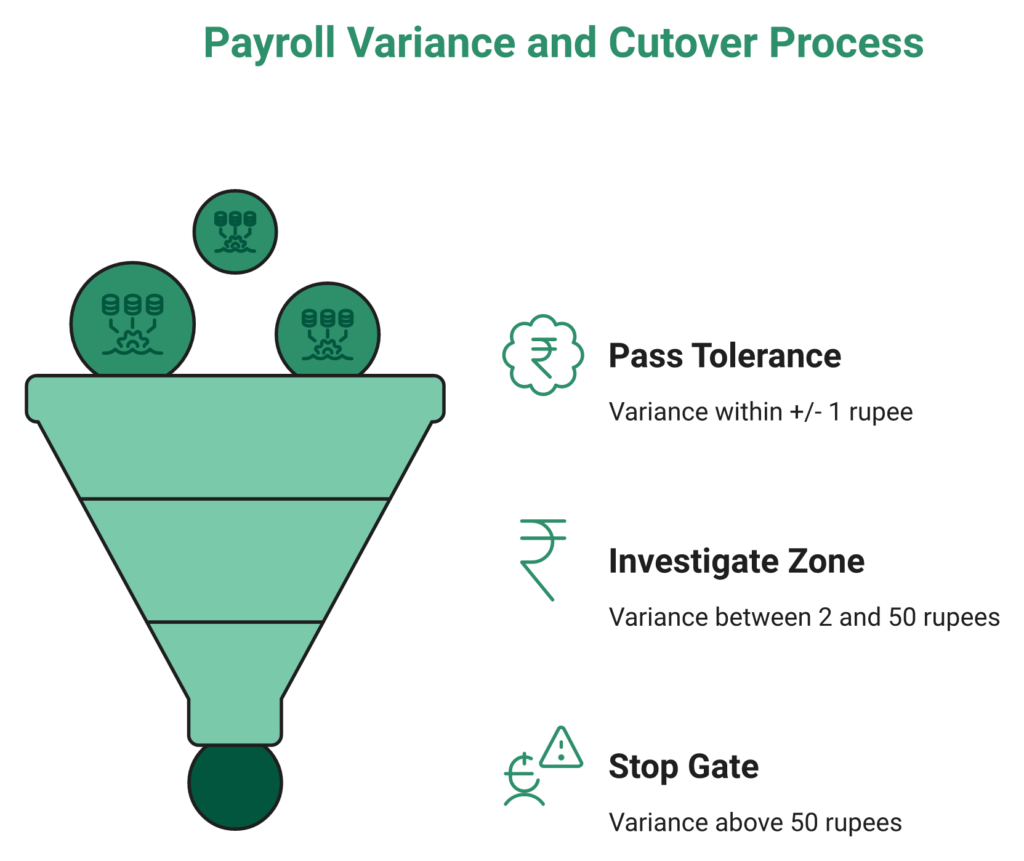
Variance-threshold matrix:
| Variance Band | Decision |
|---|---|
| Less than or equal to plus or minus ₹1 per payslip | ✅ Pass, proceed to go-live |
| ₹2 to ₹50 | ⚠️ Investigate, usually rounding; document and proceed |
| Greater than ₹50 | ❌ Stop, structural issue in CTC/arrear mapping |
Cutover-weekend checklist: master-write lock Friday 6 PM, final attendance freeze, legacy write-path disabled, Form 16/24Q pre-generated, PF ECR dry run, ESI challan stub ready, rollback script tested, and communication cascade at T-7, T-1, and T+0.
✅ HROne’s approach, and the proof
HROne addresses payroll accuracy at the data-flow layer, not just computation. The Auto Scheduler triggers attendance-correction arrears, increment arrears, and overtime calculations from Time Office natively, collapsing the reconciliation window. Group payout validations run statutory checks on every payslip before disbursal inside the payroll software engine. JV sync pushes payroll into the GL automatically post-run. The outcome operators actually see:
“Salary processing along with exact calculation of Comp off and overtime is achieved now… real time monitoring of the employee punch data with API functionality is great.”
— Deepak S. HROne G2, Verified Review
“Zero-touch payroll and compliance automation… handles salary calculations, statutory deductions (PF, ESI, taxes, and filings) automatically, with zero manual intervention, removing payroll errors and compliance anxiety during audits.”
— Waldon S. HROne G2, Verified Review
Customers running 1,000+ employees routinely close parallel runs within plus or minus ₹1 on the first cycle, which is why MR DIY India went live without a salary delay on Day 1. See the full MRDIY case study for the sequencing.
Q7: How Do You Cascade Training, Run Change Management, and Drive Adoption in Manufacturing and Field Workforces?
Cascade training in three waves: admin certification in Week 7, manager live labs in Week 8, and employee self-service rollout in Week 9, through a train-the-trainer plus champion network of 1 champion per 50 employees. For manufacturing and field workforces, adoption depends on vernacular UI, shop-floor kiosks, shift-aware attendance with offline sync, and regional-language communications. Target 80%+ active-user adoption by Day 45, not Day 180. A vertical-specific starting point is the manufacturing HR reference.
Training cadence table
| Audience | Week | Format | Duration | Exit Criteria |
|---|---|---|---|---|
| Admin / HR Ops | W7 | Certification workshop | 2 days | 100% certified |
| Payroll Manager | W7 | Statutory deep-dive | 1 day | Sign-off on test run |
| People Managers | W8 | Live labs + sandbox | 4 hours | 90% approval-flow fluency |
| Employees (ESS) | W9 | Micro-videos + townhall | 30 min | 80% login in 7 days |
| Shop-floor / Field | W9 | In-person + kiosk demo | Per shift | Kiosk usage tracked |
Town halls cadence: T-14 (awareness), T-7 (what changes), T-0 (go-live), and T+30 (what’s working). Skipping the T+30 review is the #1 reason adoption plateaus at 50% to 60%.
⚙️ The six-step field and manufacturing adoption playbook
- Regional-language comms 2 weeks ahead. Hindi, Tamil, Marathi, Gujarati, and Bengali as the shop-floor language map demands, not just a translated PDF but voice-note driven WhatsApp broadcasts from the plant head.
- Kiosks at plant entry with a shift-supervisor shadow. The first week of every shift has a supervisor walking the kiosk flow with new users.
- Mobile-first ESS with geofenced punch and low-data mode. Assume 2G fallback and intermittent connectivity, and offline sync is non-negotiable. The mobile HR app ships these out of the box.
- Champion network. 1 trained champion per 50 employees, identified 4 weeks before go-live, and incentivised with recognition.
- Weekly adoption dashboard. Active users, helpdesk ticket deflection, and manager-approval TAT tracked plant by plant.
- 30/60/90 review with plant heads. The dashboard drives the conversation, not a generic HR slide.
🏭 Sector-specific tactics and the metrics that matter
- Manufacturing: shift rotation and OT claims in vernacular, comp-off calculations that match plant practice, and weekly-off working day logic tested before go-live.
- Logistics: geofenced mobile punch across routes, and auto-approval for route-match attendance. Deeper context in the logistics HR reference.
- Healthcare: 20-unit deployments with unified master, and per-unit PT and LWF codes.
- BFSI: branch-level RBAC, and TDS depth for variable-pay-heavy roles.
Metrics to watch through Day 60: active-user rate of 80% or higher, payslip-download rate of 70% or higher, app-vs-paper leave ratio of 4 to 1 or higher, helpdesk ticket volume down 40%, and manager-approval TAT below 24 hours.
✅ How HROne collapses the adoption curve
Operators running these rollouts describe the mobile-first architecture directly:
“Tracking employee movement for sales department was a tough one task for us but now with functionality of HROne, employees can mark their attendance from HROne mobile application.”
— Sachin K. HROne G2, Verified Review
“Managing the sales employee attendance becomes easy with mobile punch facility available. Now no need to asking their reporting managers every time. Sharing pay slips, letter of appreciation, transfer letters becomes systematic.”
— Manna S. HROne G2, Verified Review
HROne’s mobile-first architecture, vernacular support, geofenced mobile punch, Super Inbox for managers, kiosk-ready ESS flows, and 127 pre-built workflows mean plant-heavy employers hit 80%+ adoption without building parallel training infrastructure. The platform meets shop-floor reality where it is, not where a desk-bound HRMS assumes it will be.
Q8: What Are the Top 10 Delay Drivers in Indian HRMS Rollouts, and What Is the Rupee Cost of Each Week Slipped?
The 10 delay drivers, in rank order by frequency × severity in the Indian mid-market and enterprise reality, are: (1) dirty employee master data, (2) scope creep mid-flight, (3) state-PT and LWF variance missed at discovery, (4) biometric OEM firmware mismatch, (5) vendor day-one billing incentive misalignment, (6) manager-hierarchy gaps, (7) fiscal-year timing mis-choice, (8) UAT sign-off delays, (9) change-management treated as a training event only, and (10) rollback plan absent at cutover. For the buyer-side counter-checklist, see HRIS buyer pitfalls.
The delay-driver register
| # | Driver | Frequency | Severity | Typical Week Surfaced | ₹ Cost per Week Slipped* | Countermeasure |
|---|---|---|---|---|---|---|
| 1 | Dirty master data | H | H | W3 | ₹3 to 5 L | Data-readiness score of 90 or higher at W-1 |
| 2 | Scope creep | H | H | W4 | ₹4 to 6 L | Signed scope freeze pre-kickoff |
| 3 | State-PT / LWF variance | H | H | W4 | ₹3 to 5 L | PT slab inventory at W-1 |
| 4 | Biometric firmware mismatch | H | M | W2 to 3 | ₹2 to 3 L | OEM firmware validation at W2 |
| 5 | Vendor day-one billing | M | H | Ongoing | ₹2 to 4 L + subscription | Go-live-linked billing contract |
| 6 | Manager-hierarchy gaps | H | M | W5 | ₹2 to 3 L | Org chart approved by Day 3 |
| 7 | Fiscal-year timing miss | M | H | W6 | ₹4 to 7 L | Decision tree locked at W0 |
| 8 | UAT sign-off delays | H | M | W7 to 8 | ₹3 to 4 L | UAT template + defect log |
| 9 | Change-mgmt as training only | H | H | W9 post-go-live | ₹4 to 6 L | Champion network at W-2 |
| 10 | No rollback plan at cutover | M | H | W9 to 10 | ₹5 to 8 L | Tested rollback script |
*Indicative per-week soft-cost range for a 500 to 2,000 employee firm.
💰 The cost-of-delay calculator
Rupee cost per week slipped combines five components:
Cost / week = HR-team soft cost + payroll rework cost + grievance handling + compliance penalty exposure + deferred productivity gain
The ROI calculator turns this formula into a board-ready number.
Worked example, 500-person firm:
- HR-team soft cost (6 people × 25 hrs × ₹1,000/hr) = ₹1.5 L
- Payroll rework (2 month-ends × ₹50 K) = ₹1 L
- Grievance handling = ₹50 K
- Deferred productivity gain (delayed adoption × ₹200 per employee) = ₹1 L
- Total is approximately ₹4 L per week
Worked example, 2,000-person firm:
- HR-team soft cost = ₹3 L
- Payroll rework = ₹2 L
- Grievance handling = ₹1.5 L
- Compliance exposure = ₹1 L
- Deferred productivity gain = ₹4 L
- Total is approximately ₹11.5 L per week
A 4-week slip on a 2,000-person rollout is roughly ₹46 L of soft cost, enough to fund the entire annual HRMS subscription twice over.
📈 Three anonymized case-study snapshots
- 200-person D2C brand, 5-week go-live, single entity, 2 states, and clean master data. Data-readiness score 92, scope frozen at Day 0, and one parallel cycle.
- 1,500-person IT services firm, 4-month mid-market rollout, 3 entities, and 4 states. Slipped one cycle because of manager-hierarchy gaps discovered in Week 5, recovered through a dedicated champion network.
- 5,000-person manufacturing group (11 locations), 7-month enterprise rollout. State-PT variance across Maharashtra, Gujarat, Tamil Nadu, and West Bengal added 3 weeks at discovery, but kiosks at every plant and vernacular comms pushed adoption to 78% by Day 45 and 91% by Day 90.
✅ How HROne structurally removes most drivers before Week 1
HROne’s operating model was engineered against this register specifically. Go-live-linked flat PEPM billing removes Driver #5, because the vendor and the buyer have the same incentive to close fast. The prior-HR onboarding SPOC (9.8 NPS) plus 127 pre-built workflows address Drivers #1, #3, #6, and #8, because configuration starts from an India-tuned baseline, not a blank canvas. The Super Inbox and front-end Policy Engine inside the core HCM address Drivers #2 and #9, because scope changes and policy refinements happen in the platform instead of triggering a developer ticket and a re-training cascade. That leaves dirty data, fiscal-year timing, and rollback discipline on the buyer’s side, which is exactly where a Phase 0 readiness audit earns its keep.
Q9: Which Modules Can You Phase, Core HR, Payroll, Attendance, ATS, LMS, PMS, Travel/Expense, and What Is the Typical Module-wise Timeline?
Core HR, Payroll, and Attendance always go live together. They share the data spine, and phasing them fractures the employee master. ATS, LMS, PMS, and Travel/Expense can be phased in as 30 to 60 day follow-on sprints after stabilization. Typical module-wise durations inside a mid-market rollout: Core HR 2 to 3 weeks, Payroll 3 to 5 weeks, Attendance 2 to 4 weeks, ATS 2 to 3 weeks, LMS 2 weeks, PMS 3 to 4 weeks (seasonal), and Travel/Expense 2 weeks. For the full module surface, see HR software.
The module-dependency and sequencing map
🔗 Dependency chain that cannot be broken. Attendance feeds Payroll, and Core HR feeds everything. Going live with Payroll before Attendance means someone re-keys a month of biometric punches into a spreadsheet every cycle, which is exactly the reconciliation hell rollouts are supposed to eliminate. The integrating payroll with attendance guide lays out the spine logic.
⚖️ Big-bang vs phased decision criteria. Firms below 500 employees with an ICI score of 70 or higher should big-bang all seven modules. Firms of 500 to 2,000 with an ICI of 40 to 70 should big-bang the base four (Core HR, Workforce, Time Office, and Payroll) and phase ATS/LMS/PMS/Travel at Day 60 and Day 90. Enterprises above 2,000 should phase aggressively, with the base four at go-live, ATS at Day 45, PMS before the next appraisal cycle, and LMS and Travel by Day 120.
🧭 Recommended mid-market phasing sequence. Phase 1 at go-live: Core HR, Attendance, and Payroll. Phase 2 at Day 45: ATS and onboarding workflows activated, with detail in the onboarding process reference. Phase 3 at Day 75: Travel/Expense and receipt parser. Phase 4 at Day 90 to 120: PMS aligned to the appraisal calendar, and LMS once PMS goals feed learning paths.
📦 The HROne consolidated-bundle reality. 98% of our customers run Core HR, Workforce, Time Office, and Payroll as the base bundle at go-live, with ATS, LMS, PMS, and Travel/Expense activated post-stabilization. The phasing isn’t a vendor limitation. It’s a change-management choice that prevents adoption overload.
✅ Module-wise timeline matrix
| Module | Typical Duration | Depends On | Best Phase |
|---|---|---|---|
| Core HR / Workforce | 2 to 3 weeks | None | Go-live |
| Attendance / Time Office | 2 to 4 weeks | Core HR, biometric OEM | Go-live |
| Payroll | 3 to 5 weeks | Core HR, Attendance | Go-live |
| ATS / Recruitment | 2 to 3 weeks | Core HR | Day 45 |
| Travel / Expense | 2 weeks | Core HR, GL sync | Day 60 to 75 |
| PMS / Performance | 3 to 4 weeks (seasonal) | Core HR, manager hierarchy | Day 90 to 120 (pre-appraisal) |
| LMS / Learning | 2 weeks | PMS (goal-linked) | Day 120+ |
⭐ Why phasing doesn’t mean a second implementation project
The reason most HRMS rollouts treat phased modules as fresh projects is because the underlying platforms are assembled from acquired or stitched-together products that don’t share a data spine. HROne’s architecture was built the opposite way. Every module writes to the same employee master and surfaces in the same Super Inbox. Activating ATS at Day 45 means switching on resume-relevancy scoring inside the One AI Suite, not standing up a parallel recruitment software portal. Turning on Travel/Expense at Day 75 means enabling the receipt parser inside expense and reimbursement against the same approval chains Payroll already uses. PMS slots into the same manager hierarchy via performance management. That connective tissue is what turns phased activation from a three-week sprint with a separate SOW into a configuration toggle, and is why phased-module adoption tracks straight against the base-bundle adoption curve instead of starting from zero each time.
Q10: What Post-Go-Live Benchmarks and KPIs Should You Track at 30, 60, 90, and 180 Days?
Track seven benchmarks across the hypercare-to-optimization curve: payroll cycle duration (10 to 5 or 6 days), payroll accuracy (99%+), helpdesk ticket volume (down 40% by Day 60), self-service adoption (80%+ by Day 90), policy-change TAT (developer-free, same-day by Day 90), compliance timeliness (100% statutory filings on time), and ROI in hours saved surfaced on the CHRO dashboard by Day 180. These are the numbers that separate “we implemented an HRMS” from “HR is measurably compounding value.” Quantifying the last one is easiest with the ROI calculator.
The 30/60/90/180-day benchmark curve
⏰ 30 days, Hypercare. Stabilize payroll, attendance, and PT variances to zero. Ticket triage SLA under 4 hours for P1, and 24 hours for P2. First month-end payroll must close inside 5 to 6 days without variance spikes. Biometric sync reliability of 99.5% or higher. All cutover rollback artefacts archived.
📈 60 days, Stabilization. Helpdesk ticket volume down 40% from Day 1. Manager-approval TAT below 24 hours for leave, expense, and OD. Form 16 readiness confirmed for the previous FY, including YTD imports where applicable. Active-user adoption crossing 70% on mobile, and 85% on desktop. Self-service deflection visible in the helpdesk dashboard.
🔧 90 days, Optimization. Workflow automation audit: which of the 127 workflows are firing, which are underused, and which need refinement. Shift and leave policy refinements based on the first two months of adherence data, driven through leave management. Appraisal module onboarded and aligned to the calendar. Policy-change TAT dropped to same-day, and no developer ticket should be open for a leave or attendance rule change.
📊 180 days, Board report. ROI Dashboard surfaces lifetime hours saved vs average HR salary, attrition trend segmented by tenure, function, and plant, and cost-per-hire tracked against the pre-HRMS baseline. The CHRO walks into the board review with specific rupee-denominated savings, not a generic “we digitized HR” slide. For the persona frame, see CHRO solutions.
The KPI scoreboard
| KPI | Day 30 Target | Day 60 Target | Day 90 Target | Day 180 Target |
|---|---|---|---|---|
| Payroll cycle duration | 7 days or fewer | 6 days or fewer | 5 to 6 days | 5 days steady |
| Payroll accuracy | 99% | 99.5% | 99.8% | 99.9% |
| Helpdesk ticket volume | Baseline | Down 40% | Down 55% | Down 65% |
| Self-service adoption | 60% | 75% | 85% | 90% or higher |
| Policy-change TAT | 3 days | 1 day | Same-day | Same-day |
| Statutory filing timeliness | 100% | 100% | 100% | 100% |
| ROI (hours saved) | Baseline set | Visible trend | Board-ready | Rupee-denominated |
✅ Why HROne’s ROI Dashboard collapses the Day-180 conversation
Most CHROs lose the budget conversation not because the platform didn’t deliver value, but because they can’t instrument the value. The HROne ROI Dashboard, India’s first inbuilt, surfaces these benchmarks natively without stitching a Power BI overlay on top of exported CSVs. Lifetime hours saved is computed against average HR salary so the output lands in rupee terms. The HR Ops heat map shows exactly which processes are healthy and which are drifting, turning vague “HR is overwhelmed” complaints into specific bottleneck calls. The Super Inbox and 127 pre-built workflows collapse the policy-change TAT from days to minutes, which is why the Day-180 board review becomes a reporting exercise instead of a frantic data-gathering sprint.
Q11: HROne vs Darwinbox, Keka, greytHR, and SAP SuccessFactors, Whose Implementation Timeline and Billing Model Actually Holds?
HROne’s implementation reality, including 30-day go-lives for single-entity mid-market, billing only from go-live, a prior-HR SPOC model, 9.8 NPS on post-implementation support, and G2 #3 overall satisfaction, materially outperforms Darwinbox’s multi-month timelines with day-one billing, Keka’s email-only support delays, greytHR’s rigid workflow caps, and SAP SuccessFactors’ over-engineered transition phases. The difference isn’t modules on a checklist. It’s whose commercial and operating model is structurally aligned with closing the rollout fast. A deeper side-by-side is available on the why HROne page.
The head-to-head comparison matrix
| Dimension | HROne ⭐ | Darwinbox | Keka | greytHR | SAP SuccessFactors |
|---|---|---|---|---|---|
| Typical go-live duration | 30 to 90 days | 3 to 6 months | 2 to 4 months | 1 to 3 months | 6 to 9+ months |
| Billing starts | Go-live only | Day 1 of contract | Day 1 | Day 1 | Day 1 (often earlier) |
| Support model | Prior-HR SPOC, 9.8 NPS | Ticket + CSM | Email threads primary | Ticket-based | Tiered global |
| Multi-state PT + new wage code | Native | Native | Native | Native | Retrofitted for India |
| Pre-built workflows | 127 | Approximately 80 | Approximately 50 | Limited | Configurable, dev-heavy |
| Lock-in | No lock-in | Multi-year common | Annual | Annual | Multi-year |
| G2 overall rank | #3 satisfaction | Enterprise leader | #55 | #42 worldwide | Enterprise-tier |
The three buyer-reality narratives
🥊 Reality 1, vs Darwinbox (the entrenched enterprise incumbent)
Darwinbox is a genuinely capable platform and has earned its unicorn halo. The gap isn’t capability, it’s closure friction. HR Ops teams describe juggling tabs and emails to close everyday tasks, and migration is a recurring sore point. The full delta sits on the HROne vs Darwinbox page.
“Bad implementation experience, bad UI UX, configurations getting broken in production on its own due to product deployments, terrible customer service.”
— Verified User in Computer Software Darwinbox, G2 Verified Review
HROne’s Super Inbox collapses the 110 daily tasks into three-click closures from one screen, and billing meters only after go-live, so the vendor shares the incentive to close fast.
🥊 Reality 2, vs Keka, greytHR, Zoho (the mid-market mainstream)
Keka’s UX polish is real, but the support channel is the structural bottleneck. See the HROne vs Keka breakdown for specifics.
“From Friday evening 6PM to Monday morning 10AM there is no source of support from KEKA, Telephonic communication to a POC during emergency is not possible.”
— Prem K. Keka, G2 Verified Review
greytHR hits the same ceiling on configurability. The HROne vs greytHR comparison shows the rule-engine gap.
“GreytHR is not much good at customizing based on our requirements… many times we were manually correcting the leave balance of employees.”
— Verified User in IT and Services greytHR, G2 Verified Review
HROne counters with 127 pre-built workflows, a 9.8 NPS dedicated SPOC answering phone and email within 24 hours, and India-native depth, reflected in customer experience:
“Zero-touch payroll and compliance automation… payroll is automated, cutting errors, and the employee self-service feature improves team efficiency.”
— Waldon S. HROne G2, Verified Review
🥊 Reality 3, vs the Frankenstein stack (the hidden competitor)
Most mid-market HR teams don’t realise they’re running a 5-tool stack, with payroll outsourced, attendance on a biometric portal, ATS standalone, performance in Excel, and engagement on WhatsApp. HROne replaces the stack with Core HR, Workforce, Time Office, and Payroll as the base bundle for 98% of customers, anchored on the core HCM spine.
✅ Best-for / Skip-if prescriptions
- HROne. Best for 100 to 5,000 employee Indian mid-market and enterprise wanting one hire-to-retire suite, ROI Dashboard, go-live billing, and no lock-in. Skip if you only need a basic leave tracker.
- Darwinbox. Best for 5,000+ enterprises willing to absorb multi-year contracts. Skip if you need 30-day go-live or tab-free daily ops.
- Keka. Best for sub-300 SMBs on simple payroll. Skip if phone or SPOC support matters.
- greytHR. Best for single-entity SMB payroll. Skip the moment you hit multi-entity or shift complexity.
- SAP SuccessFactors. Best for global 10,000+ firms with SAP ERP already deployed. Skip for 100 to 5,000 Indian employee reality. See HROne vs SAP for the India-specific delta.
Proof anchors: MR DIY India, 30-day go-live; Asia Healthcare Holdings, 20 pan-India units on one HROne instance; G2, HROne #3 satisfaction vs Keka #55; HROne #8 worldwide vs greytHR #42. The full MRDIY case study captures the retail-rollout sequence.
Q12: Ready to Run a 30-Day HRMS Implementation Without Slipping Payroll or Compliance?
Running a 30 to 90 day HRMS implementation without slipping parallel payroll, dropping state-PT compliance, or stalling employee adoption is exactly what HROne’s prior-HR onboarding model, 127 pre-built workflows, and go-live-linked billing were engineered for.
Why this is the implementation model that actually closes
- ⭐ 2,000+ Indian brands live, and 10 lakh users operating daily across Core HR, Workforce, Time Office, and Payroll as the base bundle. Explore the customer success stories library.
- ⏰ MR DIY India went live in 30 days, a full-stack retail rollout, consolidated stack, with Super Inbox as the Day-1 HR surface.
- 🏥 Asia Healthcare Holdings runs 20 pan-India units on a single instance with unified employee master and per-entity compliance isolation, a pattern familiar across healthcare HR deployments.
- 💰 Billing meters only from go-live, so the vendor’s incentive and the buyer’s incentive are finally pointed in the same direction. See pricing.
- 🤝 9.8 NPS on the prior-HR SPOC model, a domain operator, not a technical PM reading a checklist.
- 📊 India’s first inbuilt ROI Dashboard, lifetime hours saved against average HR salary, ready for the Day-180 board review.
- ✅ G2 #3 overall satisfaction and #8 Best HR Software Worldwide, the third-party ranking that maps to the operator reality.
The shortest path from “we’re evaluating HRMS timelines” to “we’re live, payroll runs in 5 days, and the board has a rupee number to look at” is a free trial start or a book a demo booking. Paste-ready CTA below.
Go Live in 30 Days. Bill From Day One of Value, Not Day One of Purchase.
Trusted by 2000+ brands. 10 lakh users. Finally, HR feels right.
Book a DemoFor enterprise buying committees (CFO, CHRO, and IT Director evaluating multi-entity rollouts), swap the primary action to Book a Demo at https://hrone.cloud/demo/ while keeping the palette, sub-copy, and structure unchanged.















 Secures Top Spot in
