


Q1. HROne Reviews 2026 at a Glance: What Do 1,500+ Companies Actually Rate It?
A payroll manager at a 900 person logistics firm once told me she keeps sixteen browser tabs open during a software search. Half are review sites. The other half are the vendor’s own glossy claims. She wanted one honest number before she booked a single demo.
Here is that number, up front.
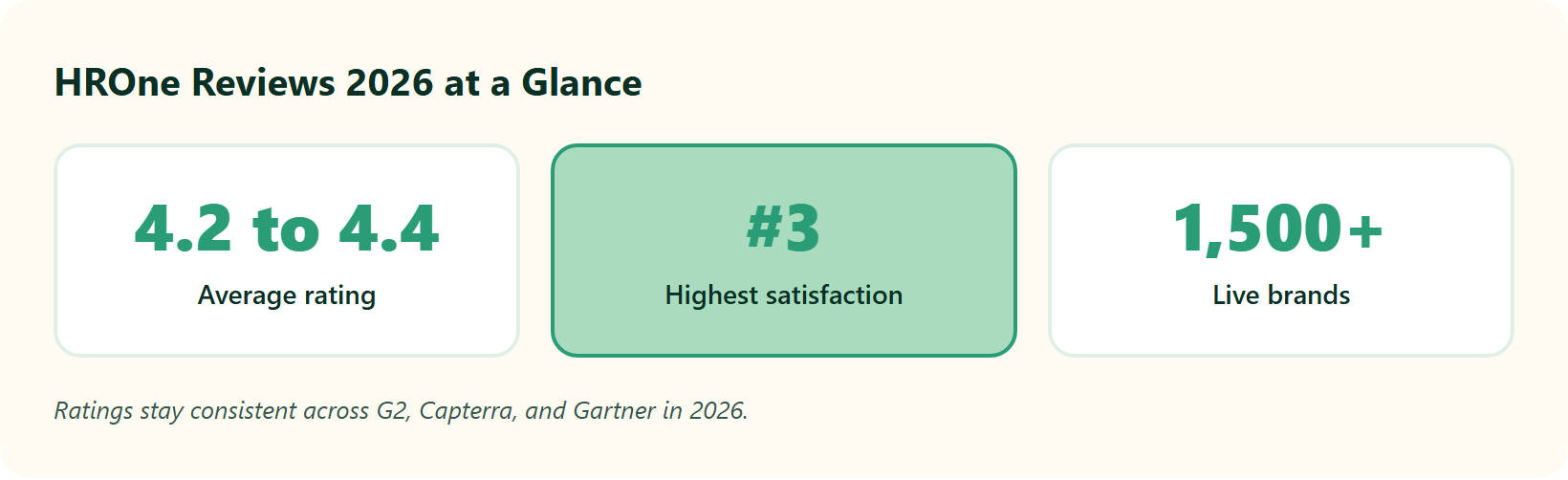
Across G2, Capterra, Gartner Peer Insights, GetApp, and TrustRadius, HROne holds a steady 4.2 to 4.4 out of 5 in 2026. That rating rests on Gartner’s 696 verified reviews and thousands more elsewhere. HROne also ranks #3 in Highest Satisfaction Products out of 1,17,579 software products worldwide, and #8 among Best HR Software globally.
⭐ The cross-platform scorecard
I pulled the current aggregate ratings into one table, so you do not have to open sixteen tabs.
📋 HROne Cross-Platform Rating Scorecard 2026
| Platform | Rating | Review base |
|---|---|---|
| HROne (G2) | 4.7 / 5 | 25+ verified reviews |
| Gartner Peer Insights | Strong verified sample | 696 reviews |
| Capterra | 4.4 / 5 | 27+ reviews |
| GetApp | 8.43 / 10 | 28+ reviews |
| Google Play (mobile app) | ~3.9 / 5 | ~5,750 reviews |
The pattern is consistent. Desktop and admin experiences score high, while the mobile HR app sits lower, a gap I will unpack in a later section. You can see the depth of the HR software behind these scores in the module ratings.
📈 The 2024 to 2026 trend nobody screenshots
Static ratings hide movement. What I find more useful is direction, and HROne’s app store scores have climbed through 2026 after performance fixes. Recent verified reviewers still flag occasional load lag, then note it clears in a minute or two.
“Sometimes it’s not updated as soon as I open it in the morning, but in 1 or 2 minutes it reloads and gets up-to-date data. It’s not a big issue.”
— Prajwal B. HROne G2 – Verified Review
That is the honest texture of a maturing product. Not flawless, but visibly improving.
“I love HROne for its cost efficiency and holistic approach, which is why I prefer it over other vendors like Workday.”
— Priyanka S. HROne G2 – Verified Review
✅ Who should keep reading
If you run HR or payroll for an Indian mid-market or enterprise team, these ratings signal real operational relief, not marketing gloss. The unspoken question behind every review search is simple. Will this system let me sleep at night knowing my data is correct?
We built HROne to answer that with proof, not promises. The same HR inbox that pulls every pending task into one Gmail style view is what those 1,500+ live brands actually rate when they leave a review. The rating is downstream of the workflow, and that is the part worth reading on.
Q2. Who Is HROne Really Built For in 2026 (And Who Should Skip It)?
Most vendor pages claim they serve “businesses of all sizes.” That line quietly costs buyers months. A tool tuned for a 30 person startup rarely survives contact with multi-state payroll and shift based manufacturing.
So let me draw the line clearly.
HROne fits Indian mid-market and enterprise organizations of 100 to 5,000 employees. Its sweet spot spans IT and ITeS, BFSI, manufacturing, logistics, healthtech, real estate, education, and F&B, sectors that need deep local compliance and hands-on support. It is a poor fit for early-stage startups. If you need a dedicated Applicant Tracking System (ATS, the software that manages job applicants end to end) as your primary use, plan for a separate tool.
🎯 Where HROne is a genuinely strong fit
The common thread across ideal-fit buyers is complexity that spreadsheets can no longer hold. Think multi-legal-entity structures, state wise tax slabs, and biometric attendance across scattered field locations.
- Firms running 500 to 5,000 employees across multiple states or units.
- Compliance-heavy sectors like BFSI and manufacturing HR with strict statutory needs.
- Distributed workforces needing mobile, geo-tagged attendance management.
- HR teams that want a single connected system, not five disconnected vendors.
Asia Healthcare Holdings, for example, runs 20 pan-India units on a single HROne instance with multi-legal-entity configuration. That is the scale this platform is engineered for.
❌ Who should honestly skip it
Here is the contrarian part most vendors bury. HROne deliberately does not chase the startup segment, because those leads are usually unqualified on budget. I respect that honesty, and you should factor it in.
📋 HROne Fit and No-Fit by Company Profile
| Profile | Verdict |
|---|---|
| Indian firm, 100 to 5,000 employees, multi-state | ✅ Great fit |
| Compliance-heavy BFSI, manufacturing, healthcare | ✅ Great fit |
| Sub-50-person early-stage startup | ⚠️ Think twice |
| Recruiting-first team needing a heavy native ATS | ⚠️ Pair with a separate tool |
| Global firm with minimal India footprint | ⚠️ Consider a global generalist |
A vendor honest about who it cannot serve is usually more trustworthy on the parts it can. HROne positions itself as an India-first, mobile-native HCM (Human Capital Management system) for the 100 to 5,000 band, and that focus is exactly why its payroll software and support model hold up where global generalists wobble. If you fit that band, the CHRO solutions map directly to this profile.
Q3. What Do Users Love Most About HROne? (The Bread-and-Butter Modules)
Picture a Time Office executive on the 28th of the month. Biometric logs from three plants, half a dozen comp off requests, and one CTC sheet that refuses to reconcile. Before HROne, that person spent the night chasing managers over email to confirm attendance.
That specific pain is what the strongest reviews describe getting rid of.
Reviewers rate HROne’s payroll and attendance experience highly, praising accurate statutory payroll, intuitive self-service, and a genuinely responsive support team. The recurring theme is relief from manual chasing. Its four strongest modules, Core HR, Workforce, Time Office, and Payroll, are what I would call the product’s bread and butter.
⏰ Time Office and payroll: the proof points
The most detailed praise clusters around attendance sync and error-free salary runs. These are not soft feelings; reviewers name specific mechanics.
“The best and useful module is the time office module where exactly calculation of actual paid days achieved and arrear calculation is also working fine. Relief is when biometric sync is perfectly working. Salary disbursement process [is] easy and error less with bank Challan creation.”
— Sachin K. HROne G2 – Verified Review
“Proper calculation of PF and ESI was a pain area for us before, but now with the HROne automated calculation process, results are up to the mark and following Indian tax compliances properly.”
— Ajay K. HROne G2 – Verified Review
🤝 The human-touch layer
A system cannot replace an HR professional. It can, though, take the tactical noise off their plate, so they can do the human parts well. Several reviewers land on exactly that framing.
“It doesn’t simply automate processes like payroll, attendance, and compliance, it makes them easier to handle. The interface feels intuitive, the support is responsive.”
— Nijanthan R. HROne G2 – Verified Review
✅ What this frees up on Monday
When routine work runs itself, HR reclaims hours for engagement, retention, and actual conversations. One reviewer reported a 60 to 70% cut in administrative time.
That reclaimed time is the whole point of the HROne HROne AI and Super Inbox, which surface every pending task, request, and approval in one Gmail style view and close most within three clicks. When we run payroll logic across 1,500+ live brands, the goal is the same each time: fewer tabs, zero salary delays, and an HR team that stops processing a backlog and starts leading people. The workforce management spine is where that relief begins.
Q4. What Are the Real Complaints and Limitations in HROne Reviews?
Here is what I got wrong the first time I looked at HROne. I assumed a high average rating meant few complaints. The reviews tell a more useful story, and the complaints are worth reading closely before you buy.
Three criticisms recur. There is no dedicated ATS for heavy recruiting, the deeper modules carry a learning curve, and some users want richer reporting and mobile parity. These are limits of depth and scope, not reliability, and most have clear workarounds.
❌ The ATS gap
HROne’s recruitment module handles onboarding well, but it is not a full standalone ATS. If your team lives inside a hiring pipeline all day, budget for a separate tool and an integration. This is the single most important expectation to set early, and the recruitment software scope is worth reviewing in detail.
⚠️ The learning curve is real
The product is deep, and depth has a cost. Understanding the complete system can take two to three days, with roughly an hour to ninety minutes per module. Reviewers confirm the ramp.
“Some modules, especially Payroll and Performance, have a learning curve and require more detailed guidance for first-time users. Certain workflows involve many steps.”
— Shilpi M. HROne G2 – Verified Review
“It can sometimes feel a bit overwhelming for new users. Without enough guided support, the learning curve can feel quite steep.”
— Nijanthan R. HROne G2 – Verified Review
Think of it like a Ferrari. The power is real, but someone has to teach the driver, so nobody burns the clutch in week one. A structured onboarding process is what shortens that ramp.
📱 Mobile and reporting requests
Power users note that some advanced performance and audit features feel thinner on mobile than on desktop, and a few want faster deep search and more report flexibility.
“Some of the more detailed performance management and audit features are more limited on mobile compared to the web version. Custom notifications could be more flexible.”
— Waldon S. HROne G2 – Verified Review
✅ How to de-risk each gap
The fix for most of these is process, not luck. Pair a heavy hiring function with a dedicated ATS, run a structured onboarding sprint, and lean on the assigned specialist during ramp. You can also test the mobile HR app with real field users before committing.
That last point is where HROne’s model actually helps. Instead of a technical project manager reading a checklist, you get a prior-HR onboarding SPOC (a single point of contact) carrying a 9.8 NPS, someone who has sat in your chair and can shorten the curve the reviews describe. When you are ready, the fastest way to pressure test all of this is to book a demo.
Q5. How Does HROne Hold Up Under the Hood? Month-End Payroll, Mobile Experience, and Automation Depth
Every HRMS looks great in a demo. The real test comes on the 30th, when a payroll manager runs 2,000 salaries against biometric logs and hopes nothing breaks.
So I looked past the marketing and graded HROne on three things that actually decide reliability.
HROne’s payroll and Time Office engine scores high with reviewers, but some report lag during peak month-end runs. My advice is simple: stress test with real data during a live cycle. The desktop admin experience clearly outshines the field-employee mobile app, which historically sat near 3.9/5 on speed and geo-location, though 2026 updates lifted several ratings.
⏰ The month-end stress-test
Run a parallel payroll on live data before you cut over. Watch for sync gaps and upload errors under load. Reviewers who did this praise the accuracy but flag occasional bandwidth hiccups. A solid payroll software should survive that load without manual reconciliation.
“The best and useful module is the time office module where exactly calculation of actual paid days achieved. Salary disbursement process [is] easy and error less.”
— Sachin K. HROne G2 – Verified Review
“Most of times, HCM throws internet bandwidth error while uploading CTC sheet for employees.”
— Sachin K. HROne G2 – Verified Review
📱 Admin desktop vs field-employee mobile
The gap between web and mobile is real, and honest buyers should plan for it. Power users switch to desktop for deep performance and audit work. If you run field teams, test the mobile HR app and geo-tagged attendance management with real users first.
“Some of the more detailed performance management and audit features are more limited on mobile compared to the web version.”
— Waldon S. HROne G2 – Verified Review
“Mobile application don’t work properly while capturing live location. Geofencing radius not work properly.”
— Manna S. HROne G2 – Verified Review
✅ Grading automation against the patent frontier
Here is a lens no competitor review uses. I benchmarked HROne against the current patent state of the art in payroll automation. Patents like RockSpoon’s zero-touch payroll system describe fully automated pay runs, and Cast & Crew’s OCR-timecard patent describes auto-reading messy timesheets into compliant pay.
Against that frontier, HROne automates most of the run while keeping a human approval layer. I actually think that is the correct design, not a shortcoming. Full zero-touch payroll sounds elegant, but Indian statutory edge cases still need a human sign off.
We built that judgment into the architecture on purpose. The HR inbox surfaces every pending approval in one Gmail style view, and the platform completes up to 1.5 crore tasks a month across live customers, most closing within three clicks. Automation carries the load; a person still holds the final say.
Q6. Is HROne Reliable for Indian Statutory Payroll and Compliance?
A payroll manager once told me her worst week was not a system crash. It was a wrong Professional Tax slab that under-deducted for 40 employees across two states. Reconciling that by hand took her team four days.
That is the real test of Indian compliance, and it is where global tools quietly fail.
Yes, HROne handles Provident Fund (PF, the retirement savings deduction under EPFO), Employee State Insurance (ESI, the health cover contribution), Tax Deducted at Source (TDS), and Professional Tax (PT) natively across tiers. It also handles the India-specific complexity that generic tools miss. You can see the depth in the payroll solution module.
🇮🇳 The edge cases global tools drop
Two features decide whether payroll survives a multi-state reality. Operating Unit (OU) filters route salary processing by legal entity, and state-wise slab maintenance keeps PT and Labour Welfare Fund correct per location.
- OU filters for salary processing across multiple legal entities.
- State-wise PT and LWF slab maintenance without manual overrides.
- Automated PF and ESI calculation, including arrear handling.
- Auto-generated Form 16 and TDS tax slips.
Reviewers confirm these work in production, not just in demos. For the underlying rules, our guide on statutory compliance payroll breaks down each deduction.
“Proper calculation of PF and ESI was a pain area for us before, but now with the HROne automated calculation process, results are up to the mark and following Indian tax compliances properly.”
— Ajay K. HROne G2 – Verified Review
💰 Why accuracy is a retention issue, not a checkbox
Here is the part the category gets backwards. Compliance is not a legal formality; it is a trust contract with your employees. Nearly half of employees consider leaving after just two payroll mistakes, so a wrong payday quietly fuels attrition.
Your Monday action is straightforward. Ask any vendor to demo a multi-state PT run and an arrear correction on live data. If they hesitate, that is your answer.
This is exactly the ground HROne was built for. When we run statutory payroll across 1,500+ Indian brands, the auto-scheduler and group payout validations exist to guarantee zero salary delays under Indian law. That is what lets a CHRO actually sleep at night, and the CHRO solutions page maps this directly to board-level risk.
Q7. How Much Does HROne Cost in 2026, and What Is the True Total Cost of Ownership?
Ask a competitor’s sales rep for a price and you often get a discovery call instead of a number. That opacity is a cost in itself, and CFOs feel it.
Let me give you the number and the honest caveats around it.
HROne uses a flat, no-lock-in subscription starting around Rs 4,950 per month, with a 50-user minimum and roughly Rs 99 per user on the Basic tier. The part that matters most is this: billing starts only after you go live, not from the day you sign. That single detail can save you months of paying for software you have not deployed yet. See the full breakdown on the pricing page.
💰 The pricing snapshot
Here is how the entry economics compare across the common India shortlist.
📋 HROne vs Keka vs Zoho People Entry Pricing 2026
| Platform | Entry price | Minimum users | Billing trigger |
|---|---|---|---|
| HROne | ~Rs 4,950/mo | 50 | After go-live |
| Keka | ~Rs 9,999/mo | 100 | From purchase |
| Zoho People | ~Rs 1,560/mo | 5 | From purchase |
💸 The hidden TCO checklist
The sticker price is never the full cost. Before you sign anything, add these lines to your model. You can model the numbers yourself with the ROI calculator.
- Biometric hardware and integration for attendance.
- Premium or add-on modules beyond your base tier.
- A separate ATS if you hire at high volume.
- Implementation effort and internal team time.
Pricing opacity has a real cost. As one operator noted about ADP, transparency in pricing, or the lack thereof, is a genuine con of that platform. HROne’s flat PEPM (per-employee-per-month) model exists precisely to remove that guesswork, a principle we explain in our take on HR software pricing transparency.
Now that you can see the real cost picture, the fastest way to pin down your exact number is a direct quote mapped to your headcount and modules.
Q8. How Does HROne Compare to Keka, Zoho People, Darwinbox, and BambooHR?
I will be fair here. Keka has polished UX, Darwinbox carries enterprise brand weight, Zoho People is cheap to start, and BambooHR is simple for tiny US teams. Each leads somewhere.
The question for a 100 to 5,000 person Indian firm is different: which platform owns the full hire-to-retire path with proof of ROI attached?
For India-first statutory payroll, dedicated support, and ROI tracking, HROne leads. Zoho People wins on entry price for tiny teams, Keka appeals to product-led SMBs, and Darwinbox suits large enterprises but reviewers flag a ROI blind spot. HROne’s real differentiator is India’s first inbuilt ROI Dashboard.
⚖️ The shortlist, side by side
See the deeper feature-by-feature breakdowns on HROne vs Keka and HROne vs Darwinbox.
📋 HROne vs Keka vs Zoho People vs Darwinbox vs BambooHR
| Platform | India compliance | Support model | ROI tracking |
|---|---|---|---|
| HROne | ✅ Deep, native | Dedicated prior-HR SPOC, 9.8 NPS | ✅ Inbuilt ROI Dashboard |
| Keka | ✅ Good | Email-thread reliant | ❌ Limited |
| Zoho People | ⚠️ Generalist | Slow ticket response | ❌ None |
| Darwinbox | ✅ Enterprise | Mixed | ❌ No native ROI proof |
| BambooHR | ❌ US-centric | Responsive but basic | ❌ None |
The pain points are documented, not invented.
“We started working with Keka HRMS in August, and to this day, we have been unable to implement the tool, due to their consistently delayed responses and poor coordination.”
— Divya P. Keka G2 – Verified Review
“The biggest drawback for me has been the lack of customer support. Whenever I try to reach out, it often takes a long time to get a response.”
— Dhana C. Zoho People G2 – Verified Review
“This platform is terrible for companies with more than 20 employees. There is literally no customization on this platform.”
— Verified User in Construction BambooHR G2 – Verified Review
✅ How to actually decide
Pick by scenario, not by feature checklist. If you are a 5-person team watching every rupee, Zoho People is fine. If you run multi-state payroll for 500-plus employees and must prove savings to a board, the ROI blind spot in the others becomes the deciding factor. Our top 10 HR software India guide ranks the full field.
The tiebreaker is always evidence. MR DIY India collapsed payroll cycles from 10 days to 5 to 6 days after moving to HROne, and its ROI Dashboard puts lifetime hours saved against average HR salary in rupee terms. That is the number a CHRO carries into a board review, and no competitor here surfaces it natively. You can read the full MRDIY case study for the details.
Q9. What Does HROne Implementation Really Look Like (3 Months to Go-Live, 36 Months to Culture)?
The single biggest fear I hear from HR heads is not price. It is the implementation trap, the memory of a tool that took eight months and still did not work. So let me set honest expectations, not a sales timeline.
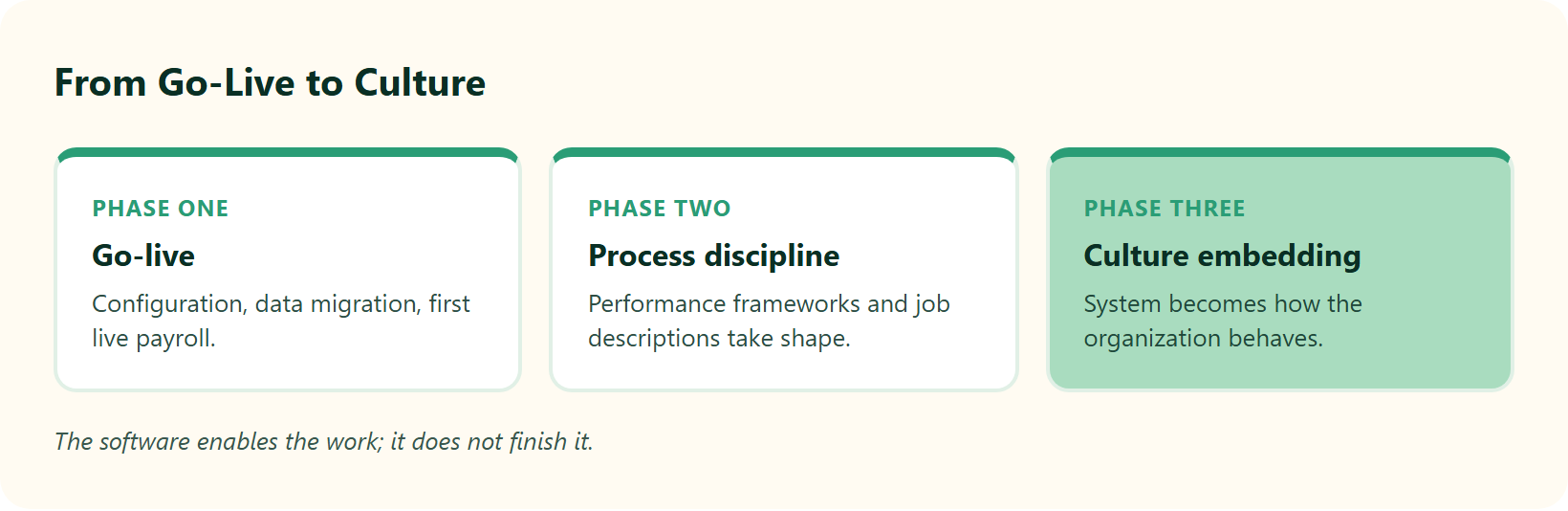
HROne can go live in roughly three months for a typical mid-market rollout. Building the performance frameworks, job descriptions, and culture on top of it is a longer journey, closer to a 36-month horizon. The software enables the work; it does not finish it.
⏰ Go-live versus the longer horizon
Separate two things in your head before you sign. Technical go-live means payroll, attendance, and core HR are running clean. Culture transformation means the deeper layer that no vendor can install for you.
- Months 0 to 3: configuration, data migration, and first live payroll.
- Beyond go-live: performance management design, job descriptions, and process discipline.
- The 36-month arc: turning the system into how your organization actually behaves.
An organization should not be person-dependent. It should be process- and system-dependent, and that shift takes real time to embed. A structured onboarding process is what makes those first three months predictable.
🚗 Why a real demo takes 2.5 hours
Here is a contrarian take. A 45-minute demo is a red flag, not a convenience. You cannot evaluate a hire-to-retire system in the time it takes to drink a coffee.
A proper HROne demonstration runs 2 to 2.5 hours, because meaningful evaluation means seeing the depth. Think of it like a Ferrari. Nobody hands you the keys without teaching you how to drive it first, or you burn the clutch in week one. When you are ready to see that depth, you can book a demo for the full walkthrough.
Reviewers confirm the ramp is real but manageable with support.
“It can sometimes feel a bit overwhelming for new users. With a little more hand-holding during onboarding, the experience would feel far more reassuring.”
— Nijanthan R. HROne G2 – Verified Review
“Their onboarding process was thorough, with helpful training sessions for the whole team.”
— Rishiraj R. HROne G2 – Verified Review
✅ What shortens adoption
The fastest adoption I have seen comes from two design choices, not luck. The HR inbox closes most tasks within three clicks, so employees do not need a manual to act. We also assign a prior-HR onboarding SPOC (single point of contact) carrying a 9.8 NPS, someone who has sat in your chair. That is the difference between a checklist reader and a partner who shortens the very learning curve the reviews describe, and it maps directly to the CHRO solutions a leadership team cares about.
Q10. What Measurable Results Do HROne Customers Report? (Real Numbers, Not Marketing)
Marketing loves the word “efficiency.” Operators want a number they can defend in a board review. So here are the specific ones customers report, not the vague ones.
Customers report concrete, before-and-after gains. One team cut time-utilization occupancy by 70%, freeing up 30% of the team’s capacity. Recruiters doubled daily closures, and engagement scores climbed sharply after switching on instant recognition.
📈 The productivity story
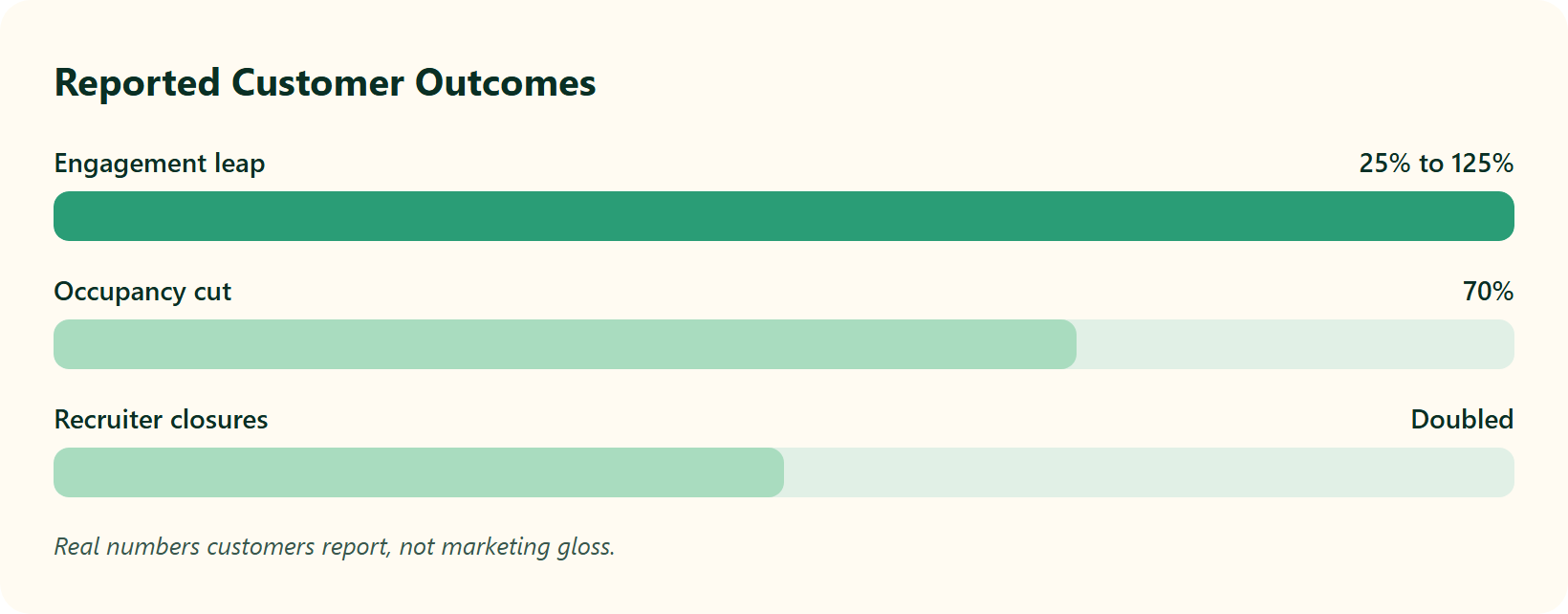
Occupancy is the share of a team’s hours consumed by manual work. When it runs at 150%, people are drowning. One HROne customer brought that down by 70%, which handed roughly a third of the team’s time back for actual HR work.
That is the whole thesis in one number. A system cannot replace an HR professional, but it can take the tactical noise off their plate, so they can do the human parts well. That reclaimed capacity is what a strong workforce management spine is designed to deliver.
⭐ Recruitment and engagement leaps
The recruitment gain is just as concrete. A team that used to close 8 to 10 positions a day moved to 15 to 20 after the switch, roughly doubling throughput. You can see how the recruitment software supports that pace.
Engagement moved too. After turning on instant “pat on the back” recognition, one customer saw participation jump from 25% to 125%. Reviewers echo that self-service and recognition reduce friction daily, which is the aim of the employee engagement module.
“The InboxforHR is a game-changer, centralizing every HR task into one simple inbox, cutting down administrative time by 60-70%.”
— Waldon S. HROne G2 – Verified Review
“It has revolutionized manual master data management, allowing me to pull reports rapidly without the hassle of multiple spreadsheets.”
— Priyanka S. HROne G2 – Verified Review
✅ What the scale number means for you
Here is the proof point I find hardest to argue with. Across live customers, HROne completes up to 1.5 crore tasks a month through its centralized Inbox for HR. For a stretched HR team, that scale is not a vanity metric. It is evidence that the connective tissue holds up when real volume hits, which is exactly when fragmented, five-vendor stacks tend to break. You can quantify your own version of these gains with the ROI calculator.
Q11. Should You Choose HROne in 2026? (The Verdict for Your Team)
After stress-testing the ratings, the complaints, the pricing, and the competitors, I can give you a clear read rather than a hedge.
Choose HROne if you are an Indian mid-market or enterprise team that values deep local compliance, hands-on support with a 9.8 NPS SPOC, and measurable ROI you can actually track. Look elsewhere if you are a sub-50-person startup or need a heavy native ATS as your core system. For everyone in between, the reviews point to real operational relief, not marketing gloss.
✅ The verdict, mapped to your team
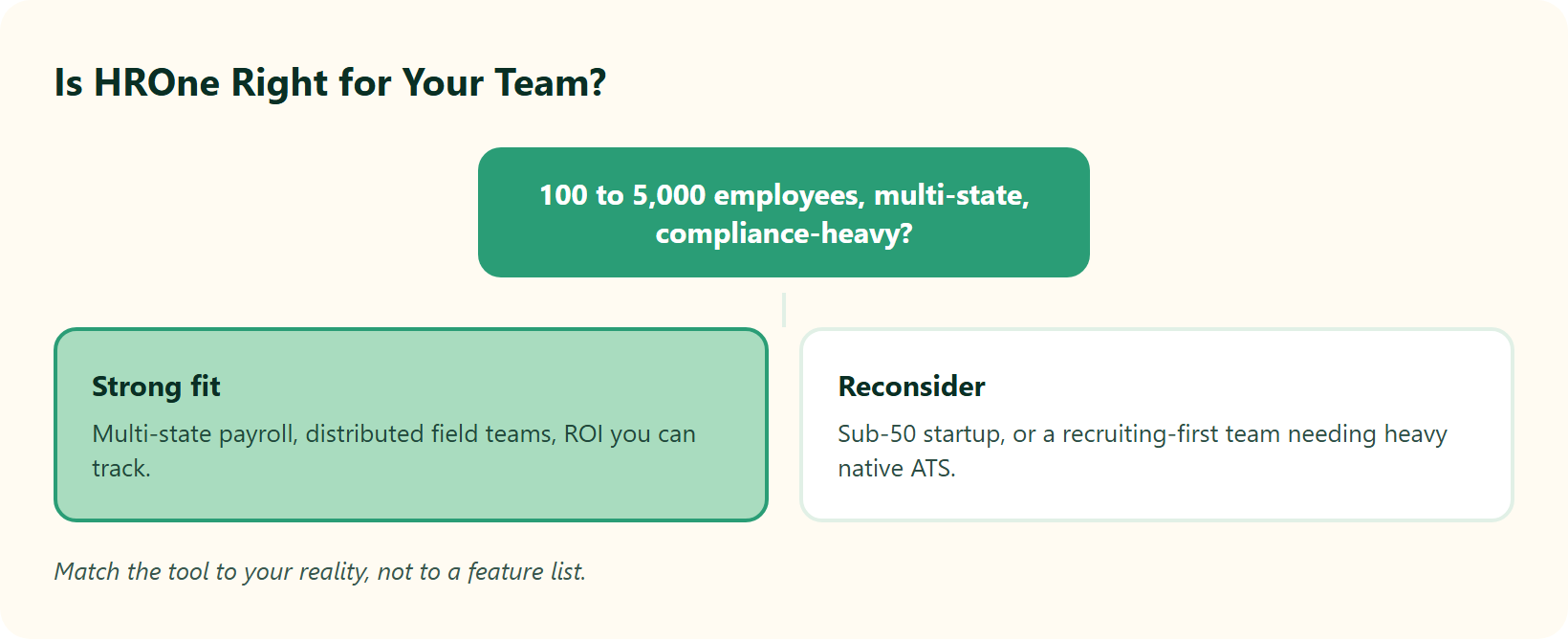
Match the tool to your reality, not to a feature list. Here is the honest split.
- 500 to 5,000 employees, multi-state, compliance-heavy: strong fit.
- Distributed field workforce needing mobile attendance: strong fit.
- Recruiting-first team: pair HROne with a dedicated ATS.
- Sub-50-person early-stage startup: probably not yet.
The reason I land here is philosophical, not just functional. An organization should not be person-dependent; it should be process- and system-dependent. HROne is built to make that shift, so the workflow survives when your best HR person is on leave. The HR software is engineered around exactly that continuity, and you can pressure test it on the pricing page.
💬 Where I have landed, and what I am still watching
The reassurance that de-risks this choice is the 9.8 NPS dedicated SPOC, a real person who has done HR, not a technical project manager reading a script. That is what turns a software purchase into a partnership. If you want to see how this plays out at scale, the MRDIY case study shows the payroll cycle collapse in practice.
The question I am sitting with is this. Over the next two years, will HROne’s inbuilt ROI Dashboard change how Indian CHROs are measured, from activity to proven rupee savings? I think it might, and I would genuinely like to hear whether that matches what you are seeing inside your own team.




















 Secures Top Spot in
