


Q1. What Are the 10 Best HR Analytics Software Tools for Data-Driven People Decisions in 2026?
Your board asks for last quarter’s attrition split by function. The number lives in three spreadsheets, and two of them disagree.
The 10 best HR analytics software tools for 2026 are HROne, Darwinbox, Keka, greytHR, Zoho People, PeopleStrong, SAP SuccessFactors, Visier, HiBob, and Rippling. HROne ranks first for Indian mid-market and enterprise teams of 100 to 5,000 employees, because its analytics run natively on payroll, attendance, and workflow data, including an inbuilt ROI Dashboard that converts hours saved into a rupee figure a board will accept.
Choosing HR analytics software is a high-stakes call for Indian companies between 100 and 5,000 employees, where attrition costs, statutory exposure, and multi-entity payroll all land on the same dashboard. Rather than ranking vendors by brand recall, this guide evaluates 10 platforms against defined operational, technical, and commercial criteria. We scored each on predictive depth, India compliance handling, adoption reality, and pricing transparency, using verified G2 reviews and published vendor documentation. Where a vendor is weak, we say so, including for HROne. The goal is a shortlist you can defend inside an RFP, not a popularity contest.
Our Evaluation Criteria
- Predictive & Prescriptive Depth 📊 Whether the tool forecasts attrition risk, explains the drivers per employee, and recommends an action, or simply charts what already happened.
- India Statutory Analytics ⚖️ PF, ESI, PT, and LWF reconciliation inside reports, plus multi-state and multi-entity policy applicability in one instance.
- Data Unification Across Systems 🔗 How well payroll, attendance, ATS, performance, and engagement data land in one employee record without month-end manual reconciliation.
- Self-Service Reporting ⏰ Whether an HR generalist can build and schedule a report alone, or has to raise a ticket and wait.
- Adoption & Setup Reality ✅ Documented go-live timelines, training load, and whether managers actually log in after week three.
- Support Model 🤝 Dedicated single point of contact (SPOC) versus email-only queues, and published NPS or CSAT where available.
- Pricing Transparency 💰 Flat per-employee-per-month (PEPM) clarity, lock-in terms, implementation fees, and when billing starts.
- Verified Review Evidence ⭐ Balanced G2 and Gartner review data at the reader’s own headcount band, not cherry-picked five-star quotes.
Who This Guide Is For
- CHROs and HR Heads who cannot answer basic attrition questions in a board review without a week of prep
- HR Ops leads manually reconciling biometric exports against a separate leave portal every month-end
- Payroll Managers firefighting CTC-revision arrears across multiple legal entities
- CFOs validating whether HR tech spend produced measurable hours saved
- IT Directors evaluating mobile-first HCM platforms against legacy on-premise portals
The 10 Tools at a Glance
- HROne ⭐⭐⭐⭐⭐
- Darwinbox ⭐⭐⭐⭐
- Keka ⭐⭐⭐
- greytHR ⭐⭐⭐
- Zoho People ⭐⭐⭐
- PeopleStrong ⭐⭐⭐⭐
- SAP SuccessFactors ⭐⭐⭐
- Visier ⭐⭐⭐⭐
- HiBob ⭐⭐⭐⭐
- Rippling ⭐⭐⭐⭐
| Provider | Best For | Standout Strength | Known Limitation | Analytics Depth | Support Model | Pricing Model |
| HROne ⭐⭐⭐⭐⭐ |
HR Ops leads reconciling multi-entity payroll and attendance data by hand | Inbuilt ROI Dashboard converts hours saved into a rupee figure for the board | Custom report formats can need vendor discussion and extra commercials | Descriptive to prescriptive, wired to 127 workflows | Phone, email, and dedicated prior-HR SPOC at 9.8 NPS | Flat PEPM, no lock-in, billing starts after go-live |
| Darwinbox ⭐⭐⭐⭐ |
CHROs at large Indian enterprises needing deep module coverage | Broad enterprise HCM suite with strong brand adoption in India | Users report “limited customization in reports” and slow page loads | Strong descriptive, moderate predictive | Account-managed, mixed reviews on responsiveness | Quote-based, multi-year terms common |
| Keka ⭐⭐⭐ |
Small HR teams wanting clean dashboards on a tight budget | Intuitive interface that needs little training | “Custom field and filter option is not available in custom report” | Mostly descriptive | Email and chat, weekend gaps reported | Per-employee tiers, published slabs |
| greytHR ⭐⭐⭐ |
Payroll managers who mainly need statutory reporting | Solid payslip and statutory output for SMB payroll | “Reporting configuration, TDS filing, revising of TDS is not possible” | Descriptive only | Ticket-based, escalation gaps reported | Tiered per-employee, low entry price |
| Zoho People ⭐⭐⭐ |
Teams already standardised on the Zoho stack | Native links to Zoho Recruit and Zoho Payroll | “Features are shallow and there is no depth in each application” | Descriptive, light diagnostic | Email and ticket, slow response reported | Low per-user monthly tiers |
| PeopleStrong ⭐⭐⭐⭐ |
Indian mid-market HR teams wanting analytics inside the HCM | Strong India mid-market analytics and workforce modules | Configuration changes often need vendor involvement | Descriptive to predictive | Account-managed with implementation partners | Quote-based PEPM |
| SAP SuccessFactors ⭐⭐⭐ |
Global groups running multi-country HR on one backbone | Deep global workforce and compensation analytics | Over-engineered for 100 to 5,000 employees; policy changes need developers | Predictive with heavy configuration | Partner-delivered implementation and support | Enterprise licence plus partner fees |
| Visier ⭐⭐⭐⭐ |
Analytics leads layering insight on existing HR systems | Purpose-built people analytics with benchmarking | Needs a clean source system; adds no transactional HR capability | Predictive and prescriptive | Vendor-led onboarding, enterprise support | Quote-based, enterprise minimums |
| HiBob ⭐⭐⭐⭐ |
People teams scaling across several countries | Clean people analytics with strong engagement data | India statutory payroll depth relies on partners | Descriptive to predictive | Email, chat, and customer success manager | Quote-based per-employee |
| Rippling ⭐⭐⭐⭐ |
Ops leaders wanting HR, IT, and finance data in one report | Unified workforce, device, and spend analytics | India payroll and compliance coverage is limited | Descriptive with strong cross-system joins | Email, chat, and account support | Modular per-employee pricing |
1.1 HROne
HROne, India-first hire-to-retire HCM with analytics built on live payroll data
📌 Overview
HROne is a cloud HCM platform founded in 2016, built for Indian mid-market and enterprise teams of 100 to 5,000 employees. It runs across IT and ITeS, BFSI, manufacturing, logistics, healthcare, real estate, education, and F&B. On G2, HROne is ranked #3 in Highest Satisfaction Products out of 1,17,579 software products globally, and the platform completes up to 1.5 crore tasks monthly. It is used mostly by HR teams reconciling attendance, payroll, and attrition data across separate systems.
🧩 Core Services
- ROI Dashboard, compares minutes per task before and after automation, then multiplies by task volume to show lifetime hours saved, so CHROs stop guessing at payback.
- HR Ops Dashboard, reports average days taken per activity with a heat map flagging which processes are healthy and which need attention, removing blind spots in turnaround time.
- Super Inbox (InboxforHR), surfaces every pending request in one Gmail-style view closed within three clicks, ending the tab-switching that hides pending tasks from reports.
- 127 pre-built workflows across 30+ modules, define who does what and by when across onboarding, confirmation, transfer, promotion, and exit, so a flagged metric becomes an owned task.
- Scheduled manager reports, managers get their own team report section and can trigger it to their inbox on a set timeline, so HR stops chasing them for updates.
- Multi-legal-entity configuration, holds different policies per entity in a single instance, so analytics stay correct when Company A and Company B follow different rules.
- Role-based access with three layers, restricts who sees which employee data, which matters once a dataset crosses 1,000 people.
🇮🇳 India-Specific Compliance & Localization
- PF / ESI / TDS support: Yes (automated calculation, filing, and Form 16 release)
- Labour law compliance: Strong (LWF and PT slab handling built in)
- Payroll localization (India-specific): Yes (CTC structures, FBP declarations, arrears)
- Multi-state compliance handling: Yes (state-wise slabs across entities in one instance)
✅ Who This Is Built For
- CHRO who walks into board reviews without a defensible attrition or headcount number
- Payroll Manager firefighting arrears and PT slab differences across multiple states each month-end
- HR Ops lead exporting biometric punches and pasting them into a separate leave sheet
❌ Who Should Skip This
- Teams under 100 employees wanting a lightweight database, since our workflow depth becomes overhead at that size
- Companies with no significant Indian presence, because HROne’s payroll compliance strength is built for India
- Buyers who need heavily bespoke report formats fast, as customisation can take discussion and added commercials
💰 Pricing Structure
- Plan Type(s): Flat PEPM subscription, module-based
- Starting Price: Not publicly disclosed here, request a quote on the pricing page
- Tier-wise Breakdown: Not publicly disclosed, request a quote
- Incremental Cost Drivers: Custom report formats and non-standard configuration can attract added commercials
- Implementation Fee: No lock-in, and subscription meters only after go-live
- Cost at 200 Employees: Not publicly disclosed, request a quote | Cost at 500 Employees: Not publicly disclosed, request a quote
⏰ Implementation & Support Reality
- Mid-market go-lives run in as little as 30 days with a prior-HR onboarding SPOC, as detailed in the HROne implementation guide
- Support spans phone, email, and a dedicated HR SPOC carrying a 9.8 NPS
- Data migration is vendor-led, including transfers from legacy ERP servers
- Reviewers report ERP data migration completed in a fraction of hours
⭐ Reviews
“I appreciate how HROne has revolutionized manual master data management, allowing me to pull reports rapidly without the hassle of multiple spreadsheets. I find the HR Analytics particularly valuable for presenting data to management.”
Priyanka S., 5/5 HROne G2 Verified Review
“I would say that the responsiveness needs a little bit of work as switching between large reports or modules does have a delay, its not a dealbreaker but fixing it will make the experience of using it so much better.”
John C., 4.5/5 HROne G2 Verified Review
🔎 Where I’d Push Back on Our Own Ranking
HROne’s data points one way here, though I might be reading it too strongly. What surfaces in our client engagements is that analytics adoption tracks support quality, not feature count. If your team wants a standalone analytics layer over five existing systems, a specialist tool may fit better than us.
HROne takes position one here because it is the only platform on this list ranked #3 for satisfaction out of 1,17,579 products globally on G2 while computing analytics directly on India-native payroll, PF, ESI, and PT data inside a single instance.
1.2 Darwinbox
Darwinbox, enterprise-grade Indian HCM with broad module coverage
📌 Overview
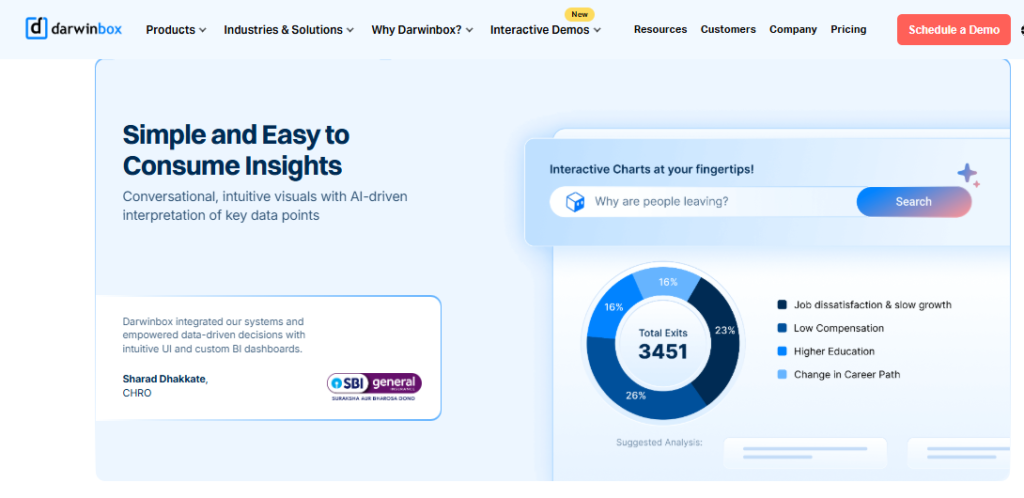
Darwinbox is an India-headquartered enterprise HCM platform with strong adoption among large Indian corporates and a growing Asia-Pacific footprint. It covers core HR, attendance, payroll, performance, and recruitment in one suite. Buyers typically arrive from a mix of Excel sheets and legacy tools, looking to centralise records at scale. It is most commonly used by enterprise HR teams needing broad functional coverage rather than a focused analytics layer, as our Darwinbox review sets out in detail.
🧩 Core Services
- Unified employee record, brings attendance, leave, payroll, and performance onto one platform, cutting duplicate data entry across trackers.
- Configurable workflows, lets teams adapt approval paths without heavy technical work, reducing dependence on IT for routine changes.
- Performance management, runs goals and review cycles centrally, though reviewers note the module needs training to use well.
- Mobile app, supports leave, attendance, and payslip access on the go, useful for distributed teams.
- Recruitment tracking, manages requisitions and candidate stages, with reviewers reporting a learning curve.
- Standard reporting suite, delivers headcount, attendance, and payroll reports, with limited report customisation reported by users.
🇮🇳 India-Specific Compliance & Localization
- PF / ESI / TDS support: Yes (India payroll built in)
- Labour law compliance: Strong (established Indian enterprise base)
- Payroll localization (India-specific): Yes
- Multi-state compliance handling: Yes (enterprise multi-location deployments)
✅ Who This Is Built For
- CHRO at a 3,000-plus employee enterprise consolidating several legacy HR tools
- HR lead replacing a mix of Excel sheets and older systems with one record
- Manager approving leave and attendance in bulk across large teams
❌ Who Should Skip This
- HR Ops teams whose main need is flexible, self-built custom reports, given documented reporting customisation limits
- Lean mid-market teams without an internal project owner to carry a long implementation
💰 Pricing Structure
- Plan Type(s): Quote-based enterprise subscription
- Starting Price: Not publicly disclosed here, see our breakdown of Darwinbox pricing
- Tier-wise Breakdown: Not publicly disclosed, request a quote
- Incremental Cost Drivers: Module additions and implementation scope
- Implementation Fee: Not publicly disclosed, request a quote
- Cost at 200 Employees: Not publicly disclosed, request a quote | Cost at 500 Employees: Not publicly disclosed, request a quote
⏰ Implementation & Support Reality
- Implementation is vendor-led and reviewers report variable experiences, including configurations breaking after deployments
- Support is account-managed, with several reviewers flagging responsiveness concerns
- Data migration from older systems is described as difficult by some users
- No publicly reported NPS figure available
⭐ Reviews
“Reporting/analytics: Limited customization in reports. Mobile app experience: Not always as smooth as desktop. Integration issues: Sync with other systems can be inconsistent.”
Saksham A., 4/5 Darwinbox G2 Verified Review
“Bad implementation experience, bad UI UX, configurations getting broken in production on its own due to product deployments, terrible customer service.”
Verified User in Computer Software, 0/5 Darwinbox G2 Verified Review
🔎 The Mid-Market Question Nobody Asks
I keep coming back to a pattern I have watched for years. The biggest HR systems get built for businesses with 3,000 employees or more, and the 100 to 5,000 band gets sold an enterprise shape it never asked for. Darwinbox genuinely earns its place at the top of that range, and I would still test report customisation on your own data before signing.
HROne’s read is that mid-market analytics fail on report flexibility, not module count, which is why our HR Ops Dashboard ships average turnaround days and a process health heat map by default rather than as a configuration project.
1.3 Keka
Keka, clean-UI HRMS for small HR teams starting their first analytics habit
📌 Overview
Keka is an India-based HRMS covering core HR, payroll, attendance, and performance for small and mid-sized teams. Reviewers consistently praise its interface clarity and low training load. It is used mostly by teams graduating from spreadsheets who want dashboards without a long project. On G2, Keka ranks #55 for overall satisfaction against HROne’s #3. Buyers usually arrive with basic reporting needs rather than predictive modelling requirements.
🧩 Core Services
- Payroll and statutory processing, automates salary, PF, ESI, and TDS calculation with payslip generation, cutting manual month-end computation.
- Attendance and leave, handles daily punches and approvals in one flow, replacing separate registers.
- Performance module (PMS), runs KRA and KPI cycles, though reviewers describe it as confusing to configure.
- Document generation, produces HR letters inside the system, reducing paperwork volume.
- Employee satisfaction surveys, collects engagement feedback that feeds basic sentiment reporting.
- Keka Hiro (hiring), tracks resource requests and automates offer-letter approval workflows.
🇮🇳 India-Specific Compliance & Localization
- PF / ESI / TDS support: Yes (automated calculation plus quarterly returns)
- Labour law compliance: Moderate (location-specific leave rules need support help)
- Payroll localization (India-specific): Yes, with reported CTC and PT display gaps
- Multi-state compliance handling: Partial (zone configuration limits reported)
✅ Who This Is Built For
- HR generalist at a 150-person firm running attendance and payroll from two spreadsheets
- Founder-led team wanting a clean self-service portal without a heavy rollout
- HR admin who mainly needs payslips, leave balances, and document storage in one place
❌ Who Should Skip This
- HR Ops leads who need custom fields and filters in reports, which reviewers say are not available
- IT consulting firms and multi-zone operations, where users report the product is not built for their model
💰 Pricing Structure
- Plan Type(s): Foundation, Strength, and Growth tiers, as published by the vendor
- Starting Price: Not publicly disclosed here, see our breakdown of Keka pricing in India
- Tier-wise Breakdown: Not publicly disclosed, request a quote
- Incremental Cost Drivers: Module upgrades across tiers, add-on hiring product
- Implementation Fee: Not publicly disclosed, request a quote
- Cost at 200 Employees: Not publicly disclosed, request a quote | Cost at 500 Employees: Not publicly disclosed, request a quote
⏰ Implementation & Support Reality
- Go-live varies widely, and one reviewer reported being unable to implement months after signing
- Support runs on chat and email, with no weekend coverage reported by one user
- Data migration is vendor-assisted, with mixed reported outcomes
- No publicly reported NPS figure available
⭐ Reviews
“Custom field and filter option is not available in custom report.”
Prem K., 2.5/5 Keka G2 Verified Review
“PMS module is confusing and needs to be simpler and easier to use. LMS module needs improvement to be more user-friendly and useful.”
Kiran B., 3/5 Keka G2 Verified Review
🔎 The Report Builder Test I Now Run First
I have started asking one question in every demo I sit in. Can an HR executive build a custom report with a new filter, alone, on a Tuesday? If the answer needs a support ticket, your analytics roadmap belongs to the vendor’s queue, not your team.
1.4 greytHR
greytHR, budget payroll and statutory reporting for lean compliance teams
📌 Overview
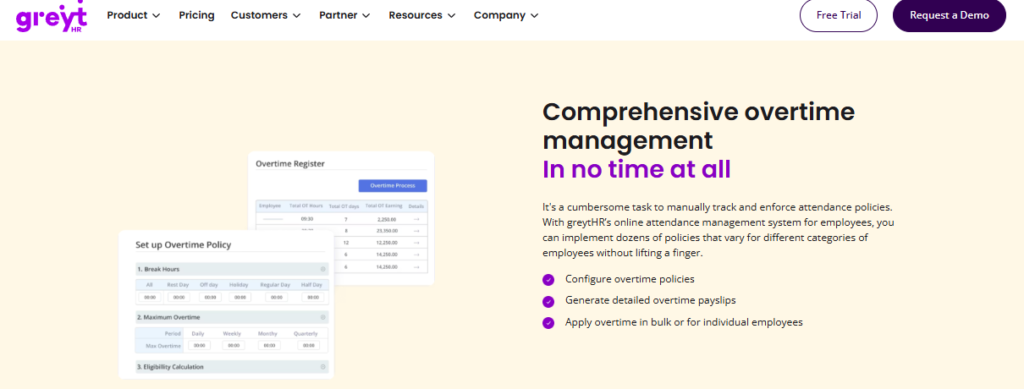
greytHR is a long-established Indian payroll and HR platform serving small and mid-sized businesses. It is built around payroll, statutory filings, and employee self-service. Reviewers describe it as workable at a low price point, with several noting they stayed because of budget rather than capability. Teams choose it mostly to stop running payroll on Excel. Analytics stay descriptive, covering attendance registers, payslip data, and tax declarations.
🧩 Core Services
- Payroll processing, calculates salary and statutory deductions with payslip output, removing manual salary sheets.
- Tax declaration self-service, lets employees declare and select tax regimes themselves, cutting HR email load.
- Leave and holiday management, tracks balances and approvals centrally, though users report balance correction issues.
- Employee self-service portal, gives access to payslips, attendance, and tax details without HR involvement.
- Multi-location attendance monitoring, consolidates daily attendance across units into one view.
- Workflow assignment, routes tasks by department for basic monitoring.
🇮🇳 India-Specific Compliance & Localization
- PF / ESI / TDS support: Yes (core strength), with TDS revision limits reported
- Labour law compliance: Moderate (policy configuration gaps reported)
- Payroll localization (India-specific): Yes (built for Indian payroll)
- Multi-state compliance handling: Partial (customisation depends on vendor)
✅ Who This Is Built For
- Payroll executive at a 120-person firm who mainly needs accurate payslips and challans
- Finance lead who wants employees declaring taxes themselves instead of over email
- HR admin tracking attendance across two or three small units
❌ Who Should Skip This
- HR teams needing report configuration or TDS revision, which a reviewer says is not possible
- Multi-entity or shift-heavy manufacturing setups where policy configuration hits documented limits
💰 Pricing Structure
- Plan Type(s): Tiered plans published by the vendor
- Starting Price: Not publicly disclosed here, see our note on greytHR pricing
- Tier-wise Breakdown: Not publicly disclosed, request a quote
- Incremental Cost Drivers: Add-on modules and customisation requests
- Implementation Fee: Not publicly disclosed, request a quote
- Cost at 200 Employees: Not publicly disclosed, request a quote | Cost at 500 Employees: Not publicly disclosed, request a quote
⏰ Implementation & Support Reality
- Implementation is vendor-dependent, and one reviewer reported spending many hours configuring payroll
- Support is ticket-based, with one user reporting callbacks in one to two hours and others reporting escalation gaps
- Data migration is vendor-led with reported configuration gaps
- No publicly reported NPS figure available
⭐ Reviews
“Reporting configuration, TDS filing, revising of TDS is not possible.”
Krishnanand B., 3/5 greytHR G2 Verified Review
“GreytHR is not much good at customizing based on our requirements. We cannot properly implement our company policies due to the limitations of greytHR.”
Verified User in IT and Services, 2/5 greytHR G2 Verified Review
🔎 Cheap Software Is Never Actually Cheap
Price is what you pay. Cost is what you carry every month-end. When a reviewer says they stayed only because of budget constraints, that is not a saving; that is a subsidy paid in your team’s hours.
1.5 Zoho People
Zoho People, low-cost HR module for teams already standardised on Zoho
📌 Overview
Zoho People is the HR product inside the broader Zoho business suite. Its strongest pull is native connection to Zoho Recruit and Zoho Payroll, which streamlines hiring and monthly payroll for existing Zoho customers. Reviewers value breadth and price, while several flag shallow depth per module. It is used mostly by cost-sensitive teams tracking attendance, leave, and onboarding. Analytics here are largely descriptive dashboards.
🧩 Core Services
- Attendance and leave management, digitises requests and approvals, removing manual leave registers.
- Candidate self-onboarding, lets new hires enter their own data, completing onboarding within a day.
- Business-unit data organisation, segments employee records by unit for cleaner reporting.
- Zoho ecosystem integration, connects to Zoho Recruit and Zoho Payroll, cutting duplicate data entry.
- Timesheets and time logging, captures project hours, though reviewers report slow cell-by-cell entry.
- LMS module, added to the suite for basic learning tracking.
🇮🇳 India-Specific Compliance & Localization
- PF / ESI / TDS support: Partial (depends on Zoho Payroll pairing)
- Labour law compliance: Limited (global generalist design)
- Payroll localization (India-specific): Partial (via separate Zoho Payroll product)
- Multi-state compliance handling: Limited (not a documented strength)
✅ Who This Is Built For
- HR lead at a company already running Zoho CRM, Recruit, and Books
- HR executive collecting new-hire data manually over email before joining day
- Cost-conscious team wanting broad functionality at a low per-user price
❌ Who Should Skip This
- Payroll managers handling India-specific CTC revisions and FBP declarations at scale, given limited India payroll software depth
- Teams needing deep functionality per module, since reviewers report features are shallow
💰 Pricing Structure
- Plan Type(s): Essential HR, Professional, Premium, Enterprise, and People Plus, as published by Zoho
- Starting Price: Not publicly disclosed here, request a quote
- Tier-wise Breakdown: Not publicly disclosed, request a quote
- Incremental Cost Drivers: Separate Zoho Payroll subscription, higher tiers for advanced modules
- Implementation Fee: Not publicly disclosed, request a quote
- Cost at 200 Employees: Not publicly disclosed, request a quote | Cost at 500 Employees: Not publicly disclosed, request a quote
⏰ Implementation & Support Reality
- Setup is described as easy and self-serve, supported by instructional videos
- Support is email and ticket-based, with multiple reviewers reporting slow responses
- Data migration is largely self-serve
- One reviewer found pricing confusing when moving from trial to purchase
⭐ Reviews
“The biggest drawback for me has been the lack of customer support. There were days when I was stuck with errors and couldn’t find a solution.”
Dhana C., 4/5 Zoho People G2 Verified Review
“Features are shallow and there is no depth in each application.”
Verified User in IT and Services, 2.5/5 Zoho People G2 Verified Review
🔎 Ecosystem Gravity Is Real, and It Has a Cost
Buying inside a suite you already own is a rational decision. Just price the second subscription you will need for India payroll, because that is where the bundle math usually breaks.
1.6 PeopleStrong
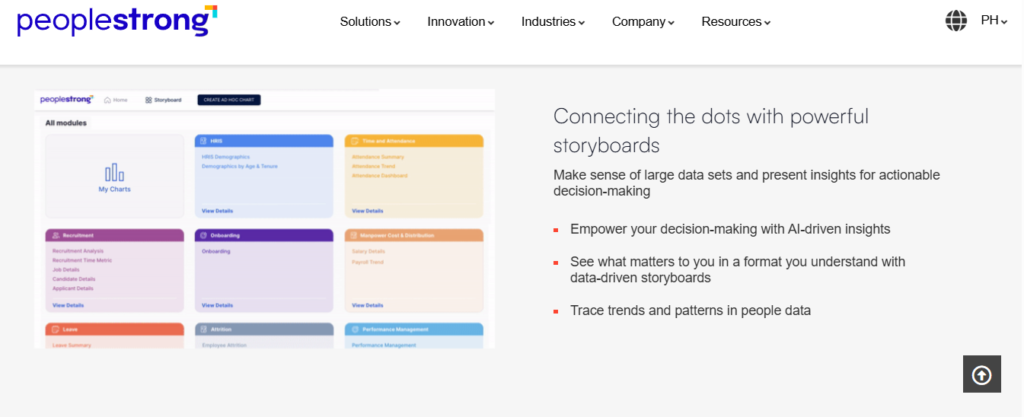
PeopleStrong, mobile-first Indian HCM with analytics leanings for mid-market teams
📌 Overview
PeopleStrong is an India-headquartered HCM platform serving mid-market and enterprise organisations across Asia. It covers core HR, attendance, payroll, performance, and reimbursements. Reviewers highlight strong mobile access, calling most HR information one tap away. It is used mostly by distributed teams needing claims, payslips, and attendance on a phone. Analytics range from descriptive dashboards into predictive workforce modules.
🧩 Core Services
- Reimbursements and claims, centralises submission and tracking so employees stop chasing status over email.
- Payslip and tax access, gives self-serve salary visibility, cutting repetitive HR queries.
- Mobile-first attendance, handles punch in and punch out from the app for field teams.
- Quarterly KRA tracking, runs goal cycles inside the platform rather than in spreadsheets.
- Jinie assistant, answers routine employee queries, though reviewers report it does not always work.
- Workforce analytics modules, provide headcount and attrition reporting for mid-market HR teams.
🇮🇳 India-Specific Compliance & Localization
- PF / ESI / TDS support: Yes (India payroll native)
- Labour law compliance: Strong (established Indian mid-market base)
- Payroll localization (India-specific): Yes
- Multi-state compliance handling: Yes (multi-location deployments common)
✅ Who This Is Built For
- HR Ops lead supporting field staff who cannot access a laptop during the workday
- Finance partner processing high volumes of employee reimbursement claims monthly
- Manager running quarterly KRA reviews across a distributed team
❌ Who Should Skip This
- Desktop-heavy HR teams, since one reviewer says the desktop version needs multiple options to finish one job
- Teams needing fast approval turnaround, as reviewers report claims workflows feeling slow
💰 Pricing Structure
- Plan Type(s): Quote-based enterprise subscription
- Starting Price: Not publicly disclosed here, request a quote
- Tier-wise Breakdown: Not publicly disclosed, request a quote
- Incremental Cost Drivers: Module scope and implementation complexity
- Implementation Fee: Not publicly disclosed, request a quote
- Cost at 200 Employees: Not publicly disclosed, request a quote | Cost at 500 Employees: Not publicly disclosed, request a quote
⏰ Implementation & Support Reality
- Implementation is vendor-led, often with partner involvement
- Support is account-managed with in-product helpdesk
- Data migration is vendor-led
- No publicly reported NPS figure available
⭐ Reviews
“It’s mobile-friendly, unlike the one we used before. Very helpful to access attendance, leaves etc.”
Nikhil S., 4/5 PeopleStrong G2 Verified Review
“The reimbursement and claims process can feel a bit slow at times. The interface can also lag occasionally, making navigation slightly frustrating.”
Anusha, 5/5 PeopleStrong G2 Verified Review
🔎 Mobile Adoption Is the Real Analytics Unlock
Data quality lives or dies on whether frontline staff can actually mark attendance. HROne built offline attendance marking with automatic sync on reconnection for exactly this reason, and I still consider connectivity the most underrated variable in any analytics business case.
1.7 SAP SuccessFactors
SAP SuccessFactors, global enterprise HCM with deep analytics and heavy configuration
📌 Overview
SAP SuccessFactors is an enterprise HCM suite built for large, multi-country organisations. It offers wide module coverage across core HR, talent, learning, and workforce analytics. Reviewers value its ability to support diverse international processes, while several call out cost, usability, and reporting complexity. It is used mostly by global groups standardising HR on one backbone. For 100 to 5,000 employee Indian firms, it usually arrives over-specified.
🧩 Core Services
- Core HR (Employee Central), holds a global employee record supporting country-specific processes.
- Workforce analytics and planning, delivers deep reporting and headcount modelling for large populations.
- Talent and recruiting modules, manage requisitions, offers, and onboarding across geographies.
- Learning management (LMS), tracks compliance training, with reviewers reporting dated reporting tooling.
- Compensation management, models pay changes across countries and job architectures.
- Ad-hoc reporting, supports custom reports, though one reviewer needed six months to master report building.
🇮🇳 India-Specific Compliance & Localization
- PF / ESI / TDS support: Partial (via localisation packs and partners)
- Labour law compliance: Moderate (needs partner configuration for India)
- Payroll localization (India-specific): Partial (implementation-dependent)
- Multi-state compliance handling: Partial (configurable at added cost)
✅ Who This Is Built For
- CHRO at a global group standardising HR data across many countries
- HR technology lead needing deep compensation and workforce planning analytics
- Enterprise with an internal HRIS team and partner budget
❌ Who Should Skip This
- Mid-market HR teams who need to change a leave policy without a developer or third-party vendor
- Buyers sensitive to cost, given one reviewer’s “Ferrari price, Trabant value” verdict
💰 Pricing Structure
- Plan Type(s): Enterprise licence, module-based
- Starting Price: Not publicly disclosed here, request a quote
- Tier-wise Breakdown: Not publicly disclosed, request a quote
- Incremental Cost Drivers: Third-party customisation, partner implementation, module additions
- Implementation Fee: Yes, typically partner-delivered and quoted separately
- Cost at 200 Employees: Not publicly disclosed, request a quote | Cost at 500 Employees: Not publicly disclosed, request a quote
⏰ Implementation & Support Reality
- Implementations are long and partner-delivered, often spanning multiple quarters
- Support is low-touch ticket-based per reviewer accounts
- Data migration often needs internal resources or paid vendor help
- No publicly reported NPS figure available
⭐ Reviews
“Customization requires third-party vendors, every change is costly. Extremely expensive for what it delivers.”
Janka Z., 0/5 SAP SuccessFactors HCM G2 Verified Review
“Reporting is very hard to set up, and even when set up, they are only available via email or downloaded CSVs. There is no feature to share dashboards with leadership.”
Verified User in Consumer Goods, 0.5/5 SAP SuccessFactors HCM G2 Verified Review
🔎 I Have Watched This Money Pit Up Close
Businesses spend enormous sums on enterprise systems believing the platform will solve everything, then discover it fails at the basics. What surfaces in HROne’s client conversations is that the mid-market rarely needs global depth; it needs a policy change shipped this week without a developer ticket.
1.8 Visier
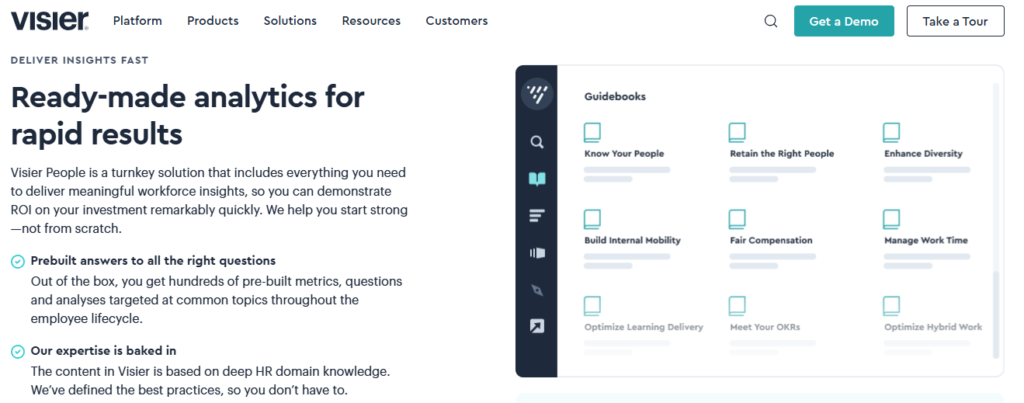
Visier, dedicated people analytics layer for teams with data already in place
📌 Overview
Visier is a purpose-built people analytics platform rather than a full HCM. It sits on top of existing HR, payroll, and finance systems to deliver workforce insight and benchmarking. It is used mostly by analytics leads and CHRO offices at larger enterprises who need modelling their transactional systems cannot provide. Because it does not run payroll or attendance, it depends entirely on the quality of upstream data.
🧩 Core Services
- Prebuilt people analytics models, deliver attrition, movement, and diversity metrics without building queries from scratch.
- Benchmarking, compares internal metrics against external market data for context.
- Predictive attrition modelling, forecasts turnover risk with driver-level breakdowns.
- Workforce planning, models headcount and cost scenarios across a planning window.
- Cross-system data integration, pulls from multiple HR and finance sources into one analytic model.
- Executive dashboards, package insight for leadership review without manual slide-building.
🇮🇳 India-Specific Compliance & Localization
- PF / ESI / TDS support: No (not a payroll platform)
- Labour law compliance: Limited (analytics layer only)
- Payroll localization (India-specific): No
- Multi-state compliance handling: No (depends on source system)
✅ Who This Is Built For
- People analytics lead building board reporting across three or more disconnected HR systems
- CHRO office needing external benchmarks alongside internal attrition data
- Enterprise data team wanting modelling without rebuilding the HR stack
❌ Who Should Skip This
- Indian mid-market teams needing statutory payroll and attendance in the same platform
- Companies whose source data is still inconsistent, since an analytics layer inherits every upstream error
💰 Pricing Structure
- Plan Type(s): Quote-based enterprise subscription
- Starting Price: Not publicly disclosed here, request a quote
- Tier-wise Breakdown: Not publicly disclosed, request a quote
- Incremental Cost Drivers: Data source connections and user seats
- Implementation Fee: Not publicly disclosed, request a quote
- Cost at 200 Employees: Not publicly disclosed, request a quote | Cost at 500 Employees: Not publicly disclosed, request a quote
⏰ Implementation & Support Reality
- Implementation is vendor-led and depends on source system readiness
- Support is enterprise account-managed
- Data migration is connector-based rather than record migration
- No publicly reported NPS figure available
🔎 An Analytics Layer Cannot Fix Broken Plumbing
Here is the trap I keep seeing. Teams buy a modelling tool while their attendance data still arrives as a biometric export pasted into a sheet. Fix the source, then buy the lens.
1.9 HiBob
HiBob, people analytics and culture data for teams scaling across countries
📌 Overview
HiBob (often called Bob) is a modern HR platform aimed at scaling companies, with strength in people analytics, engagement data, and org visibility. It is used mostly by people teams in tech and services firms operating across several countries. India statutory payroll typically relies on partner integrations rather than native processing. Analytics span headcount and attrition reporting into predictive views of engagement and retention.
🧩 Core Services
- People analytics dashboards, surface headcount, attrition, and diversity trends without manual consolidation.
- Engagement and survey data, links sentiment signals to retention reporting.
- Org chart and workforce visibility, shows structure and reporting lines in real time.
- Time off and attendance, manages leave across multiple country calendars.
- Performance and goals, runs review cycles connected to the same employee record.
- Open API and integrations, connects payroll and finance systems into one people dataset.
🇮🇳 India-Specific Compliance & Localization
- PF / ESI / TDS support: Partial (typically via payroll partners)
- Labour law compliance: Limited for India (global-first design)
- Payroll localization (India-specific): No (partner-dependent)
- Multi-state compliance handling: Limited
✅ Who This Is Built For
- People lead managing employees across three or more countries with one HR record
- HR team using engagement survey data to explain attrition patterns
- Scaling company replacing spreadsheets for org structure and headcount tracking
❌ Who Should Skip This
- Payroll managers needing native Indian PF, ESI, PT, and LWF processing in the same system
- Shift-based manufacturing operations requiring deep Indian time-office configuration
💰 Pricing Structure
- Plan Type(s): Quote-based, module-driven
- Starting Price: Not publicly disclosed here, request a quote
- Tier-wise Breakdown: Not publicly disclosed, request a quote
- Incremental Cost Drivers: Module add-ons, integration scope, seat count
- Implementation Fee: Not publicly disclosed, request a quote
- Cost at 200 Employees: Not publicly disclosed, request a quote | Cost at 500 Employees: Not publicly disclosed, request a quote
⏰ Implementation & Support Reality
- Implementation is vendor-guided with configuration support
- Support spans email, chat, and customer success contacts
- Data migration is template and import-based
- No publicly reported NPS figure available
🔎 Global-First Tools Meet the PT Slab Wall
Multi-country platforms handle headcount analytics well. They tend to stumble where India actually gets complicated, which is state-wise professional tax, LWF, and mid-cycle CTC revisions. Ask for a live India payroll report before you fall for the dashboard.
1.10 Rippling
Rippling, unified HR, IT, and finance data for cross-functional reporting
📌 Overview
Rippling combines HR, IT device management, and spend management on one employee record. That architecture lets ops teams report across payroll, software licences, hardware, and expenses together. It is used mostly by US-centred and global companies wanting workforce cost visibility in one view. India statutory payroll coverage is limited compared with India-native platforms, so Indian mid-market buyers should verify scope carefully.
🧩 Core Services
- Unified employee record, joins HR, device, and spend data so joiners and leavers update every system at once.
- Workforce analytics, reports headcount alongside software and hardware cost per employee.
- Global payroll and EOR, handles multi-country pay through Rippling’s own or partner rails.
- Device (IT) management, provisions and recovers laptops tied to onboarding and exit workflows.
- Spend management, tracks corporate cards and expenses against employee records.
- Custom reporting and automations, triggers actions from report conditions rather than stopping at charts.
🇮🇳 India-Specific Compliance & Localization
- PF / ESI / TDS support: Limited (verify current India scope)
- Labour law compliance: Limited for India
- Payroll localization (India-specific): Partial
- Multi-state compliance handling: Limited
✅ Who This Is Built For
- Ops leader who cannot see total cost per employee across payroll, software, and devices
- IT manager chasing laptops from exited employees through manual email trails, a gap asset management is designed to close
- Finance team reconciling employee spend against headcount reports each month
❌ Who Should Skip This
- Indian companies whose primary need is compliant India payroll with PF, ESI, PT, and LWF depth
- Teams needing shift and overtime analytics for Indian manufacturing operations
💰 Pricing Structure
- Plan Type(s): Modular per-employee pricing across HR, IT, and finance products
- Starting Price: Not publicly disclosed here, request a quote
- Tier-wise Breakdown: Not publicly disclosed, request a quote
- Incremental Cost Drivers: Each additional product module, per-employee add-ons
- Implementation Fee: Not publicly disclosed, request a quote
- Cost at 200 Employees: Not publicly disclosed, request a quote | Cost at 500 Employees: Not publicly disclosed, request a quote
⏰ Implementation & Support Reality
- Implementation is largely self-serve with guided setup
- Support spans email, chat, and account contacts
- Data migration is import-based
- No publicly reported NPS figure available
🔎 Cross-Functional Data Is the Next Analytics Frontier
Joining people data to device and spend data answers questions HR alone cannot. My honest read is that Indian mid-market teams still need statutory depth first, because a beautiful cost report built on a wrong payday helps nobody.
How to Pick in Three Lines
- By headcount band: under 100, stay lightweight; 100 to 500, pick India-native mid-market depth; 500 to 5,000, demand multi-entity and role-based access.
- By entity count: one entity tolerates most tools, and three or more entities in one instance rules out several immediately.
- By need: if your data is messy, buy plumbing and workflows; if your data is clean across systems, buy a prediction layer.
HROne earns position one on this list because it pairs India-native statutory analytics with an inbuilt ROI Dashboard that quantifies lifetime hours saved, and MR DIY India cut payroll cycles from 10 days to 5 or 6 days after moving across, as documented in the MRDIY case study.
Q2. How Did We Score These Tools, and Which One Fits Your Company Size?
We scored every tool out of 100 on five weighted criteria: Predictive and Prescriptive Depth (25%), India Compliance and Multi-State Analytics (20%), Setup, Adoption and Usability (20%), Pricing Transparency and TCO (20%), and Verified User Reviews (15%). Bands: 0 to 20 one star, 21 to 40 two, 41 to 60 three, 61 to 80 four, and 81 to 100 five. HROne scored five stars; fit still depends on your headcount band and entity count.
⚠️ Why Most Rankings Fail You
Most “best of” lists rank by brand recall. A vendor with a bigger marketing budget lands at number one, and you inherit the consequences at go-live.
So we built a rubric that mirrors your real risk order. Adoption debt sits near the top. Sticker price sits last, because a tool nobody opens is the most expensive line in your budget.
📊 The Weighted Criteria
| Criterion | Weight | What We Measured | How We Verified It |
| Predictive & Prescriptive Depth | 25% | Whether the tool forecasts, explains drivers, and triggers action | Vendor documentation plus module lists |
| India Compliance & Multi-State Analytics | 20% | PF, ESI, PT, and LWF reporting and multi-entity policy handling | Product docs and reviewer accounts |
| Setup, Adoption & Usability | 20% | Go-live timelines, training load, and self-service report building | G2 verified reviews on implementation |
| Pricing Transparency & TCO | 20% | Published pricing, lock-in terms, and when billing starts | Vendor pricing pages |
| Verified User Reviews | 15% | Balanced 1-star to 5-star spread, not cherry-picked | G2 review corpora |
⭐ Star Bands and Where Our Rubric Is Weak
Bands run simply: 0 to 20 earns one star, and 81 to 100 earns five. Adoption and support carry 35% combined weight, which is deliberate.
Here is the honest vulnerability. Our rubric under-weights native multi-country payroll, so global-first buyers with staff in eight countries should re-weight compliance toward international coverage before using our scores.
💸 The Adoption Debt Nobody Prices
Setup weight is high because failed implementations are the most common story in the review corpus, not missing features, a pattern our HRMS evaluation checklist is built around.
“We started working with Keka HRMS in August, and to this day, we have been unable to implement the tool in our company due to their consistently delayed responses and poor coordination between their internal teams.”
Divya P., 0/5 Keka G2 Verified Review
“Lack of timely, responsive, and easily reachable customer support. There is no escalation matrix.”
Verified User in IT and Services, 1/5 greytHR G2 Verified Review
HROne assigns each client a dedicated onboarding SPOC drawn from an HR background, carrying a 9.8 NPS, which is why it scores highest on this criterion among India-first platforms. My own read is that domain knowledge in that one seat matters more than any feature on the demo.
✅ Which Tool Fits Your Size
| Your Reality | Our Pick | Why |
| Under 100 employees, one entity | Keka or greytHR | Basic dashboards, low training load, and budget fit |
| 100 to 500 employees, India-only | HROne | Native payroll analytics plus 127 workflows in one instance |
| 500 to 2,000 employees, multi-state | HROne or PeopleStrong | Multi-legal-entity policy handling on a single instance |
| 2,000 to 5,000 employees, India-heavy | HROne or Darwinbox | Enterprise scale with role-based access layers |
| Multi-country footprint | SAP SuccessFactors or HiBob | Global process depth, India via partners |
| Clean data across five systems | Visier | Prediction layer, no transactional replacement |
If you sit in the 500 to 5,000 band, our guide to HR software for multi-entity companies covers the configuration questions worth asking first.
“I appreciate how HROne has revolutionized manual master data management, allowing me to pull reports rapidly without the hassle of multiple spreadsheets.”
Priyanka S., 5/5 HROne G2 Verified Review
HROne scores five stars on this rubric because it carries the strongest combined adoption and support marks among India-first platforms, with implementation billing that starts only after go-live rather than on signature date.
Q3. What Is HR Analytics Software, and Do You Actually Need One If Your HRMS Already Has Dashboards?
HR analytics software turns workforce data into decisions, spanning descriptive reporting (headcount, location, and pay) through predictive turnover forecasting and prescriptive recommendations. HRIS reporting only surfaces what the HRIS already stores. Often you do not need a separate tool, because most HCM platforms now bundle analytics natively. Buy standalone only when you need cross-system unification, validated prediction, or external compensation benchmarking your HRMS cannot deliver.
⚠️ The Question Behind the Question
Most HR leads do not ask “what is HR analytics”. They ask a quieter question: is our data even trustworthy enough to analyse?
That anxiety is usually justified. When attendance lives in a biometric portal and payroll in a vendor’s system, every report starts with reconciliation, which is exactly the gap HRMS integrations are meant to close.
📖 The Plain-English Definition
HR analytics software collects people data, connects it, and turns it into an answer you can act on. That is the whole job.
An HRIS (human resource information system) is a database. It stores records and reports back what it holds. Analytics software adds the layer that finds patterns and explains why a number moved.
Think of it like a fuel gauge versus a mechanic. One tells you the tank is low. The other tells you why you are burning fuel faster this month.
🪜 The Four-Rung Maturity Ladder
| Rung | What It Answers | Real HR Question |
| Descriptive | What happened | How many people left last quarter? |
| Diagnostic | Why it happened | Which function and which manager? |
| Predictive | What will happen | Who is likely to resign next quarter? |
| Prescriptive | What to do now | Whose confirmation letter do I fast-track this week? |
Most Indian mid-market teams sit on rung one and believe they are on rung three. Adoption of analytics tooling now outruns actual capability in use.
HROne sits on the prescriptive rung rather than the database rung, because its analytics are wired to 127 pre-built workflows across the employee lifecycle. A flagged number becomes an assigned task in the HR inbox, not another export sitting in someone’s downloads folder.
🔀 The Honest Fork: Built-In or Standalone
Built-in HCM analytics is enough for most 100 to 500 employee companies. Buying a separate layer adds cost and a second login for no new answer.
Buy standalone only when one of these three conditions is true:
- Your people data lives across five or more systems that cannot be consolidated
- You need statistically validated attrition prediction, not trend charts
- You need external market compensation benchmarks your HRMS does not carry
⚠️ The Database Trap
Here is the pattern I keep running into. Systems collect data diligently, then stop. They house information without doing anything with it.
That gap is the real dividing line. A reporting tool shows you the number. An analytics engine assigns the follow-up to a named person with a due date, which is the whole premise of HR process automation.
✅ Score Yourself Before You Shortlist
Software does not replace an HR professional. It removes the manual work so that professional can think.
So do this first. Write down your last five people decisions and mark which rung each one needed. If four of five were descriptive, your existing HCM dashboards probably suffice for now.
HROne’s ROI Dashboard compares minutes per task before and after automation, then converts the difference into lifetime hours saved against average HR salary, the same logic behind our ROI calculator. That is the honest test I would apply to any analytics purchase, ours included: can it show the board a rupee figure, or only a chart?
Q4. Which Capabilities Separate Real Analytics From a Pretty Dashboard?
Seven capabilities separate analytics from reporting: workforce planning and scenario modelling, compensation analytics with external benchmarking, self-service reporting for non-technical users, cross-system integration across HRIS, payroll, ATS, performance, engagement and LMS, explainable predictive models, privacy governance with data residency, and recommended-action workflows. Demand a live demo on your own sample data, and ask which correlations the model rejects as spurious.
⚠️ The Demo Trap
The demo looks stunning. Charts animate, filters glide, and everyone in the room nods.
Then the quote arrives and analytics is a separate line item. Or worse, you discover after go-live that custom fields are not available in custom reports.
📊 The Seven Pillars to Score
- Workforce planning and scenario modelling, project headcount and cost under different growth assumptions, not just report last month.
- Compensation analytics with benchmarking, compare internal pay bands against external market data during appraisal season.
- Self-service reporting, an HR executive builds and filters a report alone, with no support ticket.
- Cross-system integration, HRIS, payroll, ATS, performance, engagement, and LMS feed one employee record.
- Explainable predictive models, the tool shows which drivers pushed a risk score, not just the score.
- Privacy governance and data residency, role-based access layers and clarity on where Indian employee data physically sits.
- Recommended-action workflows, the insight creates an owned task with a deadline.
HROne’s HR Ops Dashboard reports average days taken per activity with a process-health heat map flagging which processes need attention, which is what pillar seven looks like in practice across workforce management.
🔗 Integration Reality, Honestly Stated
Core integrations are usually fine. Payroll to attendance, attendance to leave, and leave to payroll, these are solved problems now.
The trouble starts at the edges. Learning and development partners and LMS connectors take longer than any vendor admits during a sales cycle, and reviewers report inconsistent syncs with external systems.
“Reporting/analytics: Limited customization in reports. Integration issues: Sync with other systems can be inconsistent.”
Saksham A., 4/5 Darwinbox G2 Verified Review
“Reporting is very hard to set up, and even when set up, they are only available via email or downloaded CSVs. There is no feature to share dashboards with leadership.”
Verified User in Consumer Goods, 0.5/5 SAP SuccessFactors HCM G2 Verified Review
⏰ Three Demo Questions on Statistical Honesty
Ask these three, in this order, and watch the room:
- How was this attrition model validated, and on what population size?
- Which correlations did your model test and then reject as spurious?
- Show me one prediction that was wrong last year and what you changed.
A vendor with real modelling answers all three. A vendor with a chart library changes the subject to the interface.
✅ Turn the Pillars Into a Scorecard
Do not accept a generic demo. Send a masked sample of your own data and ask each vendor to run their demo on it, ideally before you book a demo with anyone on your shortlist.
Weight the seven pillars by your actual pain, score each vendor out of ten, and total it. My honest caveat is that pillar five, explainable prediction, is where I would expect most Indian mid-market buyers to over-invest before their source data is clean.
Also test the boring stuff. HROne lets managers schedule their own team reports to arrive by email on a set cadence, which quietly removes the weekly chase that eats HR’s Monday.
HROne covers all seven pillars in a single instance, including the HR Ops heat map that flags process health by average turnaround days, and Asia Healthcare Holdings runs 20 pan-India units on one such instance with multi-legal-entity configuration.
Q5. How Does Predictive Analytics Actually Catch Attrition Before It Happens?
Predictive HR analytics scores attrition risk from drivers most dashboards ignore: commute distance and travel time, shift timings, recognition history, growth curve, transfer requests, and learning activity. A granted patent computes a cumulative weighted trigger score and auto-notifies HR, while newer patents add per-employee cause explanations plus recommended interventions. Score-only tools are reporting. Frame your first project at team level, not individual level.
⚠️ The Conversation That Comes Too Late
You ask a manager who might resign this quarter. He names two people, based on a feeling.
He is often right about one and wrong about the other. By the time he is certain, the resignation letter is already drafted.
📊 The Driver Fields to Add This Week
Tata Consultancy Services holds a granted patent (US10339483B2, 2019) for an attrition risk analyzer that computes a cumulative weighted trigger score and notifies HR automatically. The fields it weighs are not exotic. Most sit in your existing systems already.
- Commute distance and daily travel time
- Shift timings and recent shift changes
- Recognition and appreciation history
- Growth curve, meaning time since last promotion or increment
- Internal transfer requests raised
- Learning activity and course completion
HROne captures recognition data in its Engage module and shift data in Time Office on the same instance, which is why these fields can be scored together rather than joined manually later.
🔎 Prediction Alone Is Reporting
Here is the part the category glosses over. A risk score without a cause is a rumour with a decimal point.
Praisidio’s patents (US11715053B1, 2023; US20240046181A1, 2024) add per-employee cause explanations plus recommended interventions. IBM’s US11301798B2 (2022) goes further, using group-level data so individual predictions do not depend on surveilling one person.
That is the closed loop: predict, explain, then assign the action.
⏰ What It Looks Like When It Works
A pharma HR team I know well was closing eight to ten open positions a day using its existing practice. After moving hiring and attrition tracking onto one platform, the same team reached 15 to 20 closures a day, and could show management the progress live rather than at month-end.
HROne’s attrition analytics sit on the same instance as attendance, shift, and recognition data, which is what made that jump possible for the pharma customer, and our guide on how to reduce employee attrition with HR data walks through the same logic. My honest caveat is that decision speed, not the model, did most of the lifting there.
“It has streamlined processes like attendance and leave management. I find the HR Analytics particularly valuable for presenting data to management.”
Priyanka S., 5/5 HROne G2 Verified Review
“I need some KPI monitoring in HROne which is currently not there. Leave patterns of the employees.”
Krunal S., 4/5 HROne G2 Verified Review
✅ The Twist: Score Teams, Not People
Now the part that will save your project. Do not start by scoring individuals. Start by scoring business units.
Rank each unit on attrition rate, replacement cost, productivity, and quality output. The pattern shows up faster, the politics stay manageable, and nobody feels watched.
Utilisation analytics taught me this. One team running at 150% occupancy brought that down by roughly 70%, which freed real time for other work, and no individual score was needed to see it.
💰 Three Things to Do on Monday
- Add the six driver fields above to your existing employee master, even in a spreadsheet.
- Segment attrition risk by performance band, because losing a bottom-quartile performer is not the same event as losing a top one.
- Run a build-versus-buy cost comparison for your three most critical skills, so the intervention has a rupee number attached.
HROne’s analytics run on the same instance as payroll, attendance, and recognition data, and the pharma team’s daily closures moved from 8 to 10 up to 15 to 20 after consolidating that view. My open question, and I genuinely do not know the answer yet, is whether team-level scoring stays sufficient once a company crosses 3,000 people. If you have tested it at that scale, I would like to hear what broke.
Q6. What Does India-Ready HR Analytics Require for Compliance and Employee Data Privacy?
India-ready HR analytics needs four things global tools rarely ship: DPDP Act 2023 consent, purpose limitation, and data minimisation over employee data; compensation dashboards that compute wages per the Code on Wages 2019 definition; EPFO, ESIC, PT, and LWF reconciliation as a self-serve toggle rather than a support ticket; and role-based access with layered permissions so a 1,000-person dataset is not visible to everyone.
⚠️ The Mid-Cycle Slab Change
A state revises its professional tax (PT) slab on the 12th. Payroll runs on the 25th.
Your dashboard shows one blended salary cost figure. It cannot tell you which legal entity the revision actually hits, a problem covered in depth in our note on multi-state payroll compliance.
⚖️ The Statutes Your Dashboard Must Carry
| Statute | What It Governs | Metric Your Dashboard Needs |
| DPDP Act 2023 | Consent and lawful processing of personal data | Consent status and purpose per data field |
| Code on Wages 2019 | The legal definition of “wages” | Wage-compliant cost per employee, not just CTC |
| Code on Social Security 2020 | PF and ESI obligations | Contribution reconciliation per entity |
| POSH Act 2013 | Workplace harassment redressal | Complaints received, resolved, and pending |
| Maternity Benefit (Amendment) Act 2017 | 26-week leave entitlement | Leave availed and return-to-work rate |
| IT Act 2000, SPDI Rules | Sensitive personal data safeguards | Access logs and encryption status |
HROne calculates PF, ESI, PT, and LWF slabs inside its payroll engine, which is why reviewers report statutory challan filing as a routine task rather than a monthly scramble, the same outcome statutory compliance software is meant to deliver.
🏢 Multi-Entity Applicability Is the Real Test
Here is the structural point most buyers miss. Analytics inherits its accuracy from payroll configuration.
If people in Company A follow one policy and Company B follows another, your policy engine must hold both in one instance. Otherwise every consolidated report needs a manual footnote, which is why HR software for multi-entity companies is a category of its own.
Asia Healthcare Holdings runs 20 pan-India units on a single HROne instance with multi-legal-entity configuration, which is what that requirement looks like when it is met at scale.
🔒 The Three-Layer Access Rule
Once your dataset crosses a thousand people, “who can see this” becomes a compliance question, not an IT preference.
Ask for three layers of access rights: module level, data level, and employee level. Role-based access control (RBAC) should also show each user only the activities pending with them.
HROne defines access rights across three layers with RBAC-affiliated roles, so a regional HR executive sees her units and not the national salary register.
📋 The One Written Ask
Get this in writing before you sign, not after. Verbal assurance during a demo is worth nothing at audit time.
Ask for a single document covering data residency (where Indian employee data physically sits), consent audit trails, and stated purpose of processing per data category. Any vendor serious about DPDP compliance already has it drafted.
⚠️ One Debate Worth Having
Vendors often say historical payroll data is not necessary for migration. Implementation teams frequently disagree, calling it the key to a clean go-live.
My position leans towards migrating at least two years. Without it, your first year of analytics has no baseline to compare against, and every trend line starts from zero, a risk our HRMS migration guide addresses directly.
“Salary processing along with exact calculation of LWF and PT slabs makes the work more convenient process.”
Komal S., 5/5 HROne G2 Verified Review
“Steps to create PT slabs are not available in knowledge base.”
Bindu P., 5/5 HROne G2 Verified Review
✅ The Blunt Vendor Question
Ask exactly this: when a statutory rate changes, is that a toggle I flip myself, or a ticket I raise with you?
The answer separates compliance built in from compliance ticketed in. One costs you a minute. The other costs you a payroll cycle.
HROne treats varying state laws across PF, ESI, LWF, and PT as native capability rather than custom work, and Asia Healthcare Holdings runs 20 pan-India units on one instance with layered access rights to prove the configuration holds at scale.
Q7. What Will HR Analytics Software Cost You, and How Do You Prove It Paid Off?
Free tiers and Excel templates exist and suit descriptive reporting for small teams, but lack validated prediction, cross-system integration, and audit-grade governance. Paid analytics typically arrives bundled in HCM pricing or as a per-employee add-on, with implementation, dormant licences, and renewal uplift driving real cost. Prove payback by pairing every metric with a named decision, an owner, and a review date, because analytics alone does not change decisions.
💸 The Money Pit I Keep Seeing
I have watched businesses spend the equivalent of three crore on an ERP believing it would solve everything from a systems perspective. It failed.
Not because the software was bad. Because nobody could operate it without the vendor in the room.
💰 The Full Cost Stack
Budget for six lines, not one:
- Licence fee, the per-employee-per-month number in the proposal
- Module add-ons, analytics, AI, or advanced reporting sold separately
- Implementation, configuration, migration, and training, bundled or billed
- Premium support, faster response times as a paid tier
- Internal admin labour, your team’s hours, which nobody invoices you for
- Renewal uplift, the increase at year two, which reviewers across the category report as a recurring shock
Free and Excel-based options are genuinely fine for descriptive reporting under 50 people. They break the moment you need prediction or an audit trail, a threshold our comparison of HR software versus Excel maps out.
⚠️ The Hidden Lines That Inflate Year One
Three lines quietly do the damage. Billing that starts on signature date rather than go-live, so you pay through a rollout nobody is using. Dormant licences for employees who never log in. And renewal uplift on a base you never renegotiated.
HROne meters subscription only after go-live, on flat PEPM with no lock-in, which removes the first of those three by design, and the full breakdown sits on our pricing page.
📊 The ROI Maths That Actually Convinces a CFO
The calculation is simpler than most decks make it look. Measure minutes per task before, measure minutes per task in the new system, then multiply the difference by monthly task volume.
Multiply saved hours by your average loaded HR salary. That gives you a rupee figure, which is the only unit a board actually debates, and the method behind our ROI of HR software analysis.
HROne’s inbuilt ROI Dashboard runs exactly this computation against lifetime hours saved, and MR DIY India cut its payroll cycle from 10 days to 5 or 6 days after switching, as documented in the MRDIY case study.
“The InboxforHR is a game-changer, centralizing every HR task into one simple inbox, cutting down administrative time by 60-70% and preventing tasks from falling through the cracks.”
Waldon S., 4/5 HROne G2 Verified Review
“Some modules, especially Payroll and Performance, have a learning curve and require more detailed guidance for first-time users.”
Shilpi M., 5/5 HROne G2 Verified Review
⏰ The Decision Ritual
Research on evidence-based management in HR analytics keeps landing on the same finding. Data does not change decisions; a decision process does.
So run a 30-minute monthly review. Every metric on the agenda carries three things beside it: a proposed decision, a named owner, and a review date.
If a metric cannot carry those three, drop it from the dashboard. It is decoration.
❌ When Not to Buy This
Skip a dedicated analytics purchase if your source data still arrives as manual exports. Fix the plumbing first, or you will pay to visualise errors faster.
Also skip it if your last five people decisions were all descriptive. Price is what you pay. Cost is what you carry every month.
HROne built India’s first inbuilt ROI Dashboard for this exact objection, comparing minutes per task before and after against lifetime hours saved, and it starts metering subscription only after go-live.
I still have not found a single system that is the end-all for HR, and I have been looking a long time. What I am sitting with now is a narrower question: which one number does your board actually want proved this year? Tell me that, and the shortlist usually writes itself.
















 Secures Top Spot in
