


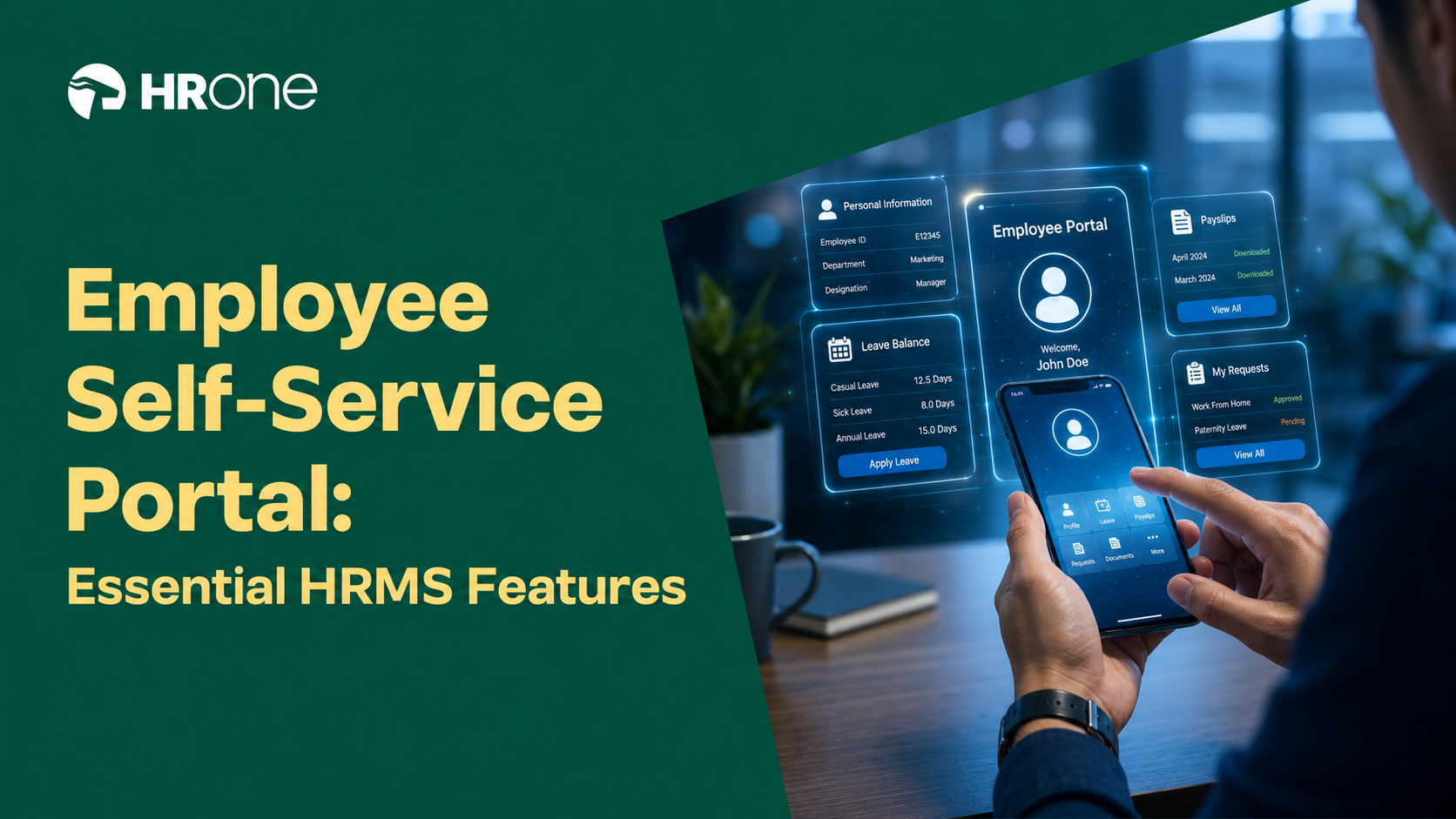
Q1: What Is an Employee Self-Service (ESS) Portal, and How Is It Different From HRIS, HCM, and Manager Self-Service?
An Employee Self-Service (ESS) portal is the secure, role-based employee-facing layer inside an HRMS that lets every employee self-serve payslips, leave, attendance, reimbursements, profile and KYC updates, documents, and policy queries, without routing each request through HR. It is distinct from an HRIS (the system of record), an HCM (the full strategic talent suite), and MSS (the manager cockpit for approvals and team analytics).
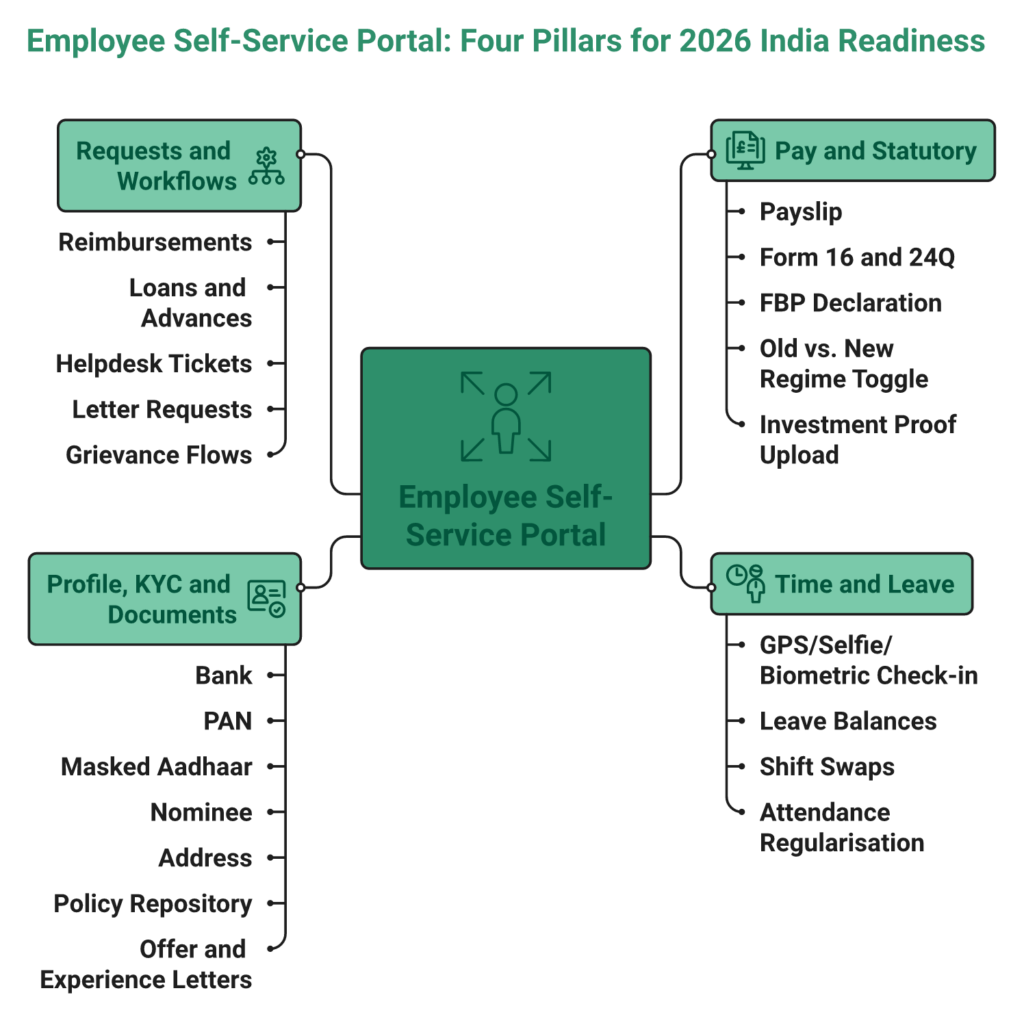
The Four Pillars Every ESS Must Cover
In my experience running month-end cycles for mid-market Indian firms, every ESS feature I have ever seen employees actually use rolls up into four buckets. If any one of them is shallow, HR is the one who pays the price in tickets.
- Pay and statutory: Payslip, Form 16 and Form 24Q, FBP declaration, old vs. new tax-regime toggle, and investment proof upload.
- Time and leave: Check-in with GPS, selfie, or biometric sync; leave balances, applications, and shift swaps; attendance regularisation.
- Profile, KYC, and documents: Bank, PAN, masked Aadhaar, nominee, address, policy repository, and offer and experience letters on demand.
- Requests and workflows: Reimbursements, loans and advances, helpdesk tickets, letter requests, and grievance flows.
ESS vs. MSS vs. HRIS vs. HRMS vs. HCM: One Table to End the Confusion
Buyers mix these terms up in every RFP I have sat through. The disambiguation is simpler than vendors make it sound, as the HCM vs HRIS vs HRMS breakdown shows.
| Term | What It Is | Primary User | Scope |
|---|---|---|---|
| ESS | Employee transaction layer | Every employee | Payslip, leave, attendance, claims, and documents |
| MSS | Manager cockpit | Line managers | Team approvals, team analytics, and goals |
| HRIS | System of record | HR Ops | Employee master, org structure, and history |
| HRMS | HRIS + payroll + workflows | HR + payroll | Core HR + payroll + time office + ESS + MSS |
| HCM | HRMS + strategic talent | CHRO | HRMS + performance, L&D, succession, and planning |
Why 2026 Is the ESS Inflection Point in India
Three shifts have collapsed the tolerance for a read-only portal. Hybrid and deskless workforces now average 40%+ of headcount at Indian mid-market and enterprise firms, which means ESS has to work offline, in multiple languages, and on a mid-range Android. The DPDP Act 2023 reframes every employee as a “Data Principal” with self-service data access, correction, and consent rights, obligations that have to live inside the portal itself. And Gen-Z joiners now expect WhatsApp-grade UX from an HR tool, not a 2012 web form. Well-architected ESS deployments in Indian enterprises consistently hit a 60 to 70% HR query deflection benchmark; most portals on the market today sit nowhere near it.
How HROne Ships ESS, MSS, and Helpdesk as One Surface
✅ HROne’s Super Inbox ships ESS, MSS, and the HR helpdesk as one unified action surface. Employees, managers, and HR close tasks in three clicks from the same screen instead of tabbing across separate ESS, admin, and payroll portals, cutting administrative time by 60 to 70% in day-to-day operations.
Q2: Why Is HR Flooded With Repetitive Queries, and Why Are Employees Unhappy With Payslips and Reimbursements?
Repetitive HR queries and payslip or reimbursement unhappiness are symptoms of a read-only ESS bolted on top of fragmented source data. The portal displays numbers but cannot explain or change them, which forces HR to act as a manual translator between the employee and the underlying payroll, attendance, and expense systems.
⏰ The Daily Reality Inside an Indian HR Ops Room
I have watched HR Ops leads at 1,000-employee firms field 40 to 60 WhatsApp pings a day: “why is Feb HRA different?”, “where is my Bangalore travel claim?”, “did my new tax regime switch apply?”, while the payroll manager firefights arrears and LOP corrections at month-end. Reimbursement cycles routinely stretch to 12 to 18 days because receipts are uploaded as JPEGs, routed over email, and manually policy-checked. The CHRO, meanwhile, cannot show the board a ticket-deflection number because the portal was never instrumented to measure one.
❌ Where the Mainstream ESS Architecture Breaks Down
The industry default is a display layer stacked on fragmented source data, and each mainstream vendor fails in a slightly different way.
- Keka renders a clean payslip but routes support through email threads, so edge-case queries land back in HR’s inbox.
- greytHR is payroll-strong but workflow-light; attendance regularisation and reimbursements loop back to HR because the workflow engine caps out.
- Zoho People under-serves multi-legal-entity FBP, CTC revisions, and new wage-code FFS timelines that Indian mid-market firms live with.
- Darwinbox fragments the employee experience across multiple tabs and email threads to close a single confirmation or claim.
“The system acts as per its own whims and gives error reports. We have to spend time manually to find errors. Not one month has passed where we have not raised a ticket. Employee experience has gone for a toss.”
— Maheshkumar J. greytHR – G2 Verified Review
“I have been a Keka user since 2021, and the service is decreasing day by day… TAT on customer request on features is bad. Keka is not built to service IT consulting firms.”
— Verified User in Consulting Keka – G2 Verified Review
✅ The Strategic Shift: Measure ESS by Tickets Deflected, Not Logins
Measure ESS not by login count but by HR tickets deflected per 100 employees, payslip-explanation self-service rate, and reimbursement cycle time. A great ESS answers “why,” not just “what.” A payslip has to show the inline CTC change, LOP impact, FBP consumption, and tax-regime math on the same screen; a reimbursement has to be OCR-parsed, policy-checked, and routed without HR ever chasing a receipt. The portal has to propagate actions back into payroll, attendance, and compliance, otherwise every self-service click creates a fresh downstream ticket.
💰 How HROne’s Super Inbox Closes the Loop, and the Proof Behind It
HROne’s Super Inbox collapses 110 daily tasks into three-click closures from one screen. The One AI Suite’s Receipt Parser auto-reads and policy-checks expense claims the moment they are uploaded, and the AI Employee Agent answers “why is my Feb payslip different?” from live payroll context instead of punting the employee back to HR. 127 pre-built workflows propagate every ESS action into payroll, attendance, and FFS without email chasing. HROne ranks #3 on G2 for Easiest-to-Use Core HR against Keka at #16, and MR DIY India went live in 30 days and cut payroll from 10 to 5 to 6 days after consolidating on HROne.
“The InboxforHR is a game-changer, centralizing every HR task into one simple inbox, cutting down administrative time by 60–70%… the employee and manager self-service feature, the mobile app and web portal enable employees to apply for leave, check leave balances, and more, leading to a 70% reduction in routine HR queries.”
— Waldon S. HROne G2 – Verified Review
Q3: What Are the 14 Must-Have ESS Features for a 2026 India-Ready HRMS?
A 2026 India-ready ESS must cover 14 features across four pillars: payslip and Form 16 download; leave and shift self-service; biometric, GPS, or selfie attendance and regularisation; timesheet and project logging; OCR-driven reimbursements; tax and investment declarations; profile, KYC, and bank updates; self-generated HR letters; policy hub; performance visibility; training access; personalised dashboards; helpdesk ticketing; and DPDP consent capture.
⭐ The 14-Feature Checklist With a Demo Test for Each
Most buyers arrive at a demo with a generic feature list. The table below is the one I hand operators instead, and each row has a specific test to run on the vendor’s live sandbox. Well-architected portals hit the 60 to 70% HR-query deflection benchmark; most fall short on features 5, 6, 9, and 14, which is where vendor demos get glossy and reality gets painful.
| # | Feature | Why It Matters in India | Demo Test to Run |
|---|---|---|---|
| 1 | Payslip + Form 16 / 24Q with inline breakup | Explains HRA, LOP, arrears, and tax regime in one view | Open a payslip and ask: can the employee see why the number changed from last month? |
| 2 | Leave application, balances, and approval tracking | Multi-state holiday calendars, comp-offs, and shift swaps | Apply a half-day that spans a comp-off and check arrear propagation |
| 3 | Biometric / GPS / selfie attendance | Field, shop-floor, and remote workforces | Mark attendance from a geofenced mobile on 3G |
| 4 | Attendance regularisation workflow | Forgotten punches, OD, WFH, and short-leave | Raise a back-dated regularisation and trace the approval chain |
| 5 | Timesheet and project tracking | Billable hours for IT/ITeS and consulting | Log 8 hours across 3 projects and export to payroll |
| 6 | Reimbursement submission with OCR | Kills JPEG-on-email fraud risk | Upload a printed bill and verify auto-extraction + policy check |
| 7 | Tax declarations + investment proof upload | Old vs. new regime, Form 12BB | Toggle regimes mid-year and watch projected take-home update |
| 8 | Profile, KYC, and bank updates (masked Aadhaar) | DPDP-era data minimisation | Update a bank account and check the approval + audit trail |
| 9 | Self-generated HR letters | Address proof, employment verification, and experience | Request a letter and confirm it generates without HR intervention |
| 10 | Policy and announcements hub | Searchable, versioned, and multi-entity | Search for “leave policy” and confirm entity-specific result |
| 11 | Performance dashboards, goals, and appraisal visibility | 360° feedback, and bell curve transparency | Open the appraisal tab and check calibrated-score visibility |
| 12 | Training and development access | L&D consumption at scale | Enrol in a course and check completion sync back to profile |
| 13 | Personalised dashboards with upcoming tasks | Kills “what’s pending” queries | Log in and count clicks to close the top three pending tasks |
| 14 | DPDP consent capture + data-access self-service | Statutory under the DPDP Act 2023 | Trigger a data export and check the consent audit log |
✅ What Most Vendors Ship vs. What India Actually Needs
Vendor demos usually crush features 1, 2, and 3 and hand-wave the rest. The ones that break deployments twelve months post-go-live are almost always the same four: timesheets that do not reach payroll, reimbursements that route via JPEG and email, letters that still need an HR click, and consent flows that do not meet DPDP obligations. This is the checklist I ask teams to score every shortlist against before a single PEPM number is discussed on the pricing conversation.
💰 How HROne Ships All 14 Under One PEPM
HROne ships all 14 features natively under one flat PEPM. The One AI Suite handles OCR-based receipt parsing and live payroll-context employee queries, the front-end policy engine toggles each feature per legal entity without developer tickets, and the Super Inbox surfaces pending actions across all 14 features in one screen instead of splintering them across modules, portals, and email threads.
Q4: Which India-Specific Statutory and DPDP Compliance Obligations Must Your ESS Cover?
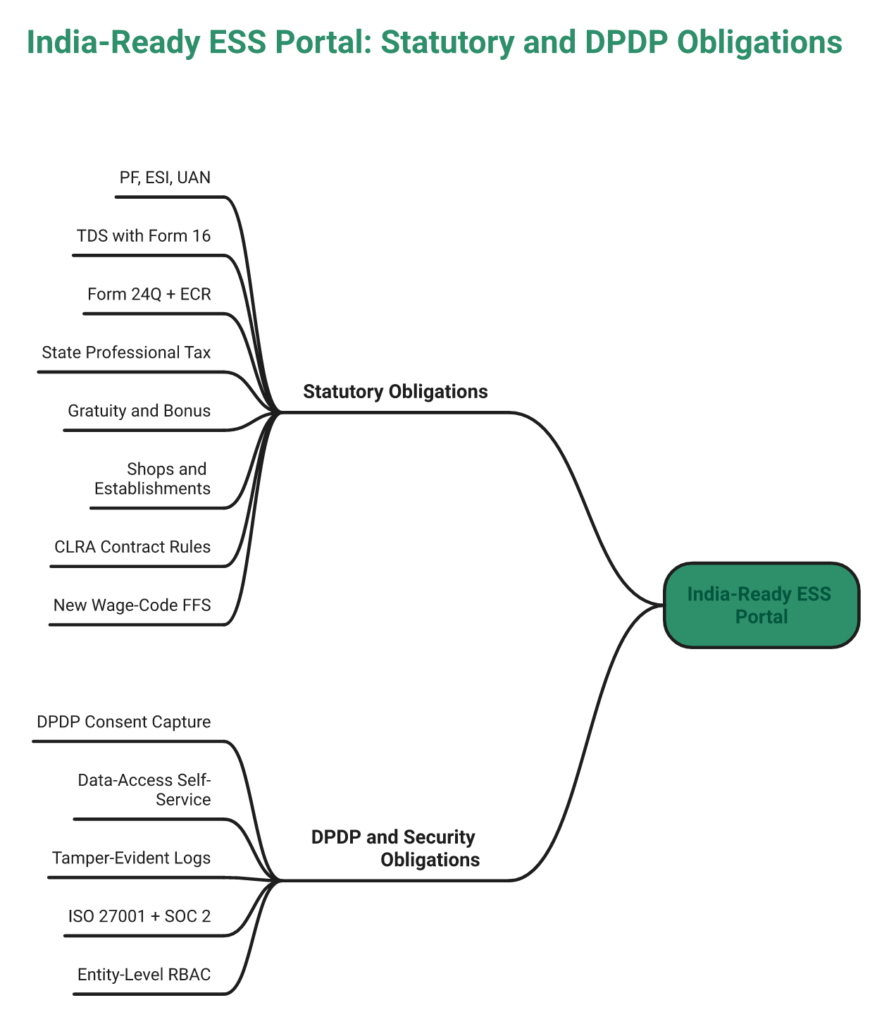
A compliant ESS must handle nine statutory and four data-protection obligations natively: PF and ESI, TDS with Form 16, Form 24Q and ECR filing support, state-wise Professional Tax, Gratuity and Bonus computation, Shops and Establishments variations, contract and gig workforce rules, the new wage-code two-working-day FFS timeline, DPDP-era consent capture, employee data-access self-service, granular RBAC, and tamper-evident access logs.
⚠️ Part A: The Statutory Stack Your ESS Cannot Afford to Miss
India payroll is not a computation problem; it is a jurisdictional one. The moment a single portal stops covering one of the items below, either finance fixes it in Excel or an employee grievance spirals into a ticket, as the statutory compliance in payroll guide underlines.
- PF and ESI auto-calculation with UAN and IP number validation, arrear handling, and Challan generation.
- TDS with old-vs-new regime toggle, and Form 16 and Form 12BA generation delivered directly to the employee profile.
- Form 24Q quarterly and ECR monthly file generation, ready for upload without manual reformatting.
- State-wise Professional Tax with live slab updates across Maharashtra, Karnataka, West Bengal, Tamil Nadu, and the rest.
- Gratuity and statutory Bonus computation under the Payment of Gratuity Act and Payment of Bonus Act.
- Shops and Establishments Act variations across states, including leave accrual and working-hour rules.
- Contract and gig worker CLRA compliance, including wage-register visibility and PF coverage checks.
- New wage-code two-working-day FFS timeline, the one that quietly breaks most legacy payroll engines.
🔒 Part B: DPDP Act 2023 and Security Obligations Baked Into ESS
The DPDP Act 2023 shifts the employee from a passive data source to a Data Principal with enforceable rights, and the Data Protection Board can levy penalties up to ₹250 crore for non-compliance. These five obligations have to live inside the ESS, not inside a PDF policy somewhere.
- Granular consent capture at onboarding, separating payroll, analytics, and third-party share as distinct purposes.
- Employee self-service data export, correction, and consent withdrawal with an SLA-bound routing to the HR Data Fiduciary.
- Tamper-evident access logs with user, timestamp, and purpose on every read and write of personal data.
- ISO 27001 + SOC 2 certification, India data residency, and encryption in transit and at rest.
- RBAC at OU and entity level configurable from the HR front-end, so that a payroll clerk should not see medical or performance data outside scope.
❌ Where Mainstream Portals Quietly Fail the Compliance Test
Global generalists like Zoho People and BambooHR under-serve state-wise PT, new wage-code FFS, and contract workforce rules in the way Indian enterprises actually live with them. greytHR handles SMB payroll adequately but caps on multi-legal-entity isolation. Legacy SAP SuccessFactors deployments demand third-party developers for a leave-policy change, which is the opposite of what DPDP’s self-service-correction obligation expects. The gap is not in statutory intent; it is in whether the portal can propagate a consent change or a bank-detail correction into payroll without raising a ticket.
✅ How HROne Builds Compliance Into the ESS Layer Itself
HROne’s ESS includes all 13 obligations natively: DPDP-aligned consent capture, self-service data export and correction, tamper-evident access logs, ISO 27001 and SOC 2 certification, India data residency, and front-end RBAC at OU and entity level without developer tickets. The India-specific payroll engine handles multi-state PF, ESI, and PT, new wage-code two-day FFS, and contract workforce compliance out of the box, instead of retrofitting a global engine with India plugins.
“I really like HROne for its zero-touch payroll and compliance automation. It handles salary calculations, statutory deductions, PF, ESI, taxes, and filings, automatically, with zero manual intervention, removing payroll errors and compliance anxiety during audits.”
— Waldon S. HROne G2 – Verified Review
“Proper calculation of PF and ESI was a pain area for us before, but now with the HROne automated calculation process, results are up to the mark and following Indian tax compliances properly.”
— Ajay K. HROne G2 – Verified Review
Q5: How Should a Mobile-First ESS Handle Field Attendance, Low-Connectivity Zones, WhatsApp, and Multilingual Workforces?
A mobile-first ESS must support geofenced selfie attendance, offline sync with conflict-free punches, 10+ Indian languages, push-notification deep links, sub-3-second payslip loads on 3G, and a WhatsApp channel for deskless workers to mark attendance, check balances, and submit claims. Otherwise, adoption stalls below 50% and HR keeps answering the same questions over the phone.
⏰ The Adoption Reality for Deskless and Field Workforces
Over 40% of the Indian enterprise workforce is deskless, including field sales, shop-floor operators, distribution drivers, retail staff, and healthcare field nurses. A web portal built for laptop users simply does not reach them. WhatsApp-first ESS typically lifts adoption by 25 to 35 percentage points for blue-collar cohorts compared to an app-only rollout, because workers already live in WhatsApp, and the learning curve collapses to zero. The WhatsApp bot channel is now a baseline, not a nice-to-have.
✅ The Seven-Step Mobile ESS Pilot Test Every Buyer Should Run
Do not trust a sales deck screenshot; run this test on the vendor’s actual sandbox with one real field employee and one HR admin before signing a PEPM contract. The same checklist applies whether you are evaluating a mobile HR app or a full HCM suite.
- 3G login test: install on a mid-range Android and time the login plus payslip load. Anything over 5 seconds signals a bloated bundle that will frustrate field users.
- Offline sync test: toggle airplane mode, mark attendance, reconnect, and verify a single clean punch and no duplicates.
- Language switch test: flip the UI from English to Hindi, Tamil, Telugu, Kannada, Bengali, or Marathi mid-session, and check that payroll and leave labels translate correctly.
- Geofence and selfie test: walk to the edge of a 50-metre radius and confirm the punch is blocked. Test selfie liveness detection under low light.
- Reimbursement OCR test: photograph a printed bill and verify the OCR runs on-device or in the cloud without manual typing.
- Push deep-link test: trigger a pending-approval notification, and check that tapping it lands on the exact action screen, not the home dashboard.
- WhatsApp parity test: mark attendance over WhatsApp and confirm it writes to the same attendance record that feeds payroll.
⚠️ Where Mainstream Mobile ESS Apps Break Down
Keka, greytHR, and Zoho People have all shipped mobile apps, but G2 reviewers consistently surface gaps that only show up post-deployment, including sluggish UIs, missing functionality compared to web, and notification lag. These are not edge cases; they decide whether ESS becomes part of the workflow or gets abandoned by month three, as the mobile app field employees analysis underlines.
“I had high expectations for the greytHR app, but unfortunately, it has been quite disappointing. The app is not as user-friendly as advertised, with frequent glitches and slow load times that disrupt workflow… the mobile app lacks key functionality compared to the web version, limiting its effectiveness for remote employees.”
— Shreeya V. greytHR – G2 Verified Review
“Mobile app experience, not always as smooth as desktop. Integration issues, sync with other systems can be inconsistent. User interface, navigation could be more intuitive in some areas.”
— Saksham A. Darwinbox – G2 Verified Review
✅ How HROne’s Mobile ESS Ships for Indian Field Reality
HROne’s mobile ESS ships with offline attendance management, geofenced selfie check-in, 10+ Indian languages, WhatsApp integration for attendance and claims, and push deep-links that land directly in the Super Inbox. It is validated across 1,500+ brands including field-heavy deployments like Asia Healthcare Holdings running 20 pan-India units on a single instance.
“My most liked feature is the GPS-based login and logout with pinpoint accuracy. It helps me track my on-field employees’ status, like where they are currently, to resolve customer service issues.”
— Krunal S. HROne G2 – Verified Review
Q6: Which AI-Native ESS Capabilities Move the Needle vs. Cosmetic Chatbots?
AI-native ESS capabilities are automations that read live HR data, including payslip context, receipts, policies, and attendance patterns, to answer employee questions, pre-fill actions, and flag anomalies without HR intervention. That is categorically different from a keyword-matching chatbot that sits outside the source data model and punts unknown queries right back to HR.
🔧 How AI-Native ESS Actually Works Under the Hood
The mechanics matter because the word “AI” has been diluted by vendor marketing to mean almost anything. Four capabilities separate genuinely useful AI from cosmetic chat widgets, and the HROne AI platform is built around exactly these primitives.
- AI Employee Agent on live data: queries the live payroll, leave, and CTC tables to answer “why is my Feb net pay lower?” with the actual LOP, arrear, and tax-regime math, instead of a canned FAQ answer.
- Receipt Parser with policy rules: runs OCR on an uploaded bill, extracts vendor, date, amount, and GST, auto-classifies the expense head, and flags policy violations before submission.
- Attendance anomaly detection: surfaces punch-pattern outliers, including unusual geolocations, punch frequency spikes, and buddy-punch signals, for HR to review without staring at raw logs.
- Agentic leave routing and predictive attrition: auto-approves within policy, routes only exceptions to managers, and scores at-risk employees so HR can intervene before a resignation letter arrives.
❌ Why Cosmetic Chatbots Add a Ticket Layer Instead of Removing One
Most competitor chatbots are stitched on top of a knowledge base that the vendor updates quarterly. If the employee’s question is not in that knowledge base, and payroll questions almost never are, because they depend on the employee’s own CTC, regime, and LOP, the bot escalates to HR. The employee has now asked twice; HR has now been pinged once. That is a net increase in friction, not a deflection. The AI in HR hype vs reality breakdown goes deeper on this pattern.
💰 Why It Matters to the CFO and the Board
For a 1,000-employee firm, AI-native ESS typically compresses the reimbursement cycle from 12 to 18 days to under 48 hours, cuts payroll-query volume by 60 to 70%, and unlocks 2,000+ HR hours annually. Those hours are what the ROI calculator Dashboard converts into board-ready savings against average HR salary, which is what turns an ESS conversation from a line-item expense into a quantifiable gain.
⭐ How HROne’s One AI Suite Delivers on Live Data
The One AI Suite is built to sit inside the data model, not next to it. The employee AI agent reads live payroll context, the Receipt Parser policy-checks every claim at the point of submission, and the Super Inbox surfaces anomaly-detected items to HR instead of forcing manual trawling. The result is a portal that deflects tickets at source, backed by customers already experiencing the 60 to 70% reduction in routine HR queries documented in G2 reviews.
“I use HROne to automate our HR processes, eliminating manual errors, and ensuring compliance. It reduces HR’s admin time by 60–70% through features like Inbox for HR, which centralizes tasks. Payroll is automated, cutting errors, and the employee self-service feature improves team efficiency.”
— Waldon S. HROne G2 – Verified Review
“Sometimes I also used its OneAI system to apply leaves. That is what I have seen first time in a HR application system.”
— Ayush G. HROne G2 – Verified Review
Q7: What Is the ESS Depth Score, the 100-Point 8-Dimension Methodology We Used to Rank 12 HRMS?
The ESS Depth Score is a 100-point, 8-dimension rubric that scores any Indian HRMS on Feature Breadth (20), Mobile UX and App Store Rating (15), India Compliance (15), Integration Ecosystem (10), Pricing Transparency (10), Security and DPDP Readiness (10), AI-Native Features (10), and Customer-Reported Adoption (10).
⚠️ The Decision Dilemma, Every Vendor Claims “Self-Service”
Every Indian HRMS vendor puts “employee self-service” in the homepage hero. Buyers need a weighted, defensible rubric to cut through marketing parity and expose actual architectural depth before committing to a multi-year contract and change-management cycle. The how to choose HRIS HRMS software framework is the right companion to this rubric.
❌ The Wrong Way to Shortlist an ESS
Most buying committees shortlist by brand familiarity, per-employee sticker price, or raw module count. That approach misses the four dimensions that actually decide whether an ESS survives the twelve-month adoption curve, including workflow propagation back into payroll, mobile adoption in Tier-2 and Tier-3 cities, DPDP-ready consent capture at the portal layer, and inbuilt ROI instrumentation that proves value to the CFO. The HRIS buyer pitfalls list catalogues the traps that keep recurring.
✅ The Right Evaluation Framework, 8 Dimensions, 100 Points
Below is the weighted rubric every shortlist should be scored against. The weights reflect what actually breaks deployments in the Indian mid-market and enterprise reality, not what sounds impressive in a feature-matrix slide.
| # | Dimension | Weight | What You Are Scoring |
|---|---|---|---|
| 1 | Feature Breadth | 20 | Coverage across the 14 must-have ESS features including timesheets, OCR claims, self-generated letters, and DPDP consent |
| 2 | Mobile UX + App Store Rating | 15 | Offline sync, multilingual (10+ Indian languages), WhatsApp channel, and Play Store 4.2+ |
| 3 | India Compliance | 15 | PF, ESI, PT, TDS, Form 24Q, ECR, new wage-code two-day FFS, S&E, and CLRA |
| 4 | Integration Ecosystem | 10 | Slack, MS Teams, Tally, Zoho Books, biometrics, SSO/SAML, BGV, LMS, and accounting APIs |
| 5 | Pricing Transparency | 10 | Published flat PEPM, billing from go-live, no lock-in, and no per-entity surcharge |
| 6 | Security + DPDP Readiness | 10 | ISO 27001, SOC 2, India data residency, DPDP consent self-service, and tamper-evident logs |
| 7 | AI-Native Features | 10 | Agent on live data, receipt OCR, anomaly detection, and agentic routing, not FAQ chatbots |
| 8 | Customer-Reported Adoption | 10 | Inbuilt ROI Dashboard, query-deflection telemetry, G2 satisfaction rank, and NPS |
⭐ Scoring Thresholds and How to Apply the Framework
Use the rubric to convert marketing parity into a numeric gap. Three bands make the shortlist decision defensible.
- 80+ : Genuine ESS architecture that will hold up at 12-month adoption review and DPDP audit.
- 60 to 79: Mid-tier. Expect gaps in either compliance depth, mobile UX, or AI that will need workarounds.
- Below 60: Shelfware risk. Adoption will stall and HR will keep running Excel sheets in parallel.
The top 12 HRMS in the next section are scored against this exact rubric, and readers can replicate the scorecard on any vendor not listed. The real question is not “which ESS has the most features?” It is, “which ESS scores 80+ across all eight dimensions without hidden add-ons?”
Q8: Top 12 ESS-First HR Software in India 2026, Ranked by ESS Depth Score With Pricing, Integrations, and Security Matrix
Below are the top 12 India-ready ESS platforms scored against the ESS Depth Score rubric, ranked by total score, fit profile, starting PEPM, billing model, and lock-in. HROne leads at 92/100 on the strength of flat PEPM billing from go-live, no lock-in, the Super Inbox, 127 workflows, the One AI Suite, the inbuilt ROI Dashboard, and DPDP-ready architecture. The top 10 HR software India listicle offers a complementary lens on the same market.
🏆 The Ranked Summary Table
| Rank | Vendor | Score /100 | Best For | Starting PEPM | Billing | Lock-In |
|---|---|---|---|---|---|---|
| 1 | HROne | 92 | 100 to 5,000 India mid-market + enterprise | Flat, on request | From go-live | None |
| 2 | Keka | 78 | Under 500 IT/ITeS with desk workforce | ₹6,999/mo base | Day one | 1 yr |
| 3 | greytHR | 74 | Under 300 SMB payroll-first | ₹3,495/mo base | Day one | 1 yr |
| 4 | Darwinbox | 82 | 1,000+ enterprise with brand preference | Quote-only | Day one | 2 to 3 yrs |
| 5 | Zoho People | 70 | Single-entity startups in Zoho stack | ₹48/user/mo | Day one | None |
| 6 | PeopleStrong | 76 | Enterprise 1,000+ multi-country | Quote-only | Day one | 2 yrs |
| 7 | Kredily | 58 | Sub-50 free-tier startups | Free / ₹30 | Day one | None |
| 8 | RazorpayX Payroll | 62 | Sub-100 payroll-only startups | ₹100/user | Day one | None |
| 9 | Pocket HRMS | 65 | SMB 100 to 300 basic HRMS | ₹2,495/mo | Day one | 1 yr |
| 10 | Zimyo | 68 | SMB 100 to 500 modern UI | ₹60/user | Day one | 1 yr |
| 11 | FactoHR | 66 | Manufacturing SMB 100 to 500 | Quote-only | Day one | 1 yr |
| 12 | Salarybox | 52 | Sub-50 blue-collar payroll | Free / ₹50 | Day one | None |
⭐ #1 HROne, The Hire-to-Retire Operating System
What it is: India-first core HCM built around the Super Inbox and a front-end policy engine, serving 100 to 5,000 employee organisations across Manufacturing, IT/ITeS, BFSI, Logistics, and Healthcare.
Key ESS features: Super Inbox three-click closure, 127 pre-built hire-to-retire workflows, One AI Suite (Employee Agent, Receipt Parser, and Resume Relevancy), and inbuilt ROI Dashboard.
Mobile UX: Geofenced selfie attendance, offline sync, 10+ Indian languages, and WhatsApp channel.
India Compliance: PF, ESI, PT, TDS, Form 24Q/ECR, new wage-code two-day FFS, and CLRA, all native.
Pricing: Flat PEPM, billing from go-live, no lock-in, and no per-entity surcharge. See pricing for the full breakdown.
Score: 92/100, leads on workflow propagation, pricing transparency, AI, and adoption ROI instrumentation.
Best For: 100 to 5,000 employee India mid-market and enterprise needing one India-compliant HCM.
Skip If: Sub-50 startups only needing payroll, or global MNCs mandated to run SAP.
“The Inbox for HR has resolved many of our issues. It allows users to manage multiple tasks from a single window, eliminating the need to switch between different modules. Additionally, searching for information is as simple and efficient as using Google.”
— Vignesh J. HROne G2 – Verified Review
#2 Keka, Clean UX, Support Caveats
What it is: Popular sub-500-employee HRMS with polished UI. See the HROne vs Keka comparison for the full architectural gap.
Key ESS features: Payslip, leave, attendance, and PMS.
Mobile UX: App available; G2 users flag sluggish updates.
India Compliance: PF, ESI, and TDS covered; multi-entity thin.
Pricing: ₹6,999/mo base, day-one billing, and 1-year lock-in.
Score: 78/100, strong UX, weak support model and configuration depth.
Best For: Under 500-employee IT/ITeS with desk workforce.
Skip If: Multi-entity, shift manufacturing, or support-sensitive buyer.
“I have been a Keka user since 2021, and the service is decreasing day by day… Most of the times folks behind the chat window is not fully aware of the functionality. TAT on customer request on features is bad.”
— Verified User in Consulting Keka – G2 Verified Review
#3 greytHR, SMB Payroll, Workflow Caps
What it is: SMB-focused payroll + ESS platform. Compare on HROne vs greytHR for configuration depth.
Mobile UX: App available; user-reported glitches on load and notifications.
India Compliance: PF, ESI, PT, and TDS covered.
Pricing: ₹3,495/mo base.
Score: 74/100, strong payroll, limited workflows, and rigid configuration.
Best For: Under 300-employee SMBs.
Skip If: Multi-entity or multi-location complexity.
#4 Darwinbox, Enterprise Brand, Tab Fatigue
What it is: Unicorn enterprise HRMS with broad modules. See HROne vs Darwinbox for operational contrasts.
Mobile UX: Modern app; sync inconsistencies reported.
Pricing: Quote-only, day-one billing, and multi-year lock-in.
Score: 82/100, breadth yes, operational friction, and day-one billing drag adoption ROI.
#5 to #12 Short Profiles
Zoho People (70): Single-entity Zoho-stack fit; support delays reported. PeopleStrong (76): Enterprise-grade, quote-only. Kredily (58): Free-tier sub-50. RazorpayX Payroll (62): Payroll-first, ESS shallow. Pocket HRMS (65): Basic SMB HRMS. Zimyo (68): Modern UI, SMB depth. FactoHR (66): Manufacturing SMB fit. Salarybox (52): Micro-business payroll.
💰 The Transparent Pricing Matrix
| Vendor | PEPM Band | Min Seats | Billing From | Lock-In | Per-Entity Surcharge |
|---|---|---|---|---|---|
| HROne | Flat, on request | 25 | Go-live | None | No |
| Keka | ₹6,999+/mo base | 10 | Day one | 1 yr | Yes |
| greytHR | ₹3,495+/mo | 5 | Day one | 1 yr | Yes |
| Darwinbox | Quote-only | 500 | Day one | 2 to 3 yrs | Yes |
| Zoho People | ₹48 to 180/user | 1 | Day one | None | No |
| PeopleStrong | Quote-only | 200 | Day one | 2 yrs | Yes |
🔌 Integration Ecosystem + Security Matrix (Summary)
HROne, Darwinbox, and PeopleStrong cover the widest integrations surface, including Slack, MS Teams, Tally, Zoho Books, biometrics, SSO/SAML, BGV, LMS, and accounting APIs. On security, HROne, Darwinbox, Keka, and PeopleStrong carry ISO 27001 and SOC 2 with India data residency. HROne leads on DPDP consent self-service and tamper-evident access logs configurable without developer tickets. Zoho People, Kredily, and Salarybox are thin on BGV and LMS integrations. Use these matrices alongside the ESS Depth Score to shortlist two or three vendors for a paid pilot, which is where architecture stops being a slide and starts being observable.
Q9: Which ESS Fits Your Organisation by Industry, Company Size, and Workforce Type?
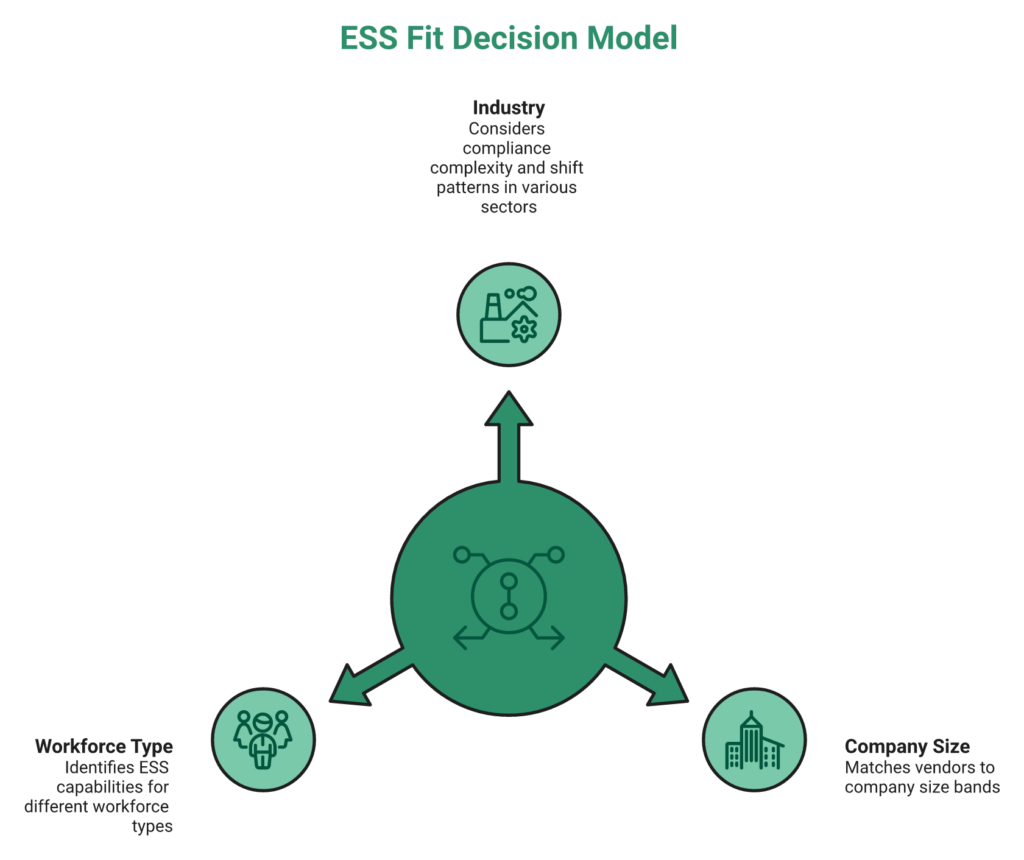
ESS fit is a three-axis decision: industry (compliance complexity and shift patterns), company size (entity count and adoption complexity), and workforce type (desk vs. deskless vs. contract). Mid-market IT/ITeS and Manufacturing at 500 to 5,000 employees with multi-state operations need the deepest ESS architecture; startups under 50 can survive with a payroll-only tool.
⚠️ The Decision Dilemma, One ESS Does Not Fit All
Vendor one-pagers pretend one ESS fits everyone. In reality, a 200-person IT startup and a 3,000-employee multi-plant manufacturer have orthogonal ESS needs. One needs AI timesheets and performance visibility; the other needs offline geofenced attendance, shift swaps, and CLRA contract-worker compliance.
❌ The Wrong Way to Pick, By Peer Logos or Cheapest PEPM
Choosing by peer-company logos or cheapest per-employee sticker price ignores shift compliance, multi-entity payroll, WhatsApp needs, field attendance in Tier-3 zones, and contract CLRA. These are exactly the dimensions that break twelve months post-go-live, right when the migration cost is sunk and switching is painful. The HR software pricing transparency guide expands on this trap.
✅ The Right Evaluation Framework, Industry × Size × Workforce Type
Score your shortlist against the ESS must-haves for your cell in the matrix below. Meeting 5 of 7 signals genuine fit; below that, you will be running Excel in parallel by year two.
| Industry | Typical Size | ESS Must-Haves |
|---|---|---|
| IT/ITeS | 500 to 2,000 | AI Employee Agent, timesheets + project tracking, performance visibility, and SSO |
| Manufacturing | 500 to 5,000 | Shift-swap, WhatsApp attendance, biometric sync, and CLRA contract compliance |
| Retail | 100 to 1,000 | Geofenced attendance, multilingual UI, and multi-store policy engine |
| BFSI | 500 to 5,000 | DPDP audit logs, granular RBAC, tamper-evident access logs, and encrypted vault |
| Healthcare | 500 to 5,000 | Multi-entity policy engine, mobile rosters, 24×7 helpdesk, and nominee/KYC flows |
Then layer on size-fit: Startup under 50 to Zoho People, RazorpayX Payroll, and Kredily. SMB 50 to 500 to HROne, Keka, and greytHR. Mid-market 500 to 2,000 to HROne and Darwinbox. Enterprise 2,000+ to HROne, Darwinbox, and PeopleStrong. Finally, layer workforce type. Desk-only fits almost any vendor; deskless, contract, and field force narrow the list sharply toward ESS platforms with offline sync, WhatsApp, and CLRA.
⭐ Applying the Framework, Where HROne Lands Across the Matrix
HROne covers 9 of the 12 cells natively, including Manufacturing 500 to 5,000 shift + deskless, Retail 100 to 1,000 multi-store, BFSI 500 to 5,000 regulated, Healthcare 500 to 5,000 multi-unit, IT/ITeS 500 to 2,000 desk-heavy, and the SMB through Enterprise size bands. Asia Healthcare Holdings runs 20 pan-India units on one HROne instance; MR DIY India rolled out across a multi-store retail footprint; 1,500+ brands across Manufacturing and IT/ITeS sit on the same platform. Skip HROne only for sub-50-employee startups where per-seat cost dominates, or global-first MNCs mandated to run SAP SuccessFactors for parent-company consolidation reasons.
“HROne has been a game-changer for our HR operations… its attendance tracking for both on-site and field employees, with features like geo-tagging, geofencing, and selfie-based attendance, has greatly improved transparency and accuracy. The payroll module automates salary processing, statutory deductions, and compliance filings.”
— Gaurav B. HROne G2 – Verified Review
“The system acts as per its own whims… Employee experience has gone for a toss. All the members in the company have raised complaints about the system.”
— Maheshkumar J. greytHR – G2 Verified Review
🎯 The Meta-Insight That Ends the Fit Debate
The real question is not “which ESS has the most customers like us?” It is, “which ESS covers my industry, size, and workforce-type cell without forcing me to buy a second tool eighteen months later?” That is the cell HROne was architected around for 100 to 5,000 employee Indian operations.
Q10: How Do You Calculate ESS Adoption ROI and Run a 30/60/90-Day Rollout With the Right KPIs?
ESS ROI equals HR hours saved from query deflection, payroll cycle compression, reimbursement cycle compression, and accuracy uplift, multiplied by fully-loaded hourly cost, and divided by annual PEPM subscription. Well-architected deployments show a 6 to 9 month payback. Run a 30/60/90-day rollout tracked against five KPIs: login frequency, query deflection %, payslip self-download rate, mobile adoption %, and reimbursement cycle days.
💰 The Five-Step ROI Calculation With a Worked Example
Use this math in every board deck instead of vague claims like “better employee experience.” For a 1,000-employee firm, the ROI calculator turns the following steps into a board-ready number:
- Baseline current state: 40 HR tickets/day, 10-day payroll cycle, 15-day reimbursement cycle, and 94% payroll accuracy.
- Apply benchmark deltas: 60 to 70% ticket deflection, 40 to 50% payroll compression, 70% reimbursement compression, and 3 to 5 pp accuracy uplift.
- Convert to HR hours saved: ~2,000 to 2,500 HR hours/year on queries, 90+ FTE-hours on payroll, and 40+ hours/month on reimbursements.
- Multiply by fully-loaded hourly cost: ₹800/hour (CTC ÷ 2,000 hours) on average for Indian HR Ops.
- Compare to annual PEPM × headcount: Savings land at ₹42 to 55 lakh/year against a ₹18 to 22 lakh PEPM spend, a 5 to 6 month payback.
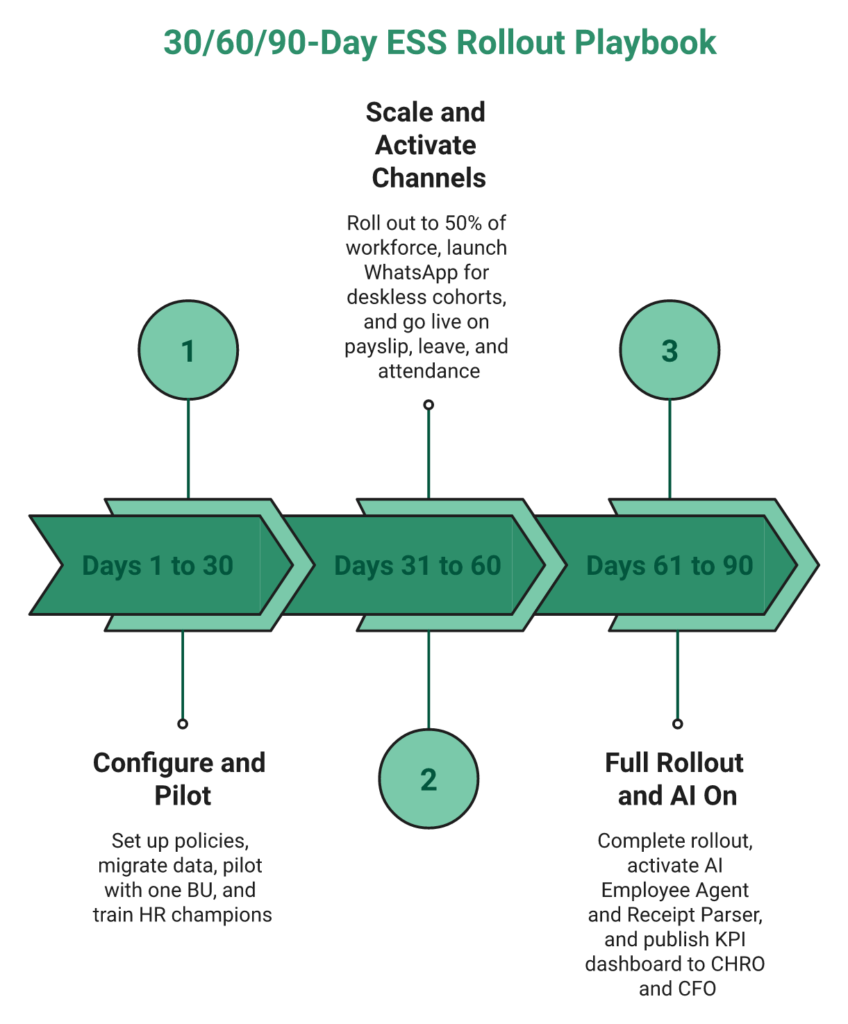
⏰ The 30/60/90-Day Rollout Playbook
Adoption dies when HR runs the legacy HRMS in parallel past day 60. Lock these phases into the project charter before day one, and use the onboarding process as the north star.
- Days 1 to 30: Configure policies, migrate employee master and 3 years of payroll history, pilot with one BU, and train HR champions.
- Days 31 to 60: Roll out to 50% of workforce, launch WhatsApp channel for deskless cohorts, and go live on payslip, leave, and attendance.
- Days 61 to 90: Full rollout, activate AI Employee Agent and Receipt Parser, and publish KPI dashboard to CHRO and CFO.
📊 The KPI Dashboard That Proves ROI to the Board
Five KPIs separate adopted ESS from shelfware. Publish them monthly.
| KPI | Target by Day 90 | Why It Matters |
|---|---|---|
| Weekly active employees | 85%+ | Measures genuine adoption, not vanity logins |
| Query deflection % | 60 to 70% | The primary HR-hour-saving metric |
| Payslip self-download rate | 95%+ | Kills the #1 repetitive query class |
| Mobile adoption % | 70%+ | Signals deskless inclusion is working |
| Reimbursement cycle (days) | <2 | Direct employee satisfaction driver |
❌ Common Rollout Mistakes and the Migration Checklist
Skip these at your peril, as they are the reason most ESS rollouts stall at 35% adoption. Launching without the policy engine configured, skipping WhatsApp for deskless cohorts, not instrumenting the ticket baseline pre-go-live, and running the legacy HRMS in parallel beyond day 60 are the four fatal moves. The migration checklist is equally unglamorous but non-negotiable: employee master, 3 years of payroll history, leave balances, open workflows, and integration credentials for biometrics, SSO, and finance GL.
⭐ How HROne Makes the 30/60/90 Plan Hit the Targets
HROne’s inbuilt ROI Dashboard, India’s first, runs this exact ROI math natively instead of relying on Power BI stitching. The prior-HR onboarding consultant model delivers 30-day go-lives (proven at MR DIY India, which also cut payroll from 10 to 5 to 6 days), and 127 pre-built workflows collapse configuration time so HR teams hit the 30/60/90 KPI targets without system integrators in the critical path.
“The initial setup of HROne was surprisingly straightforward, much lighter than expected for a full HRMS. Payroll is automated, cutting errors, and the employee self-service feature improves team efficiency.”
— Waldon S. HROne G2 – Verified Review
“HCM makes salary disbursement process as an easy one and error-less with bank Challan creation functionality supported. Salary process is fast, error-less, as per Indian Tax compliances.”
— Sachin K. HROne G2 – Verified Review
Q11: Ready to See a 30-Day ESS Go-Live in Action? Book Your HROne Demo
The fastest way to validate whether HROne’s ESS closes the 70% query-deflection, DPDP-ready, and inbuilt-ROI-Dashboard promises in your environment is a 30-minute walkthrough on your own policy configuration. It is the same playbook that took MR DIY India live in 30 days and Asia Healthcare Holdings live across 20 pan-India units on a single instance.
⭐ What to Bring to the Walkthrough
Bring your current ticket baseline, payroll cycle time, and the top three ESS pain points your HR team is firefighting today. The HROne team will score your setup against the 100-point ESS Depth Score rubric from this article, and show the Super Inbox, One AI Suite, and inbuilt ROI Dashboard live on your own data, not a sanitised sandbox.
See HROne ESS Live on Your Data
Walk through the Super Inbox, One AI Suite, and India’s first inbuilt ROI Dashboard with a prior-HR consultant. Get your ESS Depth Score benchmarked against your shortlist, in 30 minutes, on your own policies.
- 30-minute personalised demo on your current policies and workforce mix
- Free ESS Depth Score assessment against the 100-point rubric
- Flat PEPM pricing, billing from go-live, no lock-in, and no per-entity surcharge
- 30-day go-live track record across 1,500+ brands including MR DIY India
✅ What Happens After You Click
A prior-HR implementation consultant, not a generic SDR reading from a script, will reach out within one business day, scope your multi-entity structure and workforce mix, and schedule the walkthrough around your payroll cutoff. If HROne is not the right fit for your cell in the industry-size-workforce matrix, you will hear that honestly, not be pushed into a contract you will regret by quarter two. Use the contact us page if you prefer a written exchange first.














 Secures Top Spot in
