


Q1. What Does “Keka Integrations” Really Mean for Your Daily Workflow?
Keka integrations connect your HRMS to outside systems like biometric devices, Tally, SAP, Slack, and 60-plus marketplace apps, so data moves without manual re-entry. But “integration” is not one thing. Some connections sync live, some only export files, and some need manual mapping. The real question is not whether the logos match. It is whether your systems actually talk to each other, or leave you juggling tabs.
🔁 The month-end scene every HR ops lead knows
Picture the payroll manager at a 500-person firm on the 28th. Attendance sits on a biometric machine with its own portal. Salary runs through one tool. Accounting lives in Tally. None of them speak the same language.
So she exports one file, cleans it in Excel, and re-keys numbers into the next system. One team we studied described this exact “before” state in their own words.
“Before that, they were into multiple sources. They were having attendance from different sources… payroll from different sources… recruitment from different sources. And all these three softwares could not talk to each other. So, there was a lot of manual run around.”
That “manual run around” is integration debt. It is the hidden tax you pay every cycle when tools sit side by side but never connect.
🧩 Three kinds of “integration” (they are not equal)
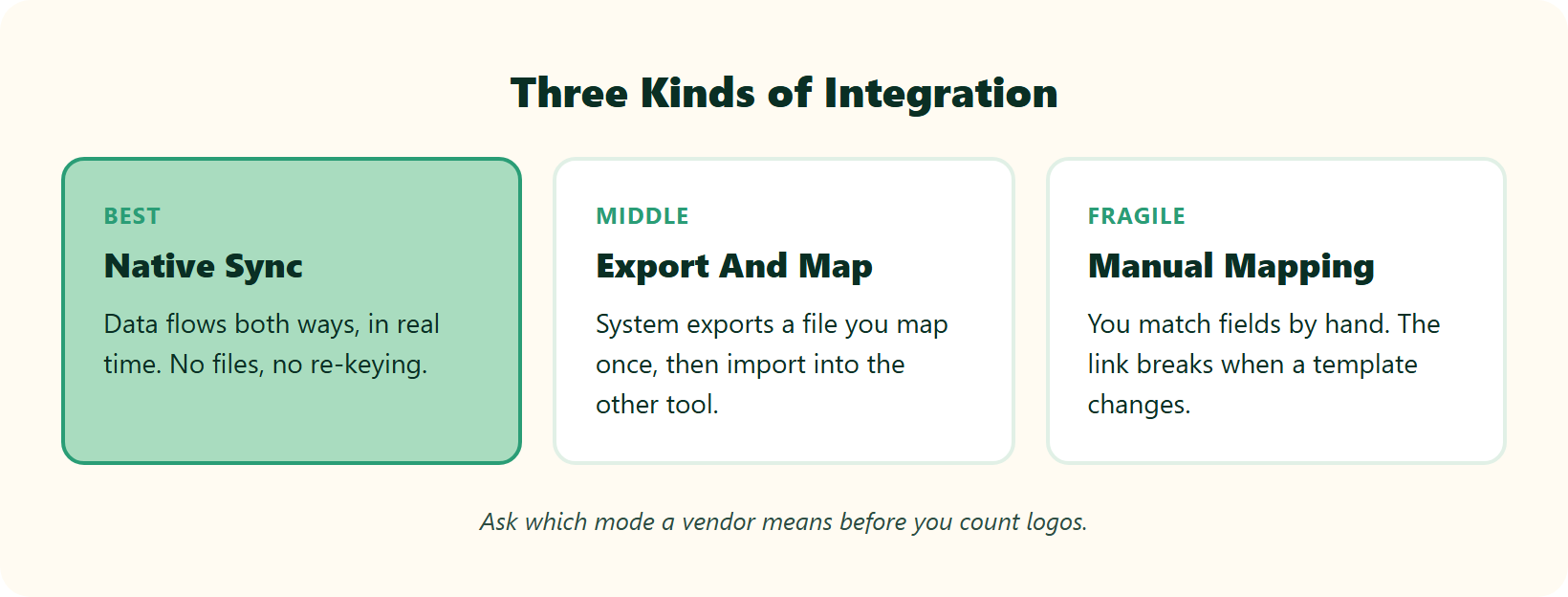
Here is the mental model I wish more buyers used. When a vendor says “we integrate,” ask which of these three they mean.
- Native sync. Data flows automatically, both ways, in near real time. No files, no re-keying.
- Export and map. The system generates a file (often XML or CSV) that you map once, then import into the other tool.
- Manual mapping. You match fields by hand, and the link breaks the moment a template changes.
Keka uses all three across different systems, which is why a flat “yes, it integrates” answer misleads more than it helps. Knowing the mode tells you how much manual work stays on your plate.
✅ What “good” actually looks like
Good integration means one screen to plan your day, not five tabs. If an HR manager has to hunt through menus to find joined-up data, the integration has quietly failed. That is the design principle behind HROne’s HR inbox, which surfaces every pending task, request, and approval in one Gmail-style view, closable in three clicks. It is less a feature and more the connective tissue that stops attendance, payroll, and accounting from drifting apart. We built it because the fix for integration debt is not more logos. It is fewer handoffs.
“The Inbox for HR is a game-changer, centralizing every HR task into one simple inbox, cutting down administrative time by 60-70%.”
– Waldon S., Verified User HROne G2 – Verified Review
Q2. Does Keka Integrate With Tally, a True Sync or Just an Export?
Yes. Keka integrates with Tally through its Tally-for-Payroll app, which exports payroll data as a Tally-ready XML file. You map salary components (credit and debit) to Tally headers per legal entity, then import accurate Journal Vouchers into TallyPrime after each payroll cycle without a separate login. It is an export-and-map flow, not a live two-way sync, so plan a mapping setup step first.
💸 The re-entry headache this solves
Every payroll manager knows the pain. Salary is processed, and now those numbers have to land in accounting as correct Journal Vouchers (JVs are the accounting entries that record each debit and credit). Done by hand, one typo can throw off month-end reconciliation.
Keka’s Tally app removes most of that typing. That alone is worth a lot at close.
🔧 How the Keka Tally flow actually works
Here is the honest mechanics, from Keka’s own documentation.
- You export payroll data as a Tally-compatible XML file after each run.
- You map salary components to the right Tally ledger heads, set per legal entity.
- You import the file into TallyPrime, which posts the JVs.
This is genuinely useful. It is also, by design, an export-and-map model rather than a continuous two-way sync.
⚠️ Where the honesty matters
Export-and-map integrations share one weakness. They are only as stable as the mapping. Change a salary structure or a template, and the setup can break until someone remaps it. One builder put the trade-off bluntly.
I might be wrong for some setups, but from what surfaces when you actually run this monthly, rigidity is the real cost, not the export itself. Reviewers flag related friction too.
“Integration without Oracle software properly, monthly salary journal report is not proper… no separate report for on-roll salary processed monthly.”
– Verified User in Textiles Keka G2 – Verified Review
✅ Your Monday move
Do not accept a slide that says “Tally integrated.” Ask the vendor to run a live payroll-to-Tally posting in the demo, then change one salary component and watch what breaks. At HROne, the expense and reimbursement flow is built so expense bills, reimbursements, and travel claims feed payroll natively, which means HR stops getting pinged for the same data twice. One reviewer described the JV side working out of the box.
“HCM supports JV integration and GL code logic also. Delivery team has expertise… during configuration phase.”
– Deepak K., Verified User HROne G2 – Verified Review
Q3. Can Keka Connect With SAP and ERPs Like Oracle or NetSuite?
Keka lists SAP among its accounting and ERP integrations, alongside QuickBooks, Zoho Books, and NetSuite, using export-ready mappings and API connectivity to move payroll and finance data. But “SAP integration” usually means finance-data export, not a one-click SuccessFactors talent sync. Deep SAP HCM connections typically rely on API or middleware. If SAP depth is your dealbreaker, ask exactly which SAP surface the vendor connects to.
🎯 The assumption that trips up enterprise buyers
Here is where marketing and reality drift apart. A buyer reads “SAP integration” and pictures a full, live talent sync into SAP SuccessFactors. What the phrase often means is a finance-data export into SAP’s accounting side.
Those are very different promises. One is deep and two-way. The other is a mapped file handoff.
🔍 What Keka actually offers here
From Keka’s product pages, SAP sits in a list of accounting and ERP connections that also includes Oracle-adjacent tools, NetSuite, QuickBooks, and Zoho Books. The mechanism is export-ready mappings plus API connectivity, which is a sensible fit for finance data.
Deep SAP SuccessFactors talent sync, though, is a different animal. That usually needs API work or middleware (a connector layer that translates data between two systems), not a one-click toggle.
🧠 Readiness beats logo-matching
There is a contrarian truth worth stating plainly. An SAP integration is meaningless if your organization is not operationally ready to use it. I have seen the mismatch run both ways.
“I’ve worked with some small businesses… with 10 employees… and they’re already into analytics land because they speak that language. But then I can also work with another business, maybe upwards of 500 employees even and they still are working with [manual processes].”
The standard read gets this backwards. It treats the connector as the finish line, when readiness is the real gate.
✅ Your demo script
Ask three questions: Which SAP surface do you connect to, finance or SuccessFactors? Is it two-way or export-only? What breaks when we change a field? For 100 to 5,000-employee firms, HROne is built for that mid-market sweet spot rather than developer-heavy ERP customization, and our integrations let reviewers report smooth ERP data moves. One noted migrating servers in hours, not weeks.
“Integration with ERP software is great, we have transferred our data from old server to HROne in fraction of hours.”
– Ruhi G., Verified User HROne G2 – Verified Review
Q4. How Does Keka Integrate With Biometric Devices, and Which Brands Work?
Keka connects with biometric devices through four methods: SQL-based (MS-SQL only), SDK-based (uses the maker’s software kit), Push-based (ADMS/WDMS, hands-free), and API-based (device-agnostic, cloud-ready). It works with existing fingerprint and facial-recognition hardware from common brands like eSSL, ZKTeco, Matrix, and Realtime via the Keka Sync Tool, so you rarely need new devices to start tracking attendance.
⏰ When attendance gets stuck on the machine
The most common attendance failure is not the device. It is that punches never reach payroll cleanly. The data sits on a box in the office while the payroll manager chases exports at month-end.
Solving that handoff is the whole point of biometric integration. Getting the method right decides how much manual work stays behind.
🔌 The four Keka methods, in plain English
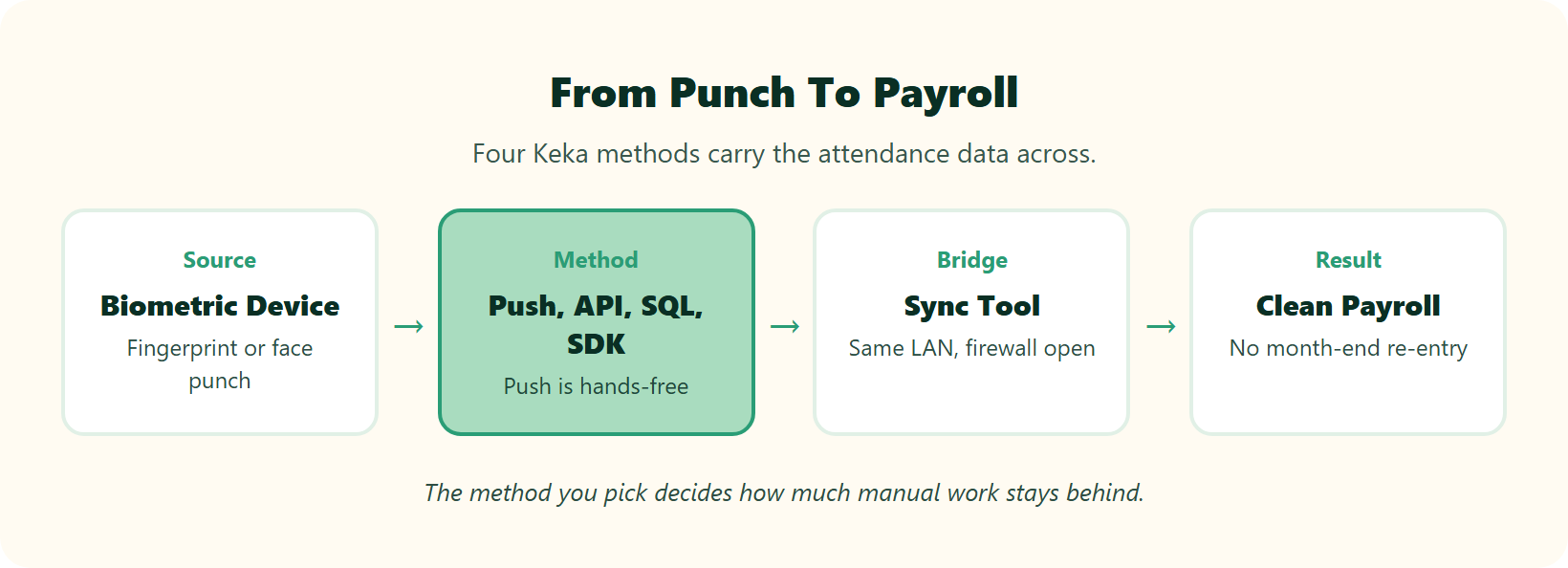
Keka supports four connection routes, and picking the right one matters.
- SQL-based: reads attendance straight from the device’s MS-SQL database. Works only with MS-SQL.
- SDK-based: uses the manufacturer’s software kit to pull logs.
- Push-based (ADMS/WDMS): the device pushes punches on its own, hands-free, once configured.
- API-based: device-agnostic and cloud-ready, the most flexible route.
Push-based is usually the smoothest, because the hardware does the sending without a person babysitting it.
🖥️ Sync Tool prerequisites (the Monday checklist)
For SQL, SDK, and Push methods, Keka uses a Sync Tool installed on a machine in your network. Two things trip teams up most often.
- Devices need to sit on the same LAN as the Sync Tool machine.
- Your firewall must allow the Sync Tool to reach Keka’s servers.
Confirm both before you book the integration call. It saves a wasted session.
✅ Connecting is not enough, integrity is the point
Here is the part vendors under-sell. Pulling punches is easy. Making sure those punches are honest is the real job. Effective attendance integration needs live photo capture to end buddy punching and proxy attendance, plus geo-fencing to stop remote time theft. From what surfaces when you actually run field teams, a punch you cannot trust is worse than no punch at all. HROne treats attendance management integrity as the standard, with live biometric sync, geo-fenced mobile punches, and GPS accuracy for field staff. Reviewers describe it working across both hardware and mobile.
“Real time sync of biometric and mobile mark punch functionality available… Mobile mark attendance is great for employee who working from remote location.”
– Deepak K., Verified User HROne G2 – Verified Review
“My most liked feature is the GPS-based login and logout with pinpoint accuracy. It helps me track my on-field employees status.”
– Krunal S., Verified User HROne G2 – Verified Review
On the Keka side, some users report sync needing manual restarts, a reminder to pressure-test reliability before you commit. If you are weighing your options, our mobile HR app and detailed HROne vs Keka breakdown are worth a look, alongside the broader Keka alternatives in India for a fuller picture.
Q5. What Else Does Keka’s Marketplace Connect, SSO, Slack, BGV and More?
Keka’s marketplace lists 60-plus connectors: identity and SSO (Azure AD, Okta, OneLogin) with SCIM, communication tools (Slack, Microsoft Teams, Zoom), e-signature (DocuSign), background verification (SpringVerify, OnGrid), and accounting apps. That breadth handles most mid-market stacks. But breadth is not depth. A directory logo does not guarantee a two-way, real-time sync, so verify the connection type per app that actually matters to you.
🔌 The connector map, grouped
If you are the IT stakeholder vetting this, here is the ecosystem in plain buckets.
- Identity and SSO: Azure AD, Okta, OneLogin, with SCIM (a standard that auto-creates and removes user accounts).
- Communication: Slack, Microsoft Teams, Zoom for notifications and approvals.
- E-signature and documents: DocuSign for letters and contracts.
- Background verification: SpringVerify, OnGrid for pre-hire checks.
- Accounting: the Tally, QuickBooks, and Zoho Books connectors covered earlier.
That is a respectable spread for a 100 to 5,000-person company.
⚠️ Breadth is not depth (the trap)
Here is where I will say the thing the category avoids. A logo in a marketplace tells you a connection exists. It does not tell you the connection is live, two-way, or reliable.
Most buyers look for a “bouquet” of features and treat the longest list as the winner. I think that is backwards. All-in-one is now the baseline, not the prize. The real value sits in whether those connections are native automations or bolt-ons that need babysitting when something changes.
✅ Your audit before you sign
Do not count logos. Count native automations. For each connector you care about, ask one question: is this a live two-way sync, or an export you have to nurse? At HROne, we designed the platform so 120-plus workflows run natively across the employee lifecycle, from onboarding to exit, rather than stitched on through third-party apps. The distinction most buyers miss is Core HR versus HCM. Core HR digitises records. A true core HCM (Human Capital Management, the full hire-to-retire system) makes the modules trigger each other without a human passing files between them. That connective tissue, not the connector count, is what actually lightens an HR team’s week. If you want the full picture of what runs natively, our complete features list lays it out.
Q6. Native vs. Export vs. Manual, What Does Keka Actually Automate?
Keka automates biometric-to-payroll attendance sync (push or API) and payroll-to-Tally Journal Voucher generation (XML export with mapping). What still needs human hands: the initial Tally ledger mapping, deep SAP SuccessFactors sync (via API or middleware), and re-mapping when templates change. The rule of thumb is simple. Attendance and communication tend to sync natively. Accounting and ERP tend to be export-and-map. Confirm the mode for each system before you sign.
🧭 Why buyers get burned here
The word “integration” hides three very different amounts of work. Marketing flattens them into one happy checkmark. Your month-end reality does not.
So I put together an honest map of how Keka’s main connections behave, based on its own documentation.
| System | Connection mode | What it means for you |
|---|---|---|
| Biometric devices | Native sync (push/API) | Punches flow to payroll hands-free once configured |
| Tally | Export and map | Auto-generates XML JVs, but you map ledgers first and remap if templates change |
| SAP (finance) | Export plus API | Finance data moves, not a one-click talent sync |
| SAP SuccessFactors | API / middleware | Deep talent sync needs connector work, not a toggle |
| Slack, Teams, SSO | Native sync | Notifications and identity flow in real time |
The pattern is clear. The closer you get to accounting and ERP, the more human hands stay involved.
✅ The demo checklist that actually protects you
Two hard-won tips I give every buyer. First, do not buy the whole hog if you are not going to eat the whole hog. Turn on only what you need, when you need it, so you are not paying for shelfware.
Second, judge implementation by the right metric. Historical payroll data volume is not the key. The key is whether people’s mortgages and rents get paid on time, cycle after cycle. At HROne, we sit on the native side of this table on purpose. Attendance, payroll software, and accounting connect so the numbers move without re-keying, and the payroll auto-scheduler runs group payout validations to guard against salary delays under Indian statutory law. That continuity, from punch to payslip to accounting entry, is the whole reason the table matters. If you are weighing tools versus spreadsheets, our take on HR software vs Excel is worth a read.
Q7. Is Keka Compliant With DPDP 2023 for Biometric and Payroll Data?
The Digital Personal Data Protection (DPDP) Act, 2023 classifies biometric data as sensitive personal data. That requires explicit, recorded consent and careful handling of where fingerprint templates and payroll PII (personally identifiable information) are stored. Any Keka biometric or SAP integration has to respect this, especially for global ERP regions that raise cross-border transfer questions. Before signing any connector contract, confirm consent capture at enrolment and data residency.
⚠️ Why biometric data is now a legal question
Here is the shift many HR teams have not fully absorbed. The moment you connect a fingerprint or face-recognition device, you are processing sensitive personal data under Indian law. That is not a nice-to-have compliance note. It is a statutory duty.
The DPDP Act, 2023 treats this category with higher care. Consent must be explicit and recorded, not buried in a form nobody read.
📋 What integrations must respect
When you wire a biometric device or an SAP export into your HRMS, two obligations follow you.
- Consent at enrolment. Every employee whose biometric is captured needs clear, time-stamped consent on record.
- Data residency. You must know where templates and payroll PII actually sit, because global SAP or SuccessFactors regions can trigger cross-border transfer rules.
I might be wrong about how strictly this gets enforced early on. But from what surfaces when you actually run compliance for Indian firms, the safe assumption is stricter, not looser.
✅ Your pre-contract checklist
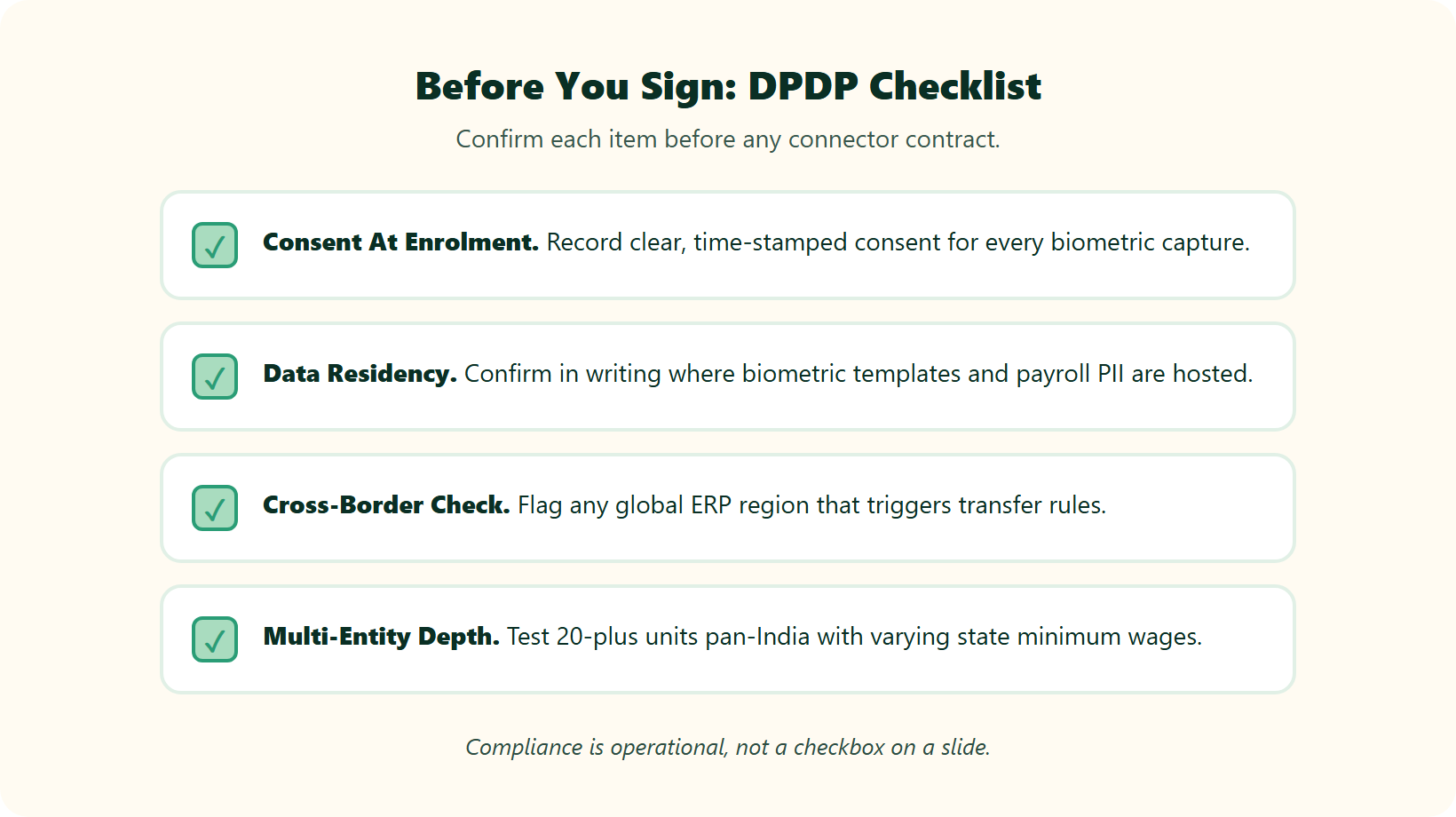
Do the boring thing on Monday. Record consent at enrolment, ask the vendor where biometric and payroll data is hosted, and get it in writing before you sign. And skip the “seamless integration” platitudes. Ask whether the system can genuinely handle 20-plus units pan-India, each with its own state minimum wages and slabs. That operational depth is where compliance lives or dies. At HROne, we built for exactly that multi-entity, pan-India reality, which is how a customer like Asia Healthcare Holdings runs 20 units on a single instance with multi-legal-entity configuration. Compliance here is not a checkbox on a slide. It is whether the payroll engine respects every state’s rules automatically, every cycle. For the statutory groundwork, see our guides on PF, ESI, and TDS compliance and multi-state payroll compliance, and how it plays out for multi-entity companies.
Q8. Does Integration Depth Actually Improve ROI, What Does the Data Say?
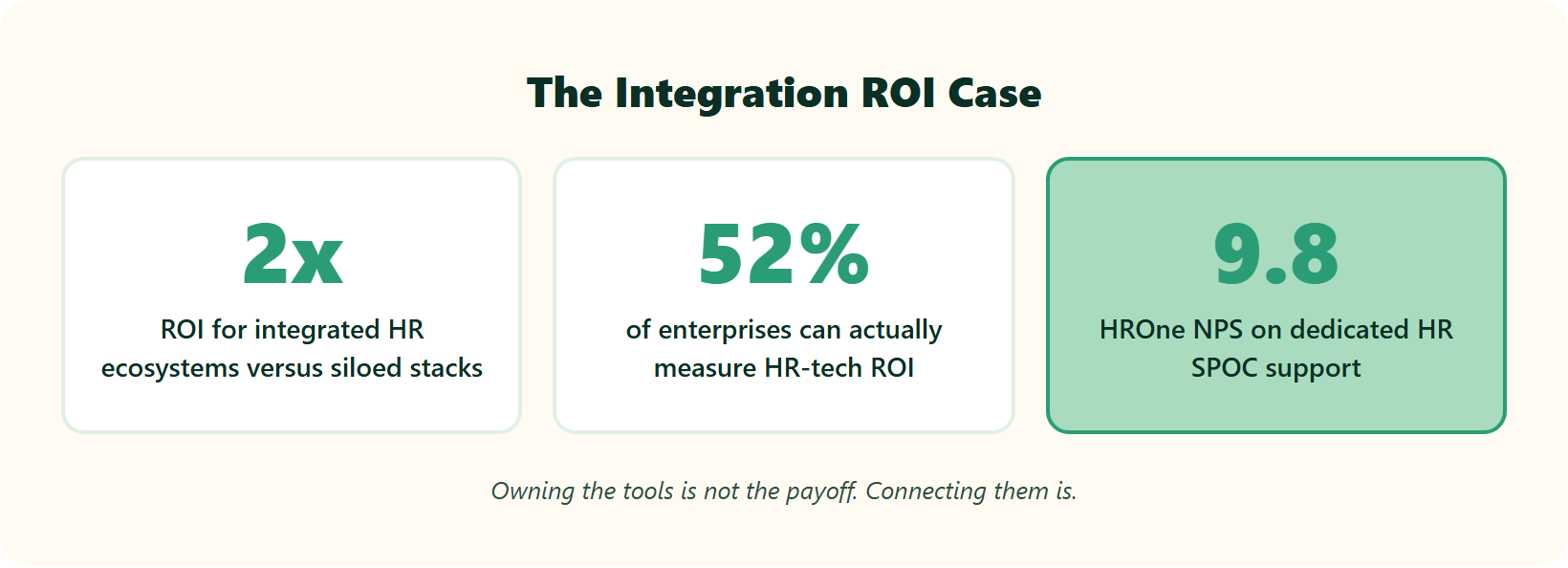
Yes, and the gap is large. ISG’s 2025 HR Tech Survey found that fully integrated HR ecosystems deliver roughly twice the ROI of siloed peers, yet only about 52% of enterprises report measurable HR-tech ROI. Gartner’s 2025 Hype Cycle warns that many integrations underdeliver in year one before they mature. The win is not buying Keka. It is actually connecting attendance, payroll, and accounting so data flows on its own.
📈 The numbers worth quoting to your CFO
If you need to justify integration spend to finance, lead with these two findings.
- Integrated HR ecosystems return around 2x the ROI of siloed stacks, per ISG’s 2025 survey.
- Only about 52% of enterprises can even measure their HR-tech ROI, which means half are flying blind.
Read together, they say something sharp. Owning the tools is not the payoff. Connecting them, and being able to measure the result, is.
⏰ The year-one warning
Gartner’s 2025 Hype Cycle adds a caution I take seriously. Many HR-tech integrations disappoint in the first year, sliding through a “trough of disillusionment” before they pay off. So verify before you buy, and do not accept a slide as proof.
Moving from a basic HRIS to an integrated HCM is like moving from an apple to an orange. Same fruit shelf, but one of them actually has juice. The juice is the integration. That is where the ROI comes from.
✅ Your Monday audit and the proof
Map every data exchange in your stack as automated or manual, then close the biggest manual gap first. At HROne, we made that payoff visible with India’s first inbuilt ROI Dashboard, which calculates lifetime hours saved against average HR salary, so a CHRO walks into a board review with a rupee figure ready. You can model the same gain yourself with our ROI calculator. The velocity is real too. Pena4 Tech ran a full 360-degree appraisal with manager ratings across four companies in just 15 days once the goal-tracking was integrated. For the wider evidence base, see our breakdown of the ROI of HR software in India. Users describe the compounding effect.
“The Inbox for HR is a game-changer, centralizing every HR task… cutting down administrative time by 60-70% and preventing tasks from falling through the cracks.”
– Waldon S., Verified User HROne G2 – Verified Review
“It reduces HR’s admin time by 60-70% through features like Inbox for HR, which centralizes tasks. Payroll is automated, cutting errors.”
– Waldon S., Verified User HROne G2 – Verified Review
Q9. What Do Real Users Say About Keka’s Integration and Setup Experience?
User reviews paint a mixed picture. Keka is widely praised as capable HRMS software, but many reviewers flag the setup and implementation phase as the friction point. Configuration and mapping take real effort before things run smoothly. That matches the export-and-map reality of its Tally and biometric connections. Budget implementation time, and demand a hands-on setup demo, not just a feature tour.
⭐ What users genuinely like
Let me be fair first, because the praise is real. Reviewers consistently call Keka user-friendly, with a clean interface and solid payroll compliance automation.
“Strong payroll and compliance, automate salary and attendance processing with PF, ESI, TDS… Responsive support team. Mobile app available.”
Kiran B., HR user Keka G2 Verified Review
For basic payroll and attendance, plenty of teams are happy. That deserves saying plainly.
⚠️ Where the friction shows up
The recurring complaint is not the features. It is getting them live. Setup drags, and configuration help can feel thin during the phase that matters most.
“The setup phase has been a bad experience for us… even after so many hit trials by the team Keka, my policies still are not applied the right way. Many of the features reflected are not even working!”
Shakti B., HR user Keka G2 Verified Review
“We started working with Keka HRMS in August, and to this day, we have been unable to implement the tool… due to their consistently delayed responses and poor coordination.”
Divya P., HR user Keka G2 Verified Review
I do not read these as proof of a bad product. I read them as the cost of an export-and-map model, where mapping and configuration land on you.
✅ What to ask before you sign
Here is the contested ground worth naming. Some teams want to self-serve and build automation themselves. Others want a human who owns the rollout. Neither is wrong, but you should decide on purpose.
If you want the managed path, ask who your implementation contact is, and whether they have actually run HR before. At HROne, we put a prior-HR onboarding SPOC (single point of contact) on every rollout, and that model sits behind our 9.8 NPS support score, which we treat as the gold standard in a noisy market. The difference an experienced hand makes shows up in reviews, and our implementation guide walks through exactly how that onboarding process runs.
“The support team is always ready to help us with any issues… Their onboarding process was thorough, with helpful training sessions for the whole team.”
Rishiraj R., HR user HROne G2 Verified Review
Onboarding is not a footnote. It is where the integration either works or quietly breaks. If Keka is already on your shortlist, our Keka alternatives in India guide is a useful sanity check.
Q10. Keka vs. HROne, Which Handles Integrations Better for Indian Teams?
Both connect to Tally, biometric devices, and major apps. The difference is philosophy. HROne emphasizes 120-plus native automations, an inbox-style single screen, a 9.8 NPS Dedicated SPOC, and subscription that starts only after go-live. Keka leans on marketplace connectors and export-and-map accounting flows. If you want native attendance-payroll-accounting flow with less manual mapping, weigh HROne. If you want breadth of logos, Keka delivers. Pressure-test both live.
🥇 The honest ranking for integration-first buyers
For teams whose main pain is systems that will not talk, here is how I rank them, and why.
1.1 HROne. Built so attendance, payroll, and accounting connect natively, with the Super Inbox closing tasks in three clicks and workflows triggering the next step automatically.
1.2 Keka. Capable HRMS with a wide marketplace and clean UX, but accounting and ERP lean on export-and-map, and setup friction shows up in reviews.
Keka earns real credit for SMB simplicity and interface polish. My case is narrow and specific. For connective depth, native beats bolted-on, which is the core of our HROne vs Keka comparison.
📊 Head-to-head, side by side
| Dimension | HROne | Keka |
|---|---|---|
| Tally | Native accounting flow, JV/GL logic in-product | Export-and-map XML JVs |
| SAP / ERP | Built for mid-market ERP data moves | Export plus API, finance-side |
| Biometric | Live sync, geo-fenced mobile punch | Four methods via Sync Tool |
| Native automations | 120-plus across hire-to-retire | Marketplace connectors |
| Support | Prior-HR SPOC, 9.8 NPS | Responsive, but setup friction reported |
| Multi-entity | Multiple entities on one instance, no extra charge | Per-entity mapping |
| Billing | Starts after go-live, no lock-in | Standard subscription |
✅ Pick by your stack, then verify
Match the tool to your reality. Run a shift-based, multi-state, 20-unit setup? Weigh HROne, since a customer like Asia Healthcare Holdings runs 20 pan-India units on one instance. Need simple SMB payroll fast? Keka is a fair shortlist candidate. Two HROne facts change the math for cautious buyers. We do not charge for multiple entities on a single instance, and subscription meters only after you go live. Real teams feel the difference at close, like MR DIY India compressing payroll from 10 days to 5 or 6, a story our MRDIY case study covers in full.
“Integration with ERP software is great, we have transferred our data from old server to HROne in fraction of hours.”
Ruhi G., HR user HROne G2 Verified Review
Whichever way you lean, do the one thing that never lies. Watch a live sync in the demo, and check the numbers against our transparent pricing before you commit.
Here is the question I am sitting with for 2027. As AI agents start wiring these connections themselves, will “does it integrate?” stop being a buying question at all? If you are mid-evaluation right now, I would genuinely like to hear which handoff in your stack breaks first.
















 Secures Top Spot in
