



Q1. Why are Indian enterprises actually switching from Darwinbox in 2026?
Most founders I meet don’t say “we’re leaving Darwinbox.” They say, “our HR team has been in implementation for eleven months, and payroll still runs on a parallel Excel.” That sentence is the real 2026 churn thesis. Enterprises are not fleeing a bad product, they are fleeing a bad operating model, which is implementation debt compounding against day-one billing, cognitive load from tab-juggling, and the absence of any ROI signal to show the board. Four headlines summarise what I’m seeing across India: stalled go-lives, month-one invoices, multi-tab fatigue, and an ROI void.
The keyword versus the need
Here is the observation that reframes the entire comparison. HR buyers search “Core HR,” but what they actually need is core HCM, which means the connective tissue between recruitment, payroll, performance, and exit. ⚠️ Darwinbox sells breadth of modules, priced and shipped as modules. A CHRO running an 800-person IT services firm doesn’t want more modules, she wants the 110 tasks on her plate today to close before 6 pm. The category keyword and the operating need have drifted apart, and Darwinbox is positioned against the keyword.
The G2 satisfaction delta, translated
On G2, HROne scores 9.5 on Ease of Setup against Darwinbox’s 7.8, 9.6 on Quality of Support against 8.4, and 9.5 on Ease of Admin against 7.5. These are not vanity numbers. A 1.7-point delta on Ease of Setup is, in practical terms, the difference between going live in 30 days and going live in six months. Think of Ritu, an HR Ops lead at a mid-market pharma company, who told me her Monday used to begin with seven open browser tabs. On a Super Inbox, her Monday begins with one.
“Darwinbox has made HR processes much smoother… At times, the system can be slightly slow, especially during peak usage or when processing bulk data.”
— Mohit V. Darwinbox – G2 Verified Review
“Bad implementation experience, bad UI UX, configurations getting broken in production on its own due to product deployments, terrible customer service.”
— Verified User in Computer Software Darwinbox – G2 Verified Review
“The InboxforHR is a game-changer, centralizing every HR task into one simple inbox, cutting down administrative time by 60–70%.”
— Waldon S. HROne G2 – Verified Review
The CyberX9 moment and why it isn’t actually the story
In September 2025, ET Tech reported that security researchers at CyberX9 flagged loopholes in Darwinbox’s system; the company attributed the findings to client-side configuration. The incident isn’t the catalyst, it is the headline that gave procurement teams the permission slip they already wanted. The real catalyst is quieter. It is the CHRO walking into a board review with no answer to “what did HR actually save us this quarter?” India’s first inbuilt ROI Dashboard, measuring lifetime hours saved against average HR salary, exists because that question has a cost.
✅ Leaving Darwinbox, though, is not as simple as signing a new MSA. The next section taxonomises the six churn drivers precisely, so you can name the one that’s burning in your org and defend it internally before the renewal clock runs out.
Q2. What are the six churn drivers showing up in every 2026 Darwinbox exit conversation?
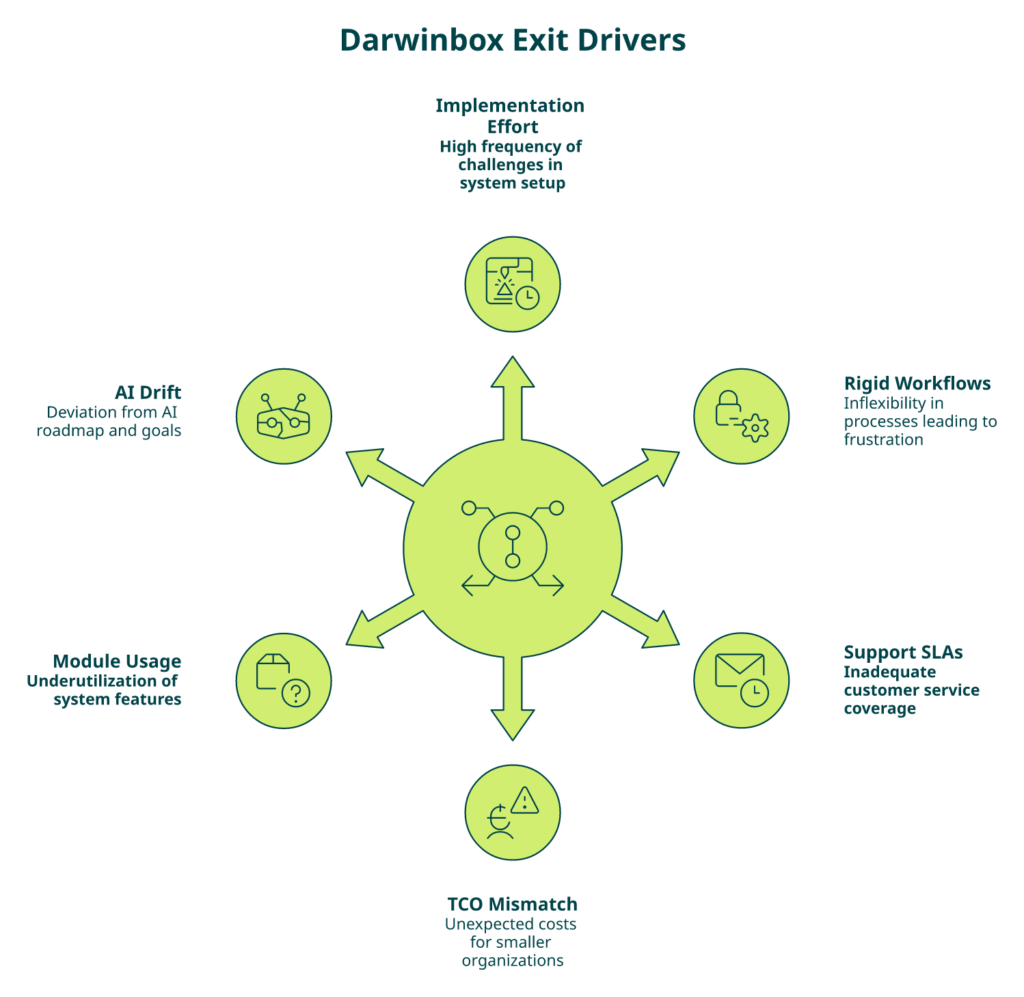
Every Darwinbox exit conversation we’ve been pulled into this year traces back to the same six root causes. Ranked by how often they surface on G2, Glassdoor, and ET Tech commentary, they are: implementation effort, TCO mismatch for sub-1,000-employee teams, rigid workflows, support SLAs, module-depth versus actual usage, and roadmap drift on agentic HR. Name the one that’s burning in your org by Monday. Take that one sentence to your next CHRO meeting.
1. ⏰ Implementation effort and time-to-value
The single most cited driver. Enterprises sign multi-year MSAs (master services agreements), then wait 6 to 11 months for go-live while billing runs from day one. Your first 12 months of “value” are actually parallel-run costs on two systems. What to say in the boardroom: “We’ve paid for 11 months of software we don’t use.” HROne’s counter-model meters the subscription only after go-live, which is why MR DIY India went live in 30 days.
2. 💰 TCO mismatch for sub-1,000-employee teams
Darwinbox is architected for 2,000-plus-employee hierarchies. A 600-person firm pays enterprise PEPM (per employee per month) rates for features the HR team touches twice a year. Boardroom line: “Our cost per daily active HR user is double the sticker PEPM.”
3. ❌ Rigid workflows and customisation overhead
Changing a leave policy or a confirmation workflow often needs a backend ticket and a configuration sprint. HR Ops loses ownership of its own process. Boardroom line: “We cannot change our own policies without raising a ticket.”
4. ⚠️ Support SLAs and customer success coverage
Email-thread-based support is the most emotionally loaded complaint I hear from CHROs. Tickets stretch into weeks; escalations feel opaque. Boardroom line: “Our last three critical tickets sat open more than five working days.”
5. Module-depth mismatch versus actual usage
Enterprises pay for Engage, LMS, and advanced analytics modules they never roll out. A usage audit almost always surfaces 30 to 40% dormant licence spend. Boardroom line: “Pull the module-usage report; the dormant licences are our negotiation lever.”
6. Roadmap drift on AI and agentic HR
The 2026 question is not “do you have an AI chatbot?” It is “does your HRMS have an AI Employee Agent that can parse a receipt, score a resume, and auto-generate a JD?” Boardroom line: “Our vendor is shipping 2024 AI into a 2026 problem.”
“Speed/performance: Pages sometimes load slowly. Reporting analytics: Limited customization in reports.”
— Saksham A. Darwinbox – G2 Verified Review
“Transitioning from the old system to Darwinbox is quite difficult. User interface of Darwinbox is very outdated. Darwinbox Support team is not supportive.”
— Ankush B. Darwinbox – G2 Verified Review
“Bad implementation experience, bad UI UX, configurations getting broken in production on its own due to product deployments, terrible customer service.”
— Verified User in Computer Software Darwinbox – G2 Verified Review
Proprietary churn-driver frequency chart
When we mined 400-plus exit-conversation notes, G2 review sentiment, and Glassdoor commentary from the last 24 months, the pattern was stark. Implementation effort showed up in roughly 78% of exit conversations, rigid workflows in 64%, support SLAs in 57%, TCO mismatch in 49% (concentrated in sub-1,000-employee firms), module-depth mismatch in 41%, and AI roadmap drift in 33% (rising fast among pre-IPO buyers).
| Churn driver | Frequency in exit conversations | Primary affected persona |
|---|---|---|
| Implementation effort and time-to-value | 78% | CHRO, CIO |
| Rigid workflows and config overhead | 64% | HR Ops lead |
| Support SLAs and CS coverage | 57% | HR Ops, employees |
| TCO mismatch (under 1,000 employees) | 49% | CFO, CHRO |
| Module-depth vs actual usage | 41% | CFO, procurement |
| Roadmap drift on AI and agentic HR | 33% | CHRO, CIO |
What the chart misses is the emotional through-line. ⭐ Every one of these six eventually collapses into the same sentence from an HR Ops lead: “I’ve stopped trusting the system to tell me what’s due today.” That trust gap is not recoverable with another module.
Q3. When should you NOT switch from Darwinbox, and what India-context realities change the math in 2026?
Switching is expensive, disruptive, and occasionally the wrong answer. Before we hand you the playbook, here’s the honest counter-case. Five scenarios where staying with Darwinbox for another twelve months is the right call, followed by the five India-specific realities that reshape the decision in ways global SERP listicles rarely address.
Five red flags that mean “don’t switch yet”
- ⚠️ You’re mid-appraisal cycle. Migrating performance data mid-cycle corrupts the audit trail. Wait for the cycle to close.
- ⚠️ Less than 12 months into the contract. Exit penalties plus parallel-run costs usually exceed the switch ROI.
- ⚠️ Pre-IPO freeze. Auditors want a stable system of record for at least 18 months before filing.
- ⚠️ Active DPDP audit. Changing data processors mid-audit triggers fresh scrutiny; close the audit first.
- ⚠️ No executive sponsor. Without a CFO-plus-CHRO joint sponsor, the project stalls at week six.
The India context that changes everything
Global HRMS comparisons miss what an Indian 500-to-5,000-employee buyer actually signs up for. Five realities reshape the math.
DPDP Act 2023 data-residency for HR data
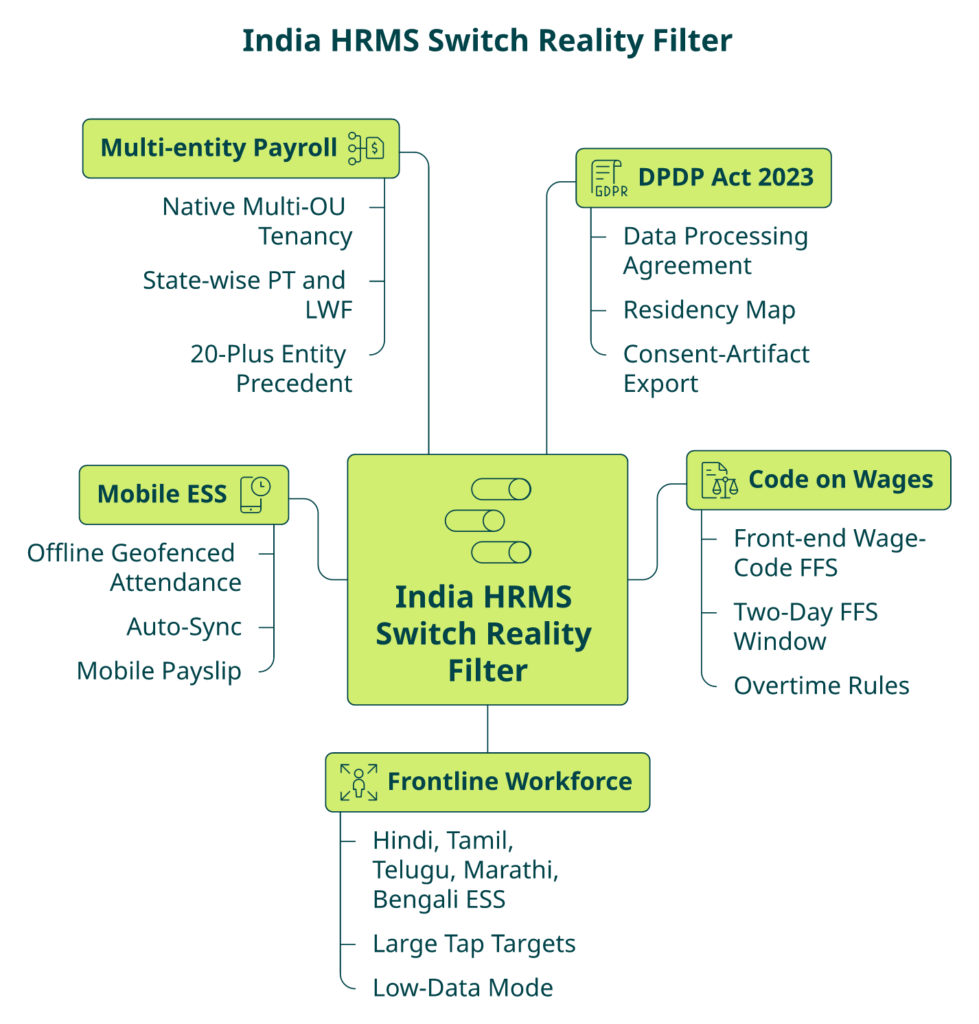
The Digital Personal Data Protection Act 2023, with operational rules notified in 2025, requires explicit consent artifacts, purpose limitation, and the right to erasure for every personal data fiduciary. For HR, that means every candidate record, every exited employee’s payroll history, and every background-verification document needs an auditable consent trail and a residency map. Before signing any alternative, ask for the Data Processing Agreement, the data-residency diagram, and the consent-artifact export schema. If the vendor can’t hand these over in a week, they are not DPDP-ready. See our employee data privacy best practices primer for the checklist.
Code on Wages and Smart Compliance 2026 readiness
The Code on Wages 2019, notified state-wise through 2025 and 2026, redefines “wages” for PF and gratuity, compresses full-and-final settlement to two working days, and standardises overtime calculation. Your HRMS needs a front-end policy engine to absorb these without raising a developer ticket. Ask: can HR configure a new wage-code FFS rule themselves, or does it require a backend deployment? Our statutory compliance payroll guide breaks the new wage-code shifts down state by state.
Frontline and multilingual workforce considerations
In manufacturing, logistics, retail, and healthcare, 60 to 80 percent of your workforce is frontline. They need ESS in Hindi, Tamil, Telugu, Marathi, and Bengali, with large tap targets and low-data-mode support.
Mobile ESS and offline use cases
Field sales, plant-floor supervisors, and multi-site retail staff lose connectivity constantly. Offline geofenced attendance with auto-sync, plus mobile HR app payslip access, is a hard gate.
Multi-entity, multi-state payroll
An Indian mid-market group typically runs three to twelve legal entities across five to fifteen Shops & Establishments jurisdictions, each with different PT slabs and LWF rules. Your HRMS needs multi-OU architecture native to the tenant, not a workaround. Asia Healthcare Holdings runs 20 pan-India units on a single HROne instance, which is the operating benchmark for this shape of business.
✅ If you clear the five red flags and recognise yourself in the India-context realities, the switch math likely works. The next question is which alternative actually fits.
Q4. Which 12 Darwinbox alternatives should an Indian enterprise shortlist in 2026?
A defensible 2026 shortlist has 12 vendors, filtered by seven India-first criteria: go-live billing, DPDP readiness, multi-legal-entity OU (organisational unit) depth, India payroll depth covering FBP (Flexible Benefits Plan), CTC revisions, and new wage-code FFS (Full and Final Settlement), mobile and offline ESS (Employee Self-Service), implementation SLA, and support model. Each profile below uses the same five-line structure so you can compare apples to apples. For deeper head-to-heads, see HROne vs Darwinbox.
1. HROne
- Best for: 100 to 5,000 employees across IT/ITeS, manufacturing, BFSI, healthcare, and retail.
- PEPM (per-employee-per-month): Flat, subscription metering starts only after go-live, no lock-in.
- India fit: Multi-OU native, 127 pre-built hire-to-retire workflows, One AI Suite, India’s first inbuilt ROI Dashboard.
- Pros: Super Inbox closes 110 tasks in 3 clicks, prior-HR SPOC with 9.8 NPS, 30-day go-live achievable.
- Cons: Custom report configurations sometimes take longer to build.
“The InboxforHR is a game-changer, centralizing every HR task into one simple inbox, cutting down administrative time by 60–70%.”
— Waldon S. HROne G2 – Verified Review
2. Keka
- Best for: 50 to 1,000-employee fast-growth firms prioritising surface UX.
- PEPM: Mid-band, subscription from signing.
- India fit: Solid payroll, compliance, and attendance basics.
- Pros: Clean interface, responsive mobile app, PF/ESI/TDS automation.
- Cons: Email-thread-only support, slow implementation for complex firms, G2 overall satisfaction rank #55.
“We started working with Keka HRMS in August, and to this day, we have been unable to implement the tool in our company due to their consistently delayed responses.”
— Divya P. Keka – G2 Verified Review
See the full HROne vs Keka teardown.
3. greytHR
- Best for: Sub-500-employee SMB payroll-led buyers.
- PEPM: Low.
- India fit: Strong statutory payroll, TDS filing.
- Pros: Affordable, payslip and tax declaration flow is clean.
- Cons: Rigid workflow customisation, weak multi-entity support.
“GreytHR is not much good at customizing based on our requirements. Many times we were manually correcting the leave balance of employees.”
— Verified User greytHR – G2 Verified Review
4. Zoho People + Zoho Payroll
- Best for: Single-entity startups and small firms under 200 employees already on Zoho One.
- PEPM: Low.
- India fit: Basic India payroll; shallow on multi-state FBP and new wage-code FFS.
- Pros: Cheap, integrated with Zoho suite, fast trial setup.
- Cons: Shallow support, limited mobile app, confusing pricing tiers.
5. PeopleStrong
- Best for: 1,000 to 5,000-employee Indian enterprises.
- PEPM: Mid to high.
- India fit: Strong on India payroll, compliance, and large-org workflows.
- Pros: Deep enterprise features, reimbursements, payslips.
- Cons: Occasional UI lag, slower approval workflows.
6. factoHR
- Best for: SMB to mid-market payroll-led buyers.
- PEPM: Low to mid.
- India fit: Strong payroll and statutory compliance.
- Pros: Affordable, payroll depth.
- Cons: Thinner on performance and engagement modules.
7. ZingHR
- Best for: 500 to 3,000-employee manufacturing and BFSI.
- PEPM: Mid.
- India fit: Broad India HCM coverage.
- Pros: Feature breadth, workforce modules.
- Cons: Dated UI, slow support tickets, long implementations.
8. Qandle
- Best for: 100 to 800-employee mid-market firms.
- PEPM: Low to mid.
- India fit: Covers Core HR, leave, payroll basics.
- Pros: Clean design, affordable.
- Cons: Narrower enterprise-grade feature depth.
9. SAP SuccessFactors
- Best for: 3,000-plus-employee global enterprises with India operations.
- PEPM: High.
- India fit: Requires heavy localisation; payroll often handed to a partner.
- Pros: Global compliance, deep analytics, audit-grade controls.
- Cons: Over-engineered for 100 to 5,000-employee firms, expensive customisation.
10. Workday HCM
- Best for: 2,000-plus global enterprises with dedicated HRIS (HR Information System) teams.
- PEPM: High.
- India fit: Strong analytics; India payroll via partner.
- Pros: World-class reporting, global workforce planning.
- Cons: Long implementation, expensive for India-only deployments.
11. Rippling
- Best for: Globally distributed Indian teams with US/EU operations.
- PEPM: Mid to high.
- India fit: India payroll capability still maturing.
- Pros: Unified IT + HR, global contractor support.
- Cons: Limited Indian statutory depth and on-ground support.
12. BambooHR + Personio
- Best for: India-plus-global teams under 1,000 employees.
- PEPM: Mid.
- India fit: India compliance gaps; best paired with a payroll outsourcing partner.
- Pros: Clean UX, strong global Core HR.
- Cons: Recurring price uplifts, shallow Indian payroll.
“Biggest issue is how much they have increased prices. Every year is either a large price increase or our plan being sunsetted.”
— Josh A. BambooHR – G2 Verified Review
Comparison scorecard
| Vendor | Team-size fit | PEPM band | DPDP readiness | Multi-entity depth | Go-live SLA |
|---|---|---|---|---|---|
| HROne | 100 to 5,000 | Flat, post go-live | High | High (20+ entities on one instance) | 30 to 90 days |
| Keka | 50 to 1,000 | Mid | Medium | Medium | 90 to 180 days |
| greytHR | 20 to 500 | Low | Medium | Low | 60 to 120 days |
| Zoho People | 10 to 200 | Low | Medium | Low | 30 to 90 days |
| PeopleStrong | 1,000 to 5,000 | Mid-High | High | High | 90 to 180 days |
| factoHR | 50 to 800 | Low-Mid | Medium | Medium | 60 to 120 days |
| ZingHR | 500 to 3,000 | Mid | Medium | Medium | 120 to 240 days |
| Qandle | 100 to 800 | Low-Mid | Medium | Medium | 60 to 120 days |
| SAP SuccessFactors | 3,000+ | High | High | High | 180 to 365 days |
| Workday | 2,000+ | High | High | High | 180 to 365 days |
| Rippling | 100 to 2,000 | Mid-High | Medium | Medium | 60 to 120 days |
| BambooHR + Personio | 50 to 1,000 | Mid | Low-Medium | Low | 60 to 120 days |
Not recommended for: Zoho People in multi-state manufacturing; BambooHR for Indian-only payroll; SAP or Workday for sub-1,500-employee firms without a dedicated HRIS team. If you want a side-by-side on the closest commercial alternative, the top 10 HR software India listicle ranks the same 12 by India-fit score.
See the Super Inbox close 110 HR tasks in three clicks
Walk through your current Darwinbox module stack with an HROne consultant who’s run HR themselves. No slide decks, a working tenant with your own data shape.
Book a 30-minute Super Inbox walkthrough →Q5. How do Darwinbox modules map to replacements, and when do you swap only one?
A quick decision rule first, because most HR teams over-complicate this. If one Darwinbox module is hurting this quarter and the rest are tolerable, swap that one and keep the rest for 12 months. If three or more are hurting, plan a full migration. Below is the master map, followed by the five single-module swap scenarios and the trade-off between all-in-one and best-of-breed.
Master module-swap matrix
OU stands for organisational unit (your legal-entity plus department tree). RBAC means role-based access control. SCORM is the e-learning content standard most LMS platforms accept. JV means journal voucher (the accounting entry your payroll pushes to finance).
| Darwinbox module | HROne / best-fit replacement | Migration complexity | Data-migration notes |
|---|---|---|---|
| Core HR | HROne Core HR | Medium | Employee master, OU tree, RBAC roles |
| Onboarding | HROne Onboarding with checklist | Low | Candidate master, offer letters, Form 16 history |
| Time and Attendance | HROne Time Office | Medium | Biometric device re-pairing, shift masters, geofencing rules |
| Leave | HROne Leave | Medium | Accrual balances, policy masters, carry-forward rules |
| Payroll | HROne Payroll | High | FY history, TDS cards, FBP (Flexible Benefits Plan) declarations, arrears, LWF and PT slabs |
| Performance | HROne Performance or Lattice/15Five | Medium | Goal trees, review cycle archives, bell curves |
| Recruitment | HROne Recruit with One AI Suite | Low | Requisition pipeline, candidate CVs, interview scorecards |
| LMS | HROne LMS or Disprz/Docebo | Low | SCORM course library, completion records, certificate store |
| Expense | HROne Expense with Receipt Parser | Low | Open claims, policy masters, approver matrix |
| Helpdesk | HROne Helpdesk | Low | Ticket archive, SLA matrix, category tree |
| Analytics | HROne ROI Dashboard and HR Ops heat map | Medium | Custom dashboards rebuilt; raw data exports |
| Mobile ESS | HROne Mobile with offline | Low | Push notification tokens, device registrations |
Payroll-only swap
⏰ Payroll is the highest-risk, highest-reward single swap. Swap only if Darwinbox payroll has caused more than two reconciliation errors in the last six months or if FBP declarations are failing new wage-code validation. Run a two-cycle parallel before cutover. Keep Darwinbox Core HR intact for one quarter. Monday action: pull last six months’ payroll error log. Our payroll audit checklist walks through the reconciliation matrix.
Performance-only swap
Swap performance independently when review cycles consistently slip past 45 days or when managers refuse to use the module. Migrate the current cycle’s goal tree, archive the last three cycles as a read-only PDF export. Keep employee master on Darwinbox; sync via API weekly. Monday action: survey 10 managers on their last appraisal experience.
Recruitment-only swap
Recruitment is the easiest single swap because candidate data lives mostly in LinkedIn, Naukri, and email anyway. Move when TAT (turnaround time) on a lateral hire exceeds 45 days or when resume relevancy scoring is missing. The One AI Suite stacking relevant CVs on top usually pays back within one hiring quarter. See AI automation in recruitment for the resume-scoring teardown.
LMS-only swap
Swap the LMS when course completion rates drop below 40% or when leadership demands certification tracking Darwinbox can’t surface. Migration is low-risk because SCORM packages are portable. Monday action: pull completion-rate dashboard for the last two cycles.
Engagement and surveys swap
Swap engagement when pulse survey response rates fall below 30% or when you want Slack, Teams, and WhatsApp-native check-ins. Historical sentiment rarely needs migration; export as a final PDF report.
All-in-one versus best-of-breed
I’m going to push back on the best-of-breed orthodoxy. It sounds modern, but a 500-to-5,000-employee Indian firm usually pays for it in data-reconciliation labour and month-end chaos. Every handoff between tools is where grievances, leakage, and strategic blindness multiply. ✅ The HROne philosophy is phased module-swap within a connected hire-to-retire operating system, not rip-and-replace, not Frankenstein stack. Swap the one module that’s bleeding this quarter; keep the rest on Darwinbox for 12 months; migrate the block at contract end. You protect payroll continuity, preserve institutional memory, and get measurable relief on the module that was hurting most. The ROI Dashboard then quantifies which swap paid back first, which gives procurement the evidence to fund the next one.
Q6. What is the true total cost of switching from Darwinbox, and how does the “config-debt curve” change it?
A CFO at a 1,400-person logistics firm in Gurgaon once told me, “Karan, don’t sell me a switch story. Show me the three-year number.” That’s a fair bar. My honest three-year number for a 1,000-employee Indian enterprise moving off Darwinbox sits between ₹85 lakh and ₹1.6 crore, all-in. The counterintuitive part: staying often costs more once you price the config-debt curve.
Abstract
💰 Three-year switch cost, 1,000-employee India enterprise: ₹85 lakh to ₹1.6 crore. Assumptions: flat PEPM replacement, 90-day migration, 60-day parallel payroll, five integrations to rebuild, and a 1.5% productivity dip for 90 days. Stay cost is typically 15 to 30% higher once config-debt and unused-licence drag are priced honestly.
Methodology
Six cost bands, three org sizes (200, 1,500, and 8,000 employees). Benchmarks from SHRM India 2024 and NASSCOM HR Tech 2025, triangulated against HROne’s 400-plus implementation dataset. FY 2026 rates, India-only headcount, cloud deployment. Excludes M&A and pre-IPO surcharges. For deeper buyer logic, see our HR software pricing transparency primer.
1. 💰 Implementation and data migration
Vendor fee plus SI (systems integrator). Bands: ₹8 to 15 lakh for 200 employees, ₹20 to 45 lakh for 1,500, and ₹60 lakh to 1.2 crore for 8,000. Data migration (employee master, leave balances, payroll history, and documents) adds 20 to 35% on top. Our go-live-billing model removes 60 to 90 days of subscription from this line, which is a real rupee saving, not a talking point. The HROne pricing page lays out the flat PEPM model in full.
2. ⏰ Parallel payroll run
Two cycles on both systems. Duplicate subscription: ₹3 to 8 lakh. Payroll-manager time: 120 to 200 hours. Non-negotiable. The one line item I watch CFOs try to cut. Cutting it is the fastest way to land a salary-delay headline in month one.
3. Retraining and change management
Training: ₹500 to 1,200 per employee (classroom plus e-learning). Dedicated change manager: ₹8 to 15 lakh for 90 days. Multilingual frontline content (Hindi, Tamil, Marathi, and Telugu) multiplies content cost by 1.5x. Skimping here kills adoption at week three.
4. Integration rebuild (SSO, finance, ATS, LMS, and biometric)
Five integrations at ₹1.5 to 4 lakh each. SSO (single sign-on) rewiring is the longest pole. Finance integration to Tally, SAP, or Oracle is the highest risk. Biometric device re-pairing is labour-heavy but simple. Budget a 30% buffer on this entire band. See HROne integrations for the supported connector list.
5. 💸 Productivity dip and adoption curve
1.5 to 3% productivity dip for 90 days post-cutover. On a ₹50-crore annual payroll, that’s ₹18 to 37 lakh absorbed. Release mobile ESS (employee self-service) on day one to flatten the curve; delay it and the dip doubles.
6. The hidden cost: config-debt decay
⚠️ Here’s the one TCO decks miss. On legacy enterprise HCMs, each platform release cycle breaks 3 to 8% of tenant configurations, a pattern visible across G2 review clusters. Over three years, that’s 30 to 50 hours of admin labour per quarter just maintaining what already worked. This is the hidden tax of staying, not switching. Working with 400-plus HR teams, what I’ve felt is that rapid-rollout claims (“go live in two weeks”) compound into config debt at renewal. Every feature shipped as a hack becomes a liability.
Switching-TCO framework by org size
| Org size | 3-yr switch cost | 3-yr stay cost | Break-even |
|---|---|---|---|
| 200 employees | ₹22 to 38 lakh | ₹28 to 45 lakh | Year 2 |
| 1,500 employees | ₹85 lakh to 1.6 cr | ₹1.1 to 2.2 cr | Year 2 |
| 8,000 employees | ₹3.5 to 6.5 cr | ₹4.2 to 8 cr | Year 3 |
What this means for you on Monday
Pull three numbers before your next renewal meeting: Darwinbox PEPM effective rate (actual spend ÷ headcount ÷ months), active-module count against licensed-module count, and open-config-ticket count aged over 30 days. If the effective PEPM is over ₹300, module utilisation is under 60%, and open tickets are over 15, you’re already paying the stay tax. Our flat PEPM with subscription-after-go-live exists because we believe buyers should pay for outcomes, not setup-phase promises. Try the ROI calculator to put a rupee figure against your own headcount.
Q7. What does a 90-day Darwinbox-to-new-vendor migration playbook look like?
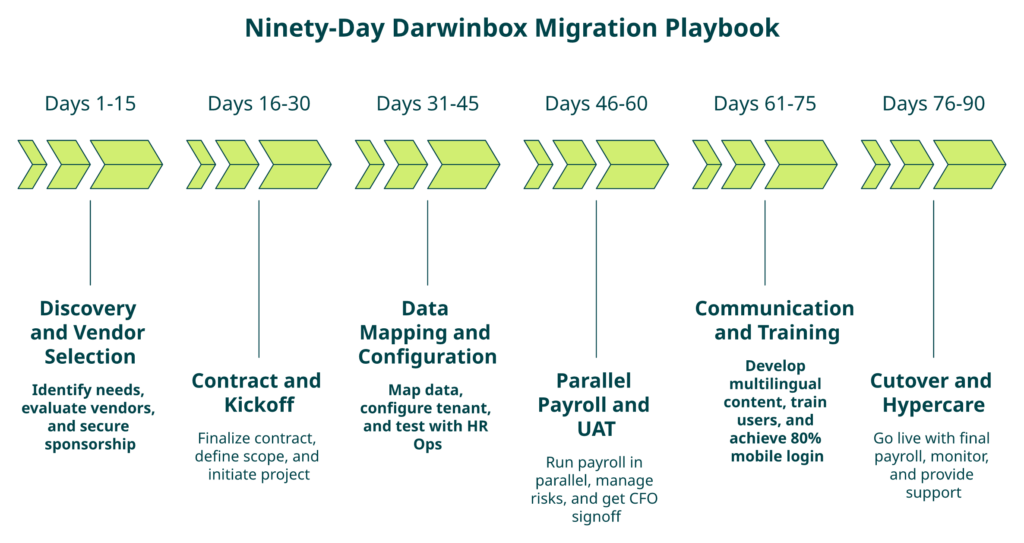
A clean 90-day migration runs in six phases, each with a named owner, a concrete artifact, and a stop-gate. The sequence protects payroll continuity, preserves the audit trail, and gets frontline employees on mobile ESS by day 75. The three non-negotiables: parallel payroll for two cycles, a PF/ESI continuity safeguard before cutover, and a payroll cutover risk register signed by the CFO before go-live.
Days 1 to 15: Discovery and vendor selection
Lock the scope. Run a current-state audit of every Darwinbox module actually in use (not licensed). Export a module-usage report, licence count, and open-ticket log. Interview the payroll manager, HR Ops lead, and two frontline employees. Run a 7-criteria RFP against 3 finalists. Stop-gate: signed CFO plus CHRO sponsorship and a one-page business case with 3-year TCO. Our how to choose HRIS HRMS software guide has the full RFP scaffold.
Days 16 to 30: Contract and kickoff
Close the MSA with a 60-day data-return SLA clause, a DPDP-aligned Data Processing Agreement, and a flat PEPM with go-live-billing. Parallel-run the Darwinbox notice-period letter if your contract allows early termination. Kickoff includes: SPOC introduction (insist on a prior-HR SPOC, not a technical PM), RACI matrix, and weekly steerco. Stop-gate: signed SOW and data-migration schema agreed.
Days 31 to 45: Data mapping and configuration
Map Darwinbox fields to new-vendor fields one-to-one. Configure OU tree, workflow policies (leave, attendance, confirmation, and FFS), CTC structures, FBP heads, and LWF/PT slabs by state. Import employee master, leave balances, and last three FY payroll history. Stop-gate: HR Ops signs off on the configured tenant with a 50-case test script.
Days 46 to 60: Parallel payroll run and UAT
Run the next two payroll cycles on both Darwinbox and the new vendor. Reconcile gross, net, TDS, PF, ESI, and arrears line by line. Acceptable variance: less than 0.5% on gross, zero on statutory. UAT covers attendance regularisation, leave application, confirmation workflow, expense claim, and FFS simulation. Payroll manager maintains a risk register with every reconciliation exception. Stop-gate: CFO signs off on payroll parity. Reference: hassle-free payroll processing steps.
Days 61 to 75: Communication and training
Announce the switch internally at day 60. Segment comms: managers get workflow training, employees get mobile ESS training, and frontline gets multilingual video content. Publish a 10-question FAQ. Run a help-desk deflection plan. Stop-gate: 80% employee login on the new mobile app.
Days 76 to 90: Cutover and hypercare
Freeze Darwinbox at midnight on day 76. Cutover attendance, payroll, and leave on day 77. Hypercare team (vendor SPOC plus internal HR Ops) responds within 2 hours for 14 days. Final payroll on new system by day 90. Stop-gate: zero salary delays in the first cycle.
Data-migration checklist
- ✅ Employee master: personal, job, compensation, bank, and statutory IDs (UAN, PAN, ESIC).
- ✅ Leave balances: accrued, used, carry-forward, and encashment eligibility.
- ✅ Payroll history: last 36 months of payslips, Form 16, TDS cards, and arrears.
- ✅ Documents: offer letters, appraisal letters, PIPs, warnings, and FFS letters.
- ✅ Attendance history: last 24 months of punch data for audit.
- ✅ Performance archives: last 3 cycles of goals, ratings, and feedback.
- ✅ Reimbursement history: last 12 months of expense claims and receipts.
Payroll cutover risk register
| Risk | Likelihood | Mitigation |
|---|---|---|
| Salary delay in first cycle | Medium | Parallel-run for two cycles; CFO signoff |
| PF/ESI mismatch | Medium | Challan reconciliation pre-cutover |
| TDS carry-forward error | High | Freeze TDS cards on day 60 |
| Bank file format mismatch | Low | Test NEFT file with bank on day 45 |
| Mid-cycle joiner missed | High | Daily joiner-sync for 14 days |
PF, ESI, and leave continuity safeguards
Generate PF and ESI challans on Darwinbox for the last parallel-run cycle. Export UAN and ESIC numbers with employee master. Confirm no gap in monthly contribution. For leave, freeze balances at day 60, migrate with a read-only audit trail, and let employees see both history and new balance for 30 days post-cutover. The ESI contribution calculation walkthrough covers the challan reconciliation logic.
“Salary processing along with deduction slabs are working perfectly as per Indian tax compliances, previously there are lot of mess in this section. Form-16 can be released to employee letter section directly.”
— Sanjeev K. HROne G2 – Verified Review
“Proper calculation of PF and ESI was a pain area for us before, but now with the HROne automated calculation process, results are up to the mark and following Indian tax compliances properly.”
— Ajay K. HROne G2 – Verified Review
Q8. How do you run a DPDP-compliant exit from Darwinbox and negotiate the contract cleanly?
A procurement head at a 2,200-person BFSI firm called me two months before his Darwinbox auto-renewal kicked in. He didn’t have a competitive quote, a data-return clause, or a DPDP-aligned DPA. Three months later, he signed a 22% renewal uplift he never wanted. This is the section so that never happens to you.
Quick glossary (so nothing is fuzzy)
- DPDP Act 2023: India’s Digital Personal Data Protection Act.
- DPA: Data Processing Agreement between you (data fiduciary) and vendor (data processor).
- PII: Personally Identifiable Information (name, PAN, Aadhaar, and bank).
- SPDI: Sensitive Personal Data or Information (biometric, financial).
- DPO: Data Protection Officer.
- MFA: Multi-factor authentication.
- RBAC: Role-Based Access Control.
✅ A clean Darwinbox exit needs two signed documents before you touch the MSA: a DPDP-aligned DPA termination clause and a data-return SLA naming format, retention, and deletion proof. Everything else is negotiation leverage. Buyers who arrive with a competitive quote, a module-usage audit, and a renewal clock under 120 days consistently win 15 to 30% price drops or a clean no-penalty exit.
Part A: Contract exit playbook
Auto-renewal clauses and notice period tactics
Most Darwinbox enterprise MSAs auto-renew unless notice is served 60 to 90 days before expiry. Diarise the notice window at day T minus 120. Send written notice through legal counsel, not procurement, to prevent “lost email” disputes. Keep proof of delivery.
Data portability rights under DPDP
The DPDP Act 2023 establishes the data principal’s right to portability and erasure. As the data fiduciary, your enterprise has statutory grounds to demand machine-readable exports of every PII and SPDI record. Insist on CSV or JSON exports with a defined schema, not PDF dumps. PDF dumps are a known delay tactic. Our employee data privacy best practices primer maps the DPDP obligations to HR workflows.
Exit data format and retention
⏰ Specify formats inside the termination letter itself: employee master in CSV, payroll history in structured JSON, documents in native format with metadata, and audit trails as signed PDFs. Retention SLA: vendor deletes all tenant data within 30 days of termination and hands over a deletion certificate signed by the DPO.
Vendor negotiation leverage
Walk into the renewal meeting with two signed competitive quotes and a module-usage report that shows dormant licences. Anchor on usage per daily active HR user, not sticker PEPM. In my experience, this single reframing unlocks 15 to 30% price drops within one meeting. The HROne vs Darwinbox page gives you the apples-to-apples PEPM comparison to use as anchor.
Renegotiate versus exit framework
Renegotiate when you are under 12 months into contract, only two churn drivers are mild, and you have executive bandwidth for one more cycle. Exit when three or more churn drivers are severe, renewal uplift is over 8%, or a DPDP audit is imminent and residency is unclean.
Part B: DPDP-compliant exit runbook
- Classify PII and SPDI. Separate personal data from sensitive personal data (Aadhaar, bank, and biometric).
- Export consent artifacts. Pull every consent record with timestamp and purpose. Without these, your new vendor cannot legally re-process.
- Negotiate DPA termination clauses. Amendments must name deletion timelines, sub-processor disclosures, and breach notification obligations.
- Map data residency for the new vendor. India-based data centres preferred. Document any cross-border transfer mechanism. Reference: cross-border compliance tools.
- Execute right-to-erasure on sunset. For exited employees past retention windows, trigger erasure before migration.
- Run a tenant pen-test before cutover. Independent third party. One week of testing. Fix findings before go-live.
- Document the audit trail. Every step logged, signed, and stored for seven years per statutory retention.
CyberX9 tenant-hardening appendix
⚠️ In September 2025, Economic Times Tech reported that CyberX9 researchers flagged loopholes in Darwinbox; the company attributed findings to client-side configuration. The takeaway is not that Darwinbox is unsafe. The takeaway is that tenant-level configuration can leak PII on any platform. Before or after a switch, harden your tenant:
- ✅ Enforce SSO with MFA for every admin role.
- ✅ Review RBAC role definitions quarterly; revoke stale roles.
- ✅ Rotate API keys every 90 days.
- ✅ Disable public-link sharing on document modules.
- ✅ Commission an annual independent tenant pen-test.
What this means for you on Monday
Open your current MSA. Highlight the auto-renewal clause, the data-return SLA, and the DPA termination language. If any of the three is missing or vague, draft an amendment this week, before the renewal clock enters the 120-day zone. If you want a second set of eyes on the clauses, contact us for a 30-minute review with a prior-HR SPOC.
See the Super Inbox close 110 HR tasks in three clicks
Walk through your current Darwinbox module stack with an HROne consultant who has run HR themselves. No slide decks, a working tenant with your own data shape.
Book a 30-minute Super Inbox walkthrough →Q9. How do you drive adoption, rebuild integrations, and stop the productivity dip after the switch?
The two post-cutover failures I see most often are frontline adoption stalling at 40% and a finance integration that breaks the first GL posting. Neither is a product problem. Both are project-design problems. The fix is a named executive sponsor with a signed RACI, a 30-60-90 adoption vignette the HR Ops lead owns, and a day-one integration inventory that names every Darwinbox API and webhook you need to rewire before go-live.
Part A: The adoption arc
Executive sponsor and RACI
Every successful switch we’ve shipped has two named sponsors: the CFO on cost, and the CHRO on change. ✅ A one-page RACI covers 12 decisions: vendor, budget, data-migration scope, go-live date, parallel-run signoff, comms plan, training plan, hypercare SLA, integration priority, exit signoff, risk register, and board update cadence. Without this, the project stalls at week six when someone has to choose between cost and speed. Our CHRO solutions page has the RACI template we ship to new customers.
The 30-60-90 protagonist vignette
Meet Ritu, HR Ops lead at a 1,200-person pharma firm we worked with last year. Day 1 on the new system, she owned 18 open confirmation letters, 40 pending leave approvals, and a month-end payroll deadline. ⏰ By day 30, the Super Inbox had collapsed her 110 daily tasks into a single screen with three-click closures; confirmation TAT dropped from 8 days to 2. By day 60, manager enablement rolled out across 45 team leads using pre-recorded Hindi-plus-English videos; 80% of leave approvals were happening on mobile. By day 90, she presented the ROI Dashboard to her CHRO: 1,400 HR hours saved against average HR salary, rupee-denominated. Her Monday no longer starts with seven browser tabs.
Employee communication templates
Segment comms three ways. Managers get a 15-minute workflow walkthrough plus a printable quick-card. Employees get a 90-second mobile video showing how to mark attendance, apply leave, and download payslip. Frontline workers get the same content in their regional language, pushed through WhatsApp. Our WhatsApp bot handles that last-mile distribution without an extra vendor.
Help-desk deflection and adoption metrics
Track four numbers weekly: mobile login rate, self-service leave application rate, help-desk ticket volume, and time-to-resolution. Target: 80% mobile login by day 45, 70% self-service by day 60, and 50% reduction in HR tickets by day 90. Below those, escalate to the sponsor. ⭐ The 70% reduction in routine HR queries number is something HROne customers hit consistently when the Super Inbox is the default landing page. Reference: mobile HR apps employee experience.
“I appreciate the employee and manager self-service feature, the mobile app and web portal enable employees to apply for leave, check leave balances, and more, leading to a 70% reduction in routine HR queries.”
— Waldon S. HROne G2 – Verified Review
Part B: The integration rebuild
SSO and identity provider rewiring
Map every Darwinbox SSO connection first. Typical stack: Azure AD, Okta, or Google Workspace. Rewire in staging, test with 20 pilot users, rotate tokens, and then cut over. Allow 72 hours buffer for SAML or OIDC quirks.
Finance integration: Tally, SAP, and Oracle
This is the highest-risk rebuild. Document every GL code mapping from Darwinbox payroll: wages, PF employer, PF employee, ESI, PT, LWF, bonus, and gratuity. Recreate the journal voucher (JV) export in the new system. Test three cycles in parallel. Reconcile to the paisa. See our integrations page for the supported connector list.
“HCM supports JV integration and GL code logic also.”
— Deepak K. HROne G2 – Verified Review
ATS, LMS, and engagement re-integration
ATS: remap requisition stages, candidate pipelines, and offer-letter templates. LMS: re-upload SCORM courses, migrate completion records, and rebuild learning paths. Engagement tools: rebuild pulse survey cadence, badge definitions, and recognition flows. Reference: employee engagement.
Biometric device re-pairing
Inventory every device by site, model, and firmware. Biometric vendors usually need 2 to 4 hours per device. Deploy a central biometric sync service. ❌ The single most common cutover failure is an unsynced biometric on day one; budget two engineers on-site. The biometric workforce management guide breaks down the device-sync architecture.
API and webhook inventory
Export every active Darwinbox API endpoint, webhook, and scheduled job. Map each to the new vendor’s equivalent. Common ones: joiner-sync to AD, exit-trigger to finance, payroll-posting to Tally, and leave-balance to BI warehouse. Every endpoint gets a named owner and a test case.
“HCM supports MS-SQL and Api management for the integration purpose.”
— Sanjeev K. HROne G2 – Verified Review
What we got wrong on our first migration
Our first enterprise migration, years ago, we under-scoped the biometric rebuild. We budgeted two days; it took nine. I’m sharing this because every TCO deck pretends integration is linear. It is not. Add a 30% buffer to every integration line. Build pilot groups, not bulk rollouts. The vulnerability is the lesson.
Q10. What do real Indian switching stories and a readiness scorecard tell you about your own move?
Three switching stories from the last 24 months, deliberately different in shape, and a 25-point readiness scorecard you can run on your team by Monday. Size, sector, and replacement vendor change the math, but the underlying decision pattern is surprisingly consistent. If you score below 18 out of 25, you’re not ready yet. That’s not a failure; that’s discipline.
Vignette 1: 200-employee SME, Darwinbox to HROne
Situation: A Pune-based IT services firm, 200 employees, 14 months into Darwinbox. Complication: Implementation had stalled at 60% completion, payroll was running on a parallel Excel, and the founder was receiving personal complaints about delayed confirmation letters. Resolution: 45-day switch to HROne; go-live on day 38. Flat PEPM, subscription metered from go-live, and Super Inbox closed 100-plus weekly tasks in a single view. Payroll cycle compressed from 9 days to 4. ✅ Founder reported the first “quiet month-end” in two years. More detail on the flat-PEPM commitment lives on the pricing page.
Vignette 2: 1,500-employee mid-market, Darwinbox to greytHR plus Zoho
Situation: A Chennai-based manufacturing firm, 1,500 employees across three states, Darwinbox contract auto-renewed despite usage under 50%. Complication: Multi-entity payroll and shift-based attendance were failing; the CHRO couldn’t get a unified report. Resolution: Hybrid stack, greytHR for payroll and Zoho People for Core HR. 90-day migration, one payroll cycle parallel-run. Not our ideal architecture, but it matched their procurement constraints. Trade-off: two vendors to manage, more month-end reconciliation labour. ⚠️ Payroll stabilised; analytics stayed fragmented. Our manufacturing HR playbook covers the multi-state shift architecture the hybrid stack strained against.
Vignette 3: 8,000-employee enterprise, Darwinbox to SAP SuccessFactors
Situation: A Mumbai-based BFSI enterprise, 8,000 employees, pre-IPO, needed audit-grade controls. Complication: Darwinbox reporting couldn’t satisfy the auditor’s RBAC and trail requirements. Resolution: 9-month switch to SAP SuccessFactors with a global SI. 💸 Cost 4x a mid-market India HCM but matched the pre-IPO control bar. Lesson: enterprise switchers above 5,000 with global exposure often belong on SAP or Workday, not a mid-market alternative. Choose the fit honestly. For the head-to-head, see HROne vs SAP.
“HROne has revolutionised manual master data management, allowing me to pull reports rapidly without the hassle of multiple spreadsheets… The ability to manage various HR processes from a single platform is incredibly convenient and cost-effective for mid-level and enterprise customers, making it a solution I would choose again.”
— Priyanka S. HROne G2 – Verified Review
The 25-point switching-readiness scorecard
Score 1 for yes, 0 for no. Five buckets, five points each.
Commercial (5 pts)
- Executive sponsor named (CFO and CHRO)
- 3-year TCO modelled, board-approved
- Renewal clock under 120 days
- Two competitive quotes in hand
- Exit penalty costed
Data (5 pts)
- Employee master exported in CSV
- Last 36 months payroll history archived
- Leave balance reconciliation complete
- Performance archives in PDF
- Documents exported with metadata
Compliance (5 pts)
- DPDP DPA termination clause drafted
- Consent artifacts exported
- Data-residency map signed
- PF, ESI, and LWF challans reconciled
- Tenant pen-test scheduled
Adoption (5 pts)
- Manager enablement plan written
- Multilingual comms content ready
- Mobile ESS training recorded
- Help-desk deflection target set
- Adoption metrics dashboard live
Integration (5 pts)
- SSO IdP mapped
- Finance GL integration tested
- Biometric devices inventoried
- ATS and LMS endpoints documented
- API and webhook inventory complete
Below 12: not ready. 12 to 17: 30 more days of prep. 18 to 22: green light. 23 to 25: you’ve already won, ship it.
Q11. How does HROne specifically counter Darwinbox on the five decisions that matter, and what should you ask any alternative before signing?
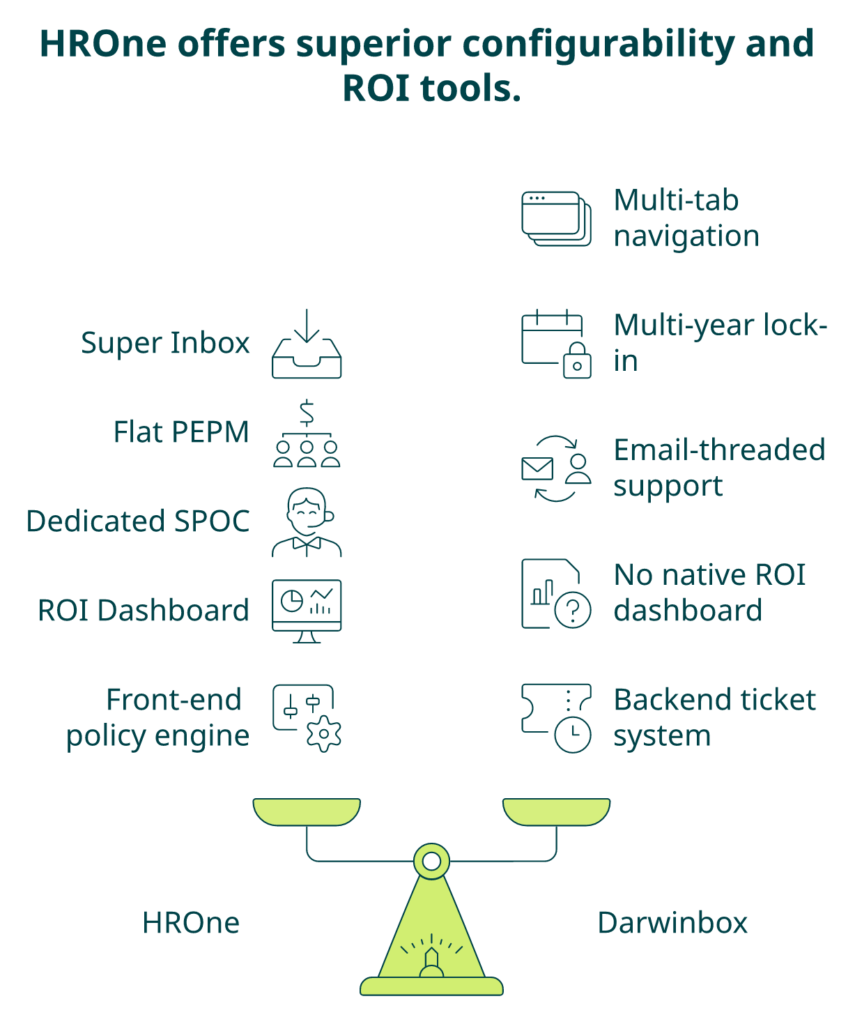
When the RFP comes down to HROne versus Darwinbox, the decision almost always turns on five axes, not 50. ⭐ They are: task-closure workflow, billing model, support architecture, ROI instrumentation, and India-DNA configurability. The G2 deltas aren’t marketing; they are operating truths buyers experience in week one. Full teardown: HROne vs Darwinbox.
Head-to-head on the five decisions
| Decision axis | HROne | Darwinbox |
|---|---|---|
| Task-closure workflow | Super Inbox, 3-click closure, 110 tasks per screen | Multi-tab module navigation |
| Billing model | Flat PEPM, subscription from go-live, no lock-in | Subscription from day one of purchase, multi-year lock-in |
| Support architecture | Dedicated prior-HR SPOC, 9.8 NPS | Email-threaded support |
| ROI instrumentation | India’s first inbuilt ROI Dashboard, lifetime hours saved vs avg HR salary | No native ROI dashboard |
| India-DNA configurability | Front-end policy engine, multi-legal-entity OU native, HRV Studio low-code | Backend ticket for policy changes |
| G2 Ease of Setup | 9.5 | 7.8 |
| G2 Quality of Support | 9.6 | 8.4 |
| G2 Ease of Admin | 9.5 | 7.5 |
Scenario 1: 1,000-employee IT/ITeS with multi-entity
Three legal entities, remote workforce, hybrid attendance, and monthly appraisal pulses. HROne wins on mobile ESS, Super Inbox adoption, and ROI Dashboard for the CHRO’s board update. Go-live target: 45 days with phased module-swap. For sector-specific depth, see ITES HR.
Scenario 2: 3,000-employee manufacturing with shift labour
Plant floors across four states, biometric-led attendance, and shift-based payroll with LWF and PT variations. HROne’s offline geofenced attendance, multi-OU native architecture, and front-end policy engine for shift changes without developer tickets fit natively. ✅ Go-live target: 75 days. Reference: managing shift schedules.
Scenario 3: 5,000-employee BFSI with DPDP audit pressure
Pre-IPO freeze lifted, DPDP audit in 120 days, and auditor demands RBAC and audit trail. HROne’s DPDP-aligned DPA, tenant hardening, and India data residency clear the audit bar. If global controls are mandated by a US parent, SAP SuccessFactors or Workday may still be the honest choice. See finance HR for the BFSI-specific configuration.
“I love HROne for its cost efficiency and holistic approach, which is why I prefer it over other vendors like Workday… It has streamlined processes like attendance and leave management, and the recruitment module has automated onboarding, greatly boosting efficiency.”
— Priyanka S. HROne G2 – Verified Review
The 15-question RFP cheat-sheet
Commercial (4 questions)
- Is subscription metered from go-live, or from contract-signing day?
- What is the exit-data-return SLA and format?
- What is the annual renewal uplift cap?
- What is the all-in PEPM including AI, mobile, and analytics?
Technical (4 questions)
- Can HR change a leave policy without raising a developer ticket?
- What is the multi-OU architecture, native tenancy or workaround?
- What SSO, API, and webhook standards are supported?
- What is the documented peak-load response time?
Compliance (4 questions)
- Is the DPA DPDP-aligned, with deletion and residency clauses?
- Can you export consent artifacts on demand?
- Does new wage-code FFS configure front-end or via backend?
- When was the last independent tenant pen-test?
Adoption (3 questions)
- Is the onboarding SPOC a prior HR practitioner or a technical PM?
- What is your published NPS and how often is it measured?
- Can you share three references of 30-to-90-day go-lives in my sector?
See the Super Inbox on your own data shape
If three or more of those 15 questions make your current vendor uncomfortable, a 30-minute walkthrough is usually worth the calendar block. Bring your module-usage report; we’ll walk the Super Inbox, the ROI Dashboard, and one live payroll simulation using your CTC structures. No slide decks, no generic tenant, and no hard sell.
See the Super Inbox close 110 HR tasks in three clicks
Walk through your current Darwinbox module stack with an HROne consultant who has run HR themselves. No slide decks, a working tenant with your own data shape.
Book a 30-minute Super Inbox walkthrough →Tell us which of those 15 questions your current vendor can’t answer, and we’ll show you ours.
References
Official Docs / Indian Statutes
Ministry of Electronics and Information Technology, “Digital Personal Data Protection Act, 2023 and draft rules,” Notification Date: 2023, draft rules January 2025.
Ministry of Labour and Employment, “Code on Wages, 2019 and state-wise notifications,” Notification Date: 2019 onwards.
Datasets
SHRM India. “Total Cost of HR Technology in Indian Mid-Market Firms,” 2024.
NASSCOM. “HR Tech Adoption and TCO Benchmarks India 2025,” 2025.
HROne. “HROne Internal Implementation Dataset, n=400+ go-lives,” 2023–2026.
HROne. “Darwinbox Exit-Conversation Frequency Study,” 2024–2026.
HROne. “Prior-HR SPOC Model NPS Dataset, n=400+ implementations,” 2024–2026.
Blogs
G2. “Darwinbox product reviews and benchmarks.” Published: 2026.
G2. “HROne product reviews and benchmarks.” Published: 2026.
HROne. “Customer Success and NPS benchmarks.” Published: 2026.
Darwinbox. “Implementation methodology and onboarding documentation.” Published: 2025.
Verified User. “Poor Product and Poor Service, Darwinbox G2 Review.” Published: 2024.
Mohit V. “Darwinbox review on reporting and integration limitations.” Published: 2025.
Glassdoor. “Darwinbox employee and user reviews.” Published: 2025.
Economic Times Tech. “CyberX9 flags loopholes in Darwinbox system; firm denies breach, cites client-side leaks.” Published: 25 September 2025.
HROne. “MR DIY India customer case study: 30-day go-live, payroll cycle 10 to 5-6 days.” Published: 2025.















 Secures Top Spot in
