




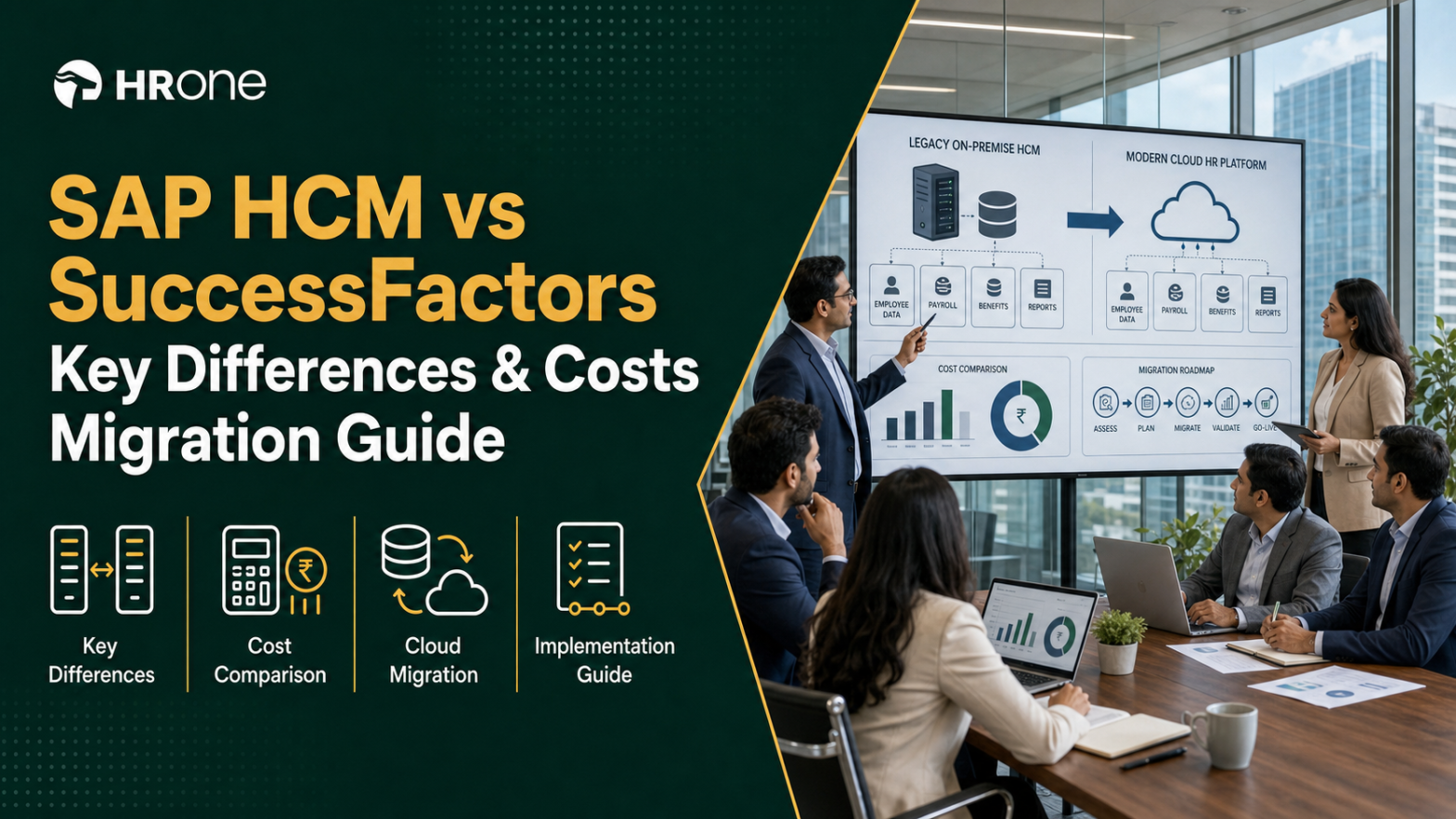
Q1. What is the actual difference between SAP HCM and SAP SuccessFactors?
SAP HCM is SAP’s on-premise HR system, built on ABAP and run inside your own landscape, upgraded on your schedule. SAP SuccessFactors is SAP’s multi-tenant cloud HXM suite, which SAP updates twice a year. HCM gives you deep customisation and full control. SuccessFactors trades that for configuration, faster innovation, and per-employee-per-month subscription pricing.
🧭 Three consultants, three different answers
A CHRO at a mid-sized manufacturing group once showed me three scoping notes for the same problem. One said “upgrade”; one said “migrate”; one said “hybrid”. All three used the words HCM, HXM, and Core HR to mean different things.
That confusion is a labelling problem, not a capability problem. I have watched buyers spend two quarters just aligning vocabulary. HROne’s sales conversations show the same pattern, where buyers search for “HCM” while vendors write “Core HR” on the pricing page.
🧱 What SAP HCM actually is
SAP HCM (Human Capital Management) is the HR module inside classic SAP ERP. Your data sits in infotypes, which are structured record types like 0008 for basic pay. Your rules sit in ABAP code and payroll schemas that your team owns.
That ownership is the point. You can encode any policy, however unusual. You also carry every upgrade, every server, and every Basis resource yourself.
☁️ What SuccessFactors actually is
SuccessFactors is a suite of cloud modules. Employee Central (EC) is the core HR record. Employee Central Payroll (ECP) runs payroll on SAP’s managed infrastructure.
You configure it rather than code it. SAP ships two releases a year whether you asked for them or not. Extensions move to the SAP Business Technology Platform instead of living inside the core.
📊 The differences that actually change your decision
| Dimension | SAP HCM (on-premise) | SAP SuccessFactors | India-native HCM (for example, HROne) |
|---|---|---|---|
| Deployment | Your data centre or hosted | Multi-tenant public cloud | Cloud, mobile-first |
| Core technology | ABAP, infotypes, schemas | Java plus BTP extensions | Cloud-native, API-first |
| Change model | Custom code, transports | Configuration, limited code | Configuration, low-code via HRV Studio |
| Release cadence | You choose | Two SAP releases a year | Continuous |
| Payroll | On-premise payroll driver | ECP, often partner-delivered in India | Inbuilt Indian payroll |
| UX | Menu and transaction driven | Portal driven | Inbox-driven task closure |
| Integrations | RFC, IDoc, custom | OData, SFAPI, CPI | Prebuilt biometric and ERP connectors |
| Licensing | Perpetual plus about 22% support | Subscription, PEPM | Flat PEPM, no lock-in |
| India statutory | Fully customised by you | Localised, configured per state | PF, ESI, PT, and LWF native |
| Maintenance horizon | Mainstream ends 2027 | Ongoing | Ongoing |
HROne appears in that table as a category peer, not a like-for-like replacement for a global SAP landscape.
🔑 The one-line rule worth remembering
SAP HCM is a system of record you own. SuccessFactors is a system of record you rent, and SAP decides how it evolves. Everything else in this article (cost, migration, and compliance) follows from that single sentence.
I would not treat either as inherently better. The honest question is which trade-off your team can actually staff for the next five years.
HROne sits in the same core HCM category as both, but was built cloud-native for Indian multi-entity operations rather than retrofitted from an on-premise codebase. That difference shows up most clearly in payroll and compliance, which the later sections cover with numbers.
Q2. Is SAP HCM being discontinued, and what do 2025, 2027 and 2030 mean for you?
SAP HCM is not discontinued. Mainstream maintenance for SAP Business Suite 7 and SAP ERP HCM ends on 31 December 2027, with optional extended maintenance to 31 December 2030 at a premium. Compatibility Pack usage rights already ended on 31 December 2025. SAP HCM for S/4HANA is committed to at least 2040.
⏰ The date that actually sits on your calendar
Three dates circulate in every SAP conversation, and only one of them is a hard wall. That wall is 31 December 2027. Extended maintenance to 2030 buys time, at a higher support fee.
I have seen teams treat 2030 as the real deadline. That reading is risky. You pay more; you get fixes but limited innovation, and your talent market thins out.
🗓️ What stops working, and when
| Date | What changes | What you must do |
|---|---|---|
| 31 Dec 2025 | Compatibility Pack usage rights ended | Confirm nothing in scope still relies on them |
| 31 Dec 2027 | Mainstream maintenance ends for Business Suite 7 and ERP HCM | Decide and start, not just plan |
| 31 Dec 2030 | Extended maintenance ends | Treat as a paid buffer, not a strategy |
| 2027 onward | SFSF EC INTEGRATION add-on maintenance ends, and ECS4HCM is required with S/4HANA 2023 | Check your exact add-on version now |
| At least 2040 | SAP HCM for S/4HANA maintained | Valid on-premise path if customisation is heavy |
HROne measures implementation readiness the same way, by checking which HRMS integrations exist before scoping, because the version detail decides the timeline.
🔢 Work backwards, not forwards
A full-suite SAP rollout commonly runs nine to eighteen months. Add two parallel payroll cycles before cutover. That means the decision lands in FY26 or FY27, not the go-live.
Here is the arithmetic I use with CHROs. Take your target cutover month, subtract two payroll cycles, then subtract twelve months of build. Whatever month you land on is your decision date, and an HRMS implementation timeline benchmark helps you sanity-check it.
💰 Why a forced migration year is your best negotiating year
Deadlines feel like pressure. They are also leverage. This is the one year your finance team will approve a full re-evaluation, including whether you stay on SAP at all.
My read is that most teams waste that leverage by starting the conversation too late. By the time the deadline is visible internally, options have already narrowed to one vendor’s proposal.
🧾 The one clause worth fighting for
Ask when billing starts. Many enterprise contracts meter subscription from the purchase date, while implementation runs for months. That gap is pure cost with zero usage.
HROne meters subscription only after go-live, with flat PEPM pricing and one-time implementation charges. I mention it here only because the clause is negotiable with any vendor, and almost nobody asks.
HROne prices per employee per month with one-time implementation and no lock-in, so a deadline-driven migration does not mean paying for a platform you are still configuring. Ask your current vendor the same question in writing this week.
Q3. Is SAP HCM for S/4HANA a real third option, and how do hybrid models work?
SAP HCM for S/4HANA lets you keep on-premise payroll, time, and org management on the S/4HANA database, maintained to at least 2040. It needs an S/4HANA licence and a HANA database migration, and it excludes SuccessFactors talent modules. Most Indian enterprises land on a hybrid instead, with Employee Central as the record and payroll staying on-premise.
🧩 Who this option genuinely suits
Two profiles benefit. The first has payroll logic that carries real business rules, built over a decade. The second sits in a compliance-heavy sector where auditors already accept the current setup.
If either sounds like you, do not let a cloud-first slide deck rush the decision. Gartner’s 2025 assessment notes that SAP’s transition guidance stays unclear for organisations with special compliance requirements.
⚠️ What H4S4 covers, and what it quietly omits
| Area | SAP HCM for S/4HANA | What you still need elsewhere |
|---|---|---|
| Personnel administration | Included | Nothing |
| Payroll and time | Included, on-premise | Nothing |
| Org management | Included | Nothing |
| Recruiting, learning, and performance | Not included | SuccessFactors or another suite |
| Employee and manager self-service | Limited | Portal or app layer |
| Database | HANA required | Migration project and licence |
HROne’s deployments show the same split in practice, where clients keep a stable payroll software core and add engagement and performance later.
🔀 Side-by-side versus core hybrid, in plain terms
Both models are common, and people mix up the names constantly. The difference is simply which system holds the employee master record.
| Model | Employee master lives in | Payroll runs in | Best when |
|---|---|---|---|
| Side-by-side | On-premise SAP HCM | On-premise | You want talent modules first, with minimal core disruption |
| Core hybrid | SuccessFactors Employee Central | On-premise or ECP | You want cloud as the single record, payroll untouched for now |
Replication between the two runs through an add-on, and the version matters. With S/4HANA 2023, the older PA_SE_IN add-on gives way to ECS4HCM. Check yours before anyone quotes a timeline, and read a practical HRMS migration guide before you commit to sequencing.
🪂 Do not buy the whole hog
There is an old operator instinct here that I trust. You do not buy the whole hog if you will not eat the whole hog. Turn on the modules you will actually use this year.
Ask HROne to switch on payroll and attendance management first, then performance or recruitment as the organisation matures. The same staged logic applies to any SAP hybrid, and it protects cash.
✅ The two-question test
Answer these before your next vendor call. First, does your payroll customisation carry real business logic, or just historical habit? Second, do you need talent modules live within twenty-four months?
Heavy customisation with no urgent talent need points to H4S4. Urgent talent need with standard payroll points to a hybrid. Neither answer is wrong, and both beat drifting.
HROne is modular by design, so most organisations start with payroll and attendance, then activate further modules across its 127 prebuilt workflows as sophistication grows. That staging is the part of hybrid thinking worth copying, whatever platform you choose.
Q4. What does each option really cost over three years, including double-running?
SAP HCM is a perpetual licence plus roughly 22% annual support, on your own infrastructure. SuccessFactors is a subscription, commonly 8 to 21 USD per employee per month for Core HR and Employee Central. Existing licences do not convert. HROne charges flat PEPM with one-time implementation and meters subscription only after go-live.
💸 The three cost structures, side by side
On-premise cost is front-loaded, then quiet, then suddenly expensive at end of maintenance. Cloud cost is smooth, predictable, and permanent. Neither is cheaper by default.
Implementation is where budgets break. Third-party analysis puts SuccessFactors implementation fees at roughly 100% to 125% of the annual software cost. Mid-market full-suite rollouts commonly land between 100,000 and 500,000 USD.
⚠️ The line items nobody puts in the deck
Four costs get missed almost every time.
- Double-running, where you pay on-premise support and cloud subscription together for 12 to 24 months
- Integration rebuild for biometric devices, ERP, and banking files
- Per-entity or per-legal-unit charges in multi-company Indian groups
- Internal time, which one published rollout logged at 18 months across 23 countries
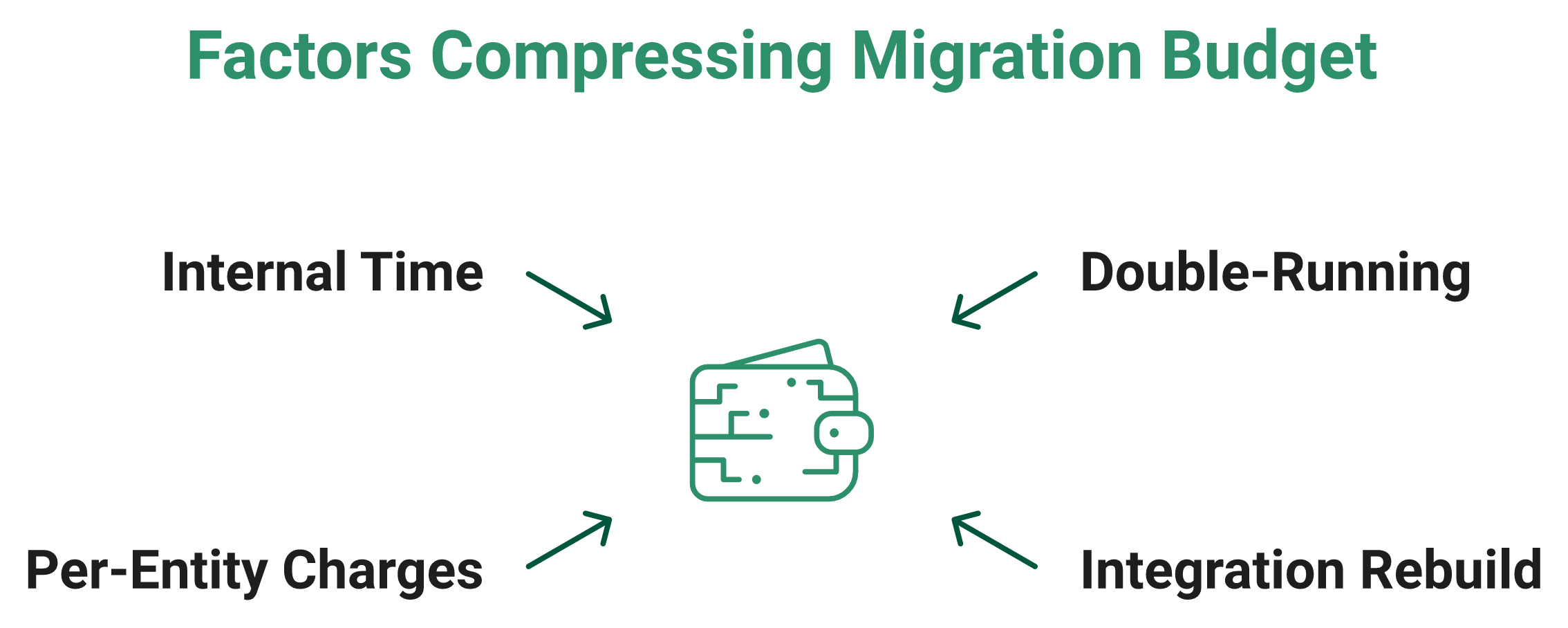
HROne runs 20 pan-India units on a single instance with multi-entity HR software configuration and no separate entity charges, which is the specific line item Indian groups should price-check first.
📊 Illustrative three-year model, 1,000 employees
These are modelling assumptions, not quotes. Rate used is 83 INR per USD. Replace every number with your own written quote before it reaches your CFO.
| Path | 3-year modelled cost | Main assumption |
|---|---|---|
| Stay on SAP HCM | ₹2.2 to ₹2.5 crore | 22% support plus infra and Basis staffing |
| SAP HCM for S/4HANA | ₹3.8 to ₹5.3 crore | Adds S/4HANA licence and HANA migration |
| SuccessFactors EC plus partner payroll | ₹5.0 to ₹5.8 crore | 12 USD PEPM, implementation at 100% of annual fee, and 18 months double-running |
| India-native HCM | ₹0.5 to ₹1.2 crore | Flat INR PEPM plus one-time implementation |
One published enterprise account reported a three-year total cost of ownership above 3.2 million USD, including licensing, implementation, support, and internal resources. Research across 22 enterprises found cloud-native HRIS platforms delivered 32% lower five-year TCO and 45% faster integrations than retrofitted stacks.
⭐ What buyers say about the money
“Covers a wide range of HR modules in theory, but it’s not user friendly. Customization requires third-party vendors, every change is costly. Extremely expensive for what it delivers.”
– Janka Z., SAP SuccessFactors G2 – Verified Review
“For every additional 100Mbps, they are charging $14,500 per month. This could amount to nearly half a million dollars.”
– r/SAP thread, December 2025, Reddit Thread
“I love HROne for its cost efficiency and holistic approach, which is why I prefer it over other vendors like Workday.”
– Priyanka S., 5/5, HROne G2 – Verified Review
“Some reports we have keep in our formatting but HROne demands more commercials for the same.”
– Ruhi G., 5/5, HROne G2 – Verified Review
🧾 Three questions to send this week
Ask for the answers in writing, not on a call.
- When does billing start, at signature or at go-live?
- What is the implementation fee as a percentage of year-one subscription?
- Are there per-entity, per-state, or per-report charges beyond PEPM?
Before that conversation, model your own savings baseline with an HR ROI calculator, so the numbers in the room are yours rather than the vendor’s.
HROne quotes flat PEPM with one-time implementation, no lock-in, and billing that starts after go-live, and it runs multi-entity Indian groups on a single instance. Use those three questions on every vendor on your list, including us, and compare the answers against our HROne vs SAP breakdown.
Q5. How does a migration to Employee Central actually run, and what happens to legacy payroll data?
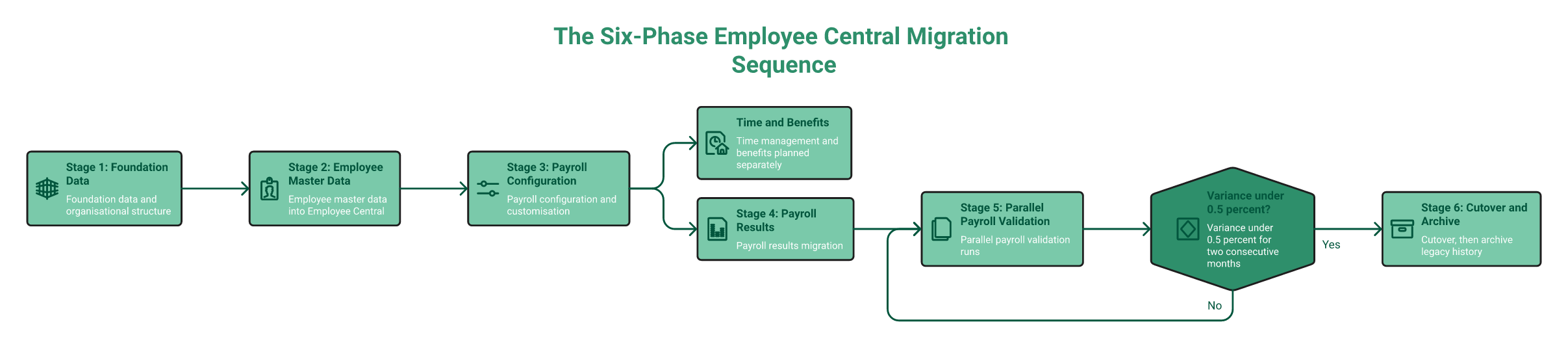
SAP sequences the move as foundation data, employee master data, payroll configuration, payroll results, parallel payroll validation, then cutover, with time and benefits planned separately. Expect nine to eighteen months for 1,000 to 5,000 employees. HROne assigns a dedicated implementation SPOC through go-live, and migrates entitlement-relevant history rather than a decade of inactive records.
🗺️ The six phases, in SAP’s own order
SAP’s Implementation Design Principle document is the closest thing to an official playbook here. It puts foundation data and org structure first, then employee master data into Employee Central.
Payroll configuration comes third, payroll results fourth, then parallel runs. Cutover is last, not first. Time management and benefits get their own separate plans.
⚠️ Where these projects actually slip
Three things break timelines, and none of them appear in a vendor Gantt chart.
- Undocumented infotype customisation, where nobody remembers why field 0008 behaves oddly
- Payroll calculation rules (PCRs) written by someone who left in 2016
- Wage-type mapping, which sounds clerical and consumes entire months
HROne’s implementation SPOCs are former HR practitioners rather than technical project managers, which is why wage-type conversations start earlier in the plan. A structured HRMS migration guide helps you surface these three items in week one.
💸 A missed payday is not a defect
Here is the part I feel strongly about. A delayed salary is not a support ticket. It is someone’s EMI, school fee, or rent.
HROne’s strategic briefing on payroll trust puts it near half of employees who would consider leaving after two payroll mistakes. I might be reading that figure too strongly, but the direction matches every payroll manager I have spoken to, and it is why teams work so hard to improve payroll accuracy before cutover.
🗄️ Migrate, archive, or retire
Loading fifteen years of documents into Employee Central raises storage and processing cost. Keeping SAP HCM alive only for history keeps paying licence and infrastructure bills.
| Tier | What goes here | Owner |
|---|---|---|
| Migrate | Current year, active entitlements, and gratuity and leave balances | Payroll lead |
| Archive | Statutory retention records, Form 16 history, and PF ledgers | Finance and compliance |
| Retire | Duplicate records, inactive vendor files, and superseded drafts | IT with sign-off |
One discipline prevents new silos being born during cutover. Assign the permanent employee code on day one of joining, replacing the temporary code immediately, which is standard practice in any well-run employee onboarding automation flow.
⭐ What migration feels like from the inside
“Integration with ERP software is great, we have transferred our data from old server to HROne in fraction of hours.”
– Ruhi G., 5/5, HROne G2 – Verified Review
“It can sometimes feel a bit overwhelming for new users. Certain features take time to understand, and without enough guided support, the learning curve can feel quite steep.”
– Nijanthan R., 3/5, HROne G2 – Verified Review
“Users find the learning curve challenging, as the application requires time and skill to use effectively.” (57 reviews)
– G2 aggregate, SAP SuccessFactors G2 – Verified Reviews
✅ The gate that protects your cutover
Do not cut over on a calendar date. Cut over on a number. Run parallel payroll until variance between old and new stays under 0.5% for two consecutive months.
Ask HROne to run the same parallel-run discipline during onboarding, with subscription starting only after go-live. That sequencing removes the pressure to declare success early.
HROne assigns a dedicated implementation SPOC (9.8 NPS) who stays through go-live, and migrates only entitlement-relevant history instead of charging you to store inactive records. That combination is what keeps the first live payroll boring, which is exactly what you want.
Q6. Will SuccessFactors handle Indian payroll, PF, ESI and state-wise compliance?
Yes, through Employee Central Payroll with India localisation, covering PF, ESI, professional tax, TDS, gratuity, Form 16, and Form 24Q. Depth varies, though. Professional tax and Labour Welfare Fund slabs are configured state by state, India payroll is frequently partner-delivered, and Code on Wages timelines need explicit setup. HROne handles PF, ESI, state-wise PT, and LWF natively in a single instance.
✅ The honest answer, with conditions
SuccessFactors can absolutely run Indian payroll. The question is who configures it, and how much of that work sits with a partner rather than the product.
That distinction matters at renewal time. Every state slab change becomes a change request, and change requests carry cost and lead time. For groups operating across borders within India, multi-state payroll compliance is where that lead time hurts most.
📋 The statutory scorecard to score every vendor against
| Statute or filing | Threshold and rate | What your system must do |
|---|---|---|
| EPF Act, 1952 | 20+ employees, ₹15,000 wage ceiling, 12% employee, and 3.67% plus 8.33% EPS employer | Auto-split contributions, and generate ECR |
| ESI Act, 1948 | 10+ employees, ₹21,000 ceiling, 0.75% employee, and 3.25% employer | Track mid-period eligibility to contribution-period end |
| Section 192, Income Tax Act | Monthly TDS on salary, and quarterly Form 24Q | Regime choice, and Form 16 generation |
| Professional tax | State-specific slabs, no central rate | Per-state slab tables, and per-entity mapping |
| Labour Welfare Fund | State-specific, varying frequency | State calendar and challan support |
| Code on Wages, 2019 | Full and final settlement within two working days of exit | Trigger FFS from exit workflow, not email |
HROne runs 20 pan-India units for Asia Healthcare Holdings on a single instance with multi-legal-entity configuration. If you want the underlying rules first, our PF, ESI, and TDS compliance guide covers each threshold in detail.
⚠️ Where multi-entity rollouts actually break
Group structures are where global suites strain. Employees in company A sit on one leave policy, company B on another, and both share a payroll calendar.
The failure is rarely calculation. It is configuration sprawl, where each entity gets its own parallel setup that drifts apart over two years, which is exactly the pattern HR software for multi-entity companies is built to prevent.
⭐ What Indian payroll teams report
“Proper calculation of PF and ESI was a pain area for us before, but now with the HROne automated calculation process, results are up to the mark and following Indian tax compliances properly.”
– Ajay K., 5/5, HROne G2 – Verified Review
“Salary processing along with exact calculation of LWF and PT slabs makes the work more convenient process.”
– Komal S., 5/5, HROne G2 – Verified Review
“Reporting configuration, TDS filing, revising of TDS is not possible. UI for mapping of challans, visibility of income considered for TDS filing.”
– Verified User, greytHR G2 – Verified Review
🧮 Do this before your next demo
Print the scorecard above. Make every shortlisted vendor answer each row live, in the product, not on a slide.
Then ask one follow-up per row. Is this standard, configured, or a change request? The answers will separate the platforms faster than any feature list, and a formal HRMS evaluation checklist keeps the scoring consistent across vendors.
HROne handles entity-level policy variation through its policy engine, part of 120+ automations spanning org structure, custom roles, access rights, and workflows. That is why state slab changes stay a configuration task rather than a partner ticket.
Q7. What usually breaks after go-live, integrations, biometrics and multi-entity data?
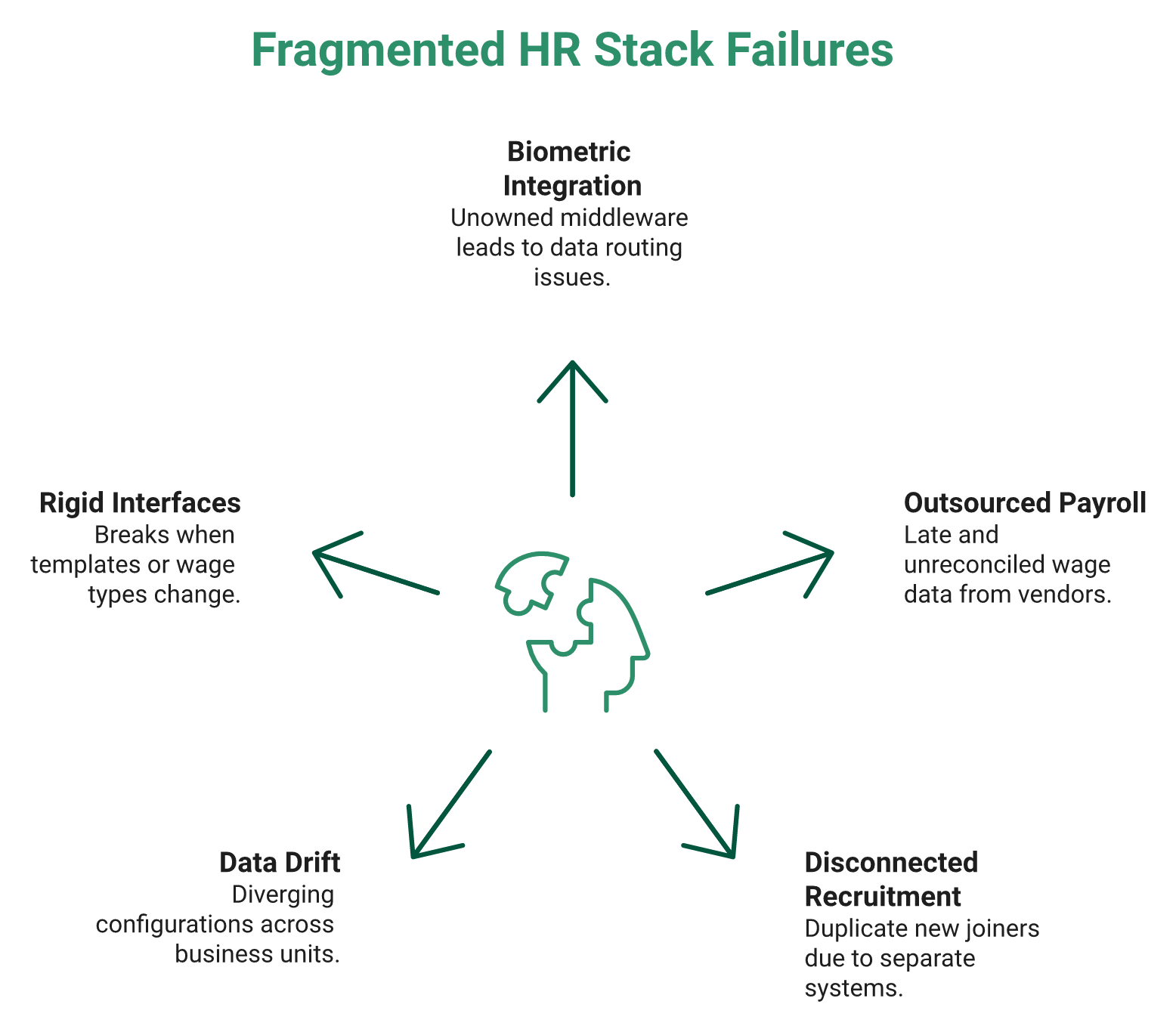
Post-migration failures cluster in three places: biometric and attendance integration built on middleware nobody owns, entity-level data drift across business units, and rigid field-mapped interfaces that break when a template or wage type changes. Gartner also flags that SAP’s transition guidance for on-premise HCM customers stays unclear where special compliance requirements exist. HROne connects biometric devices directly into its own payroll engine.
⚠️ Three failure modes, and one analyst caution
Gartner named SAP a Leader for the tenth consecutive time, with roughly 11,000 SuccessFactors customers and over 6,500 on Employee Central. The same assessment carries a caution about unclear transition guidance for compliance-heavy organisations.
Read both halves. Market leadership and migration clarity are different things.
❌ The fragmented-sources trap
A pattern shows up repeatedly in Indian mid-market groups. Attendance sits on biometric machines with a standalone portal. Payroll sits with an outsourced vendor. Recruitment sits in a disconnected tracker.
None of the three talk to each other. So month-end becomes a manual reconciliation exercise, and the HR team spends its week chasing data instead of people. That is the fragmentation HR process automation is meant to close.
📈 What integrated time capture actually changes
Published research on biometric time capture integrated with SuccessFactors and SAP Cloud Platform Integration reported measurable gains. Attendance accuracy improved 27%, payroll discrepancies fell 32%, and audit readiness improved 50%.
HROne’s deployments show the same effect through direct device sync, where punches land in payroll without a middleware hop. What surfaces repeatedly is that the integration layer, not the payroll engine, is where trust is lost, which is why attendance management and payroll belong on one platform.
⭐ What users report after go-live
“Users face integration issues with SAP SuccessFactors HCM.” (45 reviews)
– G2 aggregate, SAP SuccessFactors G2 – Verified Reviews
“Relief is when biometric sync is perfectly working. HCM makes salary disbursement process as a easy one and error less with bank Challan creation functionality supported.”
– Sachin K., 5/5, HROne G2 – Verified Review
“Mobile application don’t work properly while capturing live location. Geofencing radius not work properly.”
– Manna S., 4.5/5, HROne G2 – Verified Review
That last one is ours, and I am leaving it in. Location capture on field devices is genuinely hard, and pretending otherwise helps nobody, particularly for field and blue-collar workforces.
✅ The integration ownership checklist
Run this in week one after go-live, not month three.
- Name one owner per interface, by person, not by team
- Put every interface error into a monitored queue with an SLA
- Set a reconciliation cadence, weekly for attendance, and monthly for payroll
- Document which field mappings will break if a template changes
- Test one wage-type change end to end before you need it
Map every connection you own before signing, because your HRMS integrations across Tally, SAP, and biometric devices decide how fragile the first quarter feels.
HROne integrates biometric devices and attendance natively into the same payroll engine, so device data never travels through a middleware layer nobody owns. That single architectural choice removes the most common source of post-migration payroll variance.
Q8. Does moving to the cloud fix the manual run-around, or just make it prettier?
Moving to the cloud fixes infrastructure, not adoption. If an HR executive still needs six clicks and a menu hunt to regularise attendance, you have bought a newer database, not a faster team. HROne built InboxforHR to close 110+ HR tasks from one inbox in three clicks. Judge any migration on task velocity, not architecture diagrams.
🧭 Architecture is not adoption
Most migration business cases measure the wrong thing. They count modules, uptime, and release cadence. None of that tells you whether Monday morning got lighter for the HR team.
The metric I trust is task velocity. How long does one routine action take, start to finish, for a real user?
❌ Navigation is a design failure
My view here is unpopular with enterprise architects. If an HR person has to search for where a task lives, the design has already failed.
That is why HROne treats the HCM like Gmail, with one HR inbox where pending tasks, requests, and approvals surface together. Deep menus feel powerful in a demo and expensive in daily use.
⏱️ The three-click test
Time these five tasks on any platform, before and after migration.
- Regularise a missed attendance punch
- Approve a CTC revision
- Release a confirmation letter
- Raise and resolve a payroll query
- Complete a manager review submission
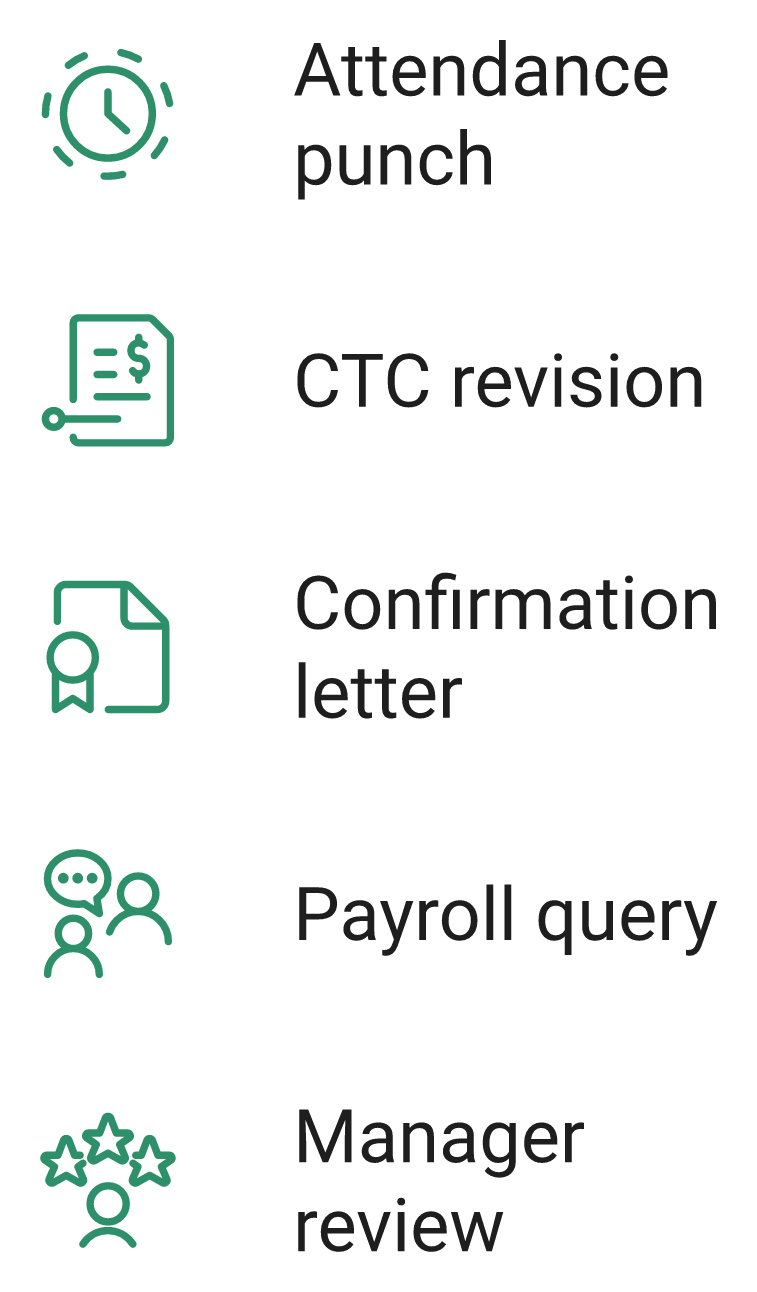
Ask HROne to demonstrate each task inside its Super Inbox, and count the clicks yourself. Do the same with every other shortlisted vendor, using the same stopwatch, and extend the test to your employee self-service portal as well.
⭐ What users actually say about clicks
“I agree, there are too many clicks! We voiced our concerns to SAP so strongly that our CSE granted us an extension.”
– r/SuccessFactors thread, March 2026, Reddit Thread
“The well-known ‘Inbox For HR’ has resolved many of our issues. It allows users to manage multiple tasks from a single window, eliminating the need to switch between different modules.”
– Vignesh J., 5/5, HROne G2 – Verified Review
“The InboxforHR is centralizing every HR task into one simple inbox, cutting down administrative time by 60 to 70%.”
– Waldon S., 4/5, HROne G2 – Verified Review
✅ Proof that velocity is measurable
Shanti Kumar at Pena4 Tech completed a full 360-degree appraisal cycle, including manager ratings, in fifteen days across four companies after moving to HROne. Before that, the process was broken enough that nobody trusted the output.
I am not claiming fifteen days is typical. I am claiming it is measurable, which is more than most migration business cases can say, and the same logic applies to any performance management cycle you are rebuilding.
📋 Baseline now, re-time in sixty days
Do this before you sign anything. Time the five tasks above with your current system, this week, with a real HR executive.
Then re-time them sixty days after go-live. If the numbers have not moved, you changed your infrastructure and left the work exactly where it was.
HROne ranks #3 in Highest Satisfaction Products globally on G2, and ease of use is the reason most cited across its 2,000+ verified reviews. Task velocity, not module count, is what those reviewers are actually describing.
Q9. Which HCM platforms should an Indian enterprise shortlist alongside SuccessFactors?
For Indian enterprises of 100 to 5,000 employees, the realistic shortlist is HROne for India-native multi-entity payroll and task velocity, SAP SuccessFactors for global talent depth, Darwinbox for large-enterprise breadth, Oracle HCM where an Oracle ERP already exists, and SAP HCM for S/4HANA if your on-premise payroll customisation is genuinely load-bearing. HROne runs 20 pan-India units on one instance.
⭐ 1. HROne, for India multi-entity payroll and daily task velocity
HROne is live with 1,500+ brands, including MR DIY India and Asia Healthcare Holdings, and closes 110+ HR tasks inside one Super Inbox. Pricing is flat per employee per month, with billing starting after go-live.
Best fit: 100 to 5,000 employees, multi-state, multi-entity, mixed blue and white collar. Not for you if you need payroll processed in 40 countries on one contract. If that profile matches yours, the best enterprise HRMS for 1,000+ employees breakdown covers the same ground in more depth.
🌍 2. SAP SuccessFactors, for genuine multi-country talent depth
Gartner has named SAP a Leader for ten consecutive years, with roughly 11,000 customers and 6,500+ on Employee Central. That footprint is real, and no Indian vendor matches it globally.
Best fit: 5,000+ employees across many countries, with a central talent strategy. Not for you if a single-country team needs to change a leave policy without a partner ticket. For India-first buyers weighing that trade-off, our list of SAP SuccessFactors alternatives in India models the three-year rupee difference.
🏢 3. Darwinbox, for large Indian enterprise breadth
Darwinbox carries strong enterprise brand recognition across Asia. Users praise the consolidation, and flag speed and integration consistency.
Best fit: 2,000+ employees wanting a single Asian enterprise suite. Not for you if procurement will not accept billing that starts before go-live. Commercial terms are worth checking line by line against published Darwinbox pricing.
🧾 4. Oracle HCM Cloud, and 5. SAP HCM for S/4HANA
Oracle was named a Gartner Leader for the tenth consecutive year and positioned furthest right on completeness of vision. It makes sense mainly where Oracle ERP already runs finance.
SAP HCM for S/4HANA stays maintained to at least 2040. Choose it only if your on-premise payroll logic is genuinely load-bearing, not just old.
| Dimension | HROne | SuccessFactors | Darwinbox | Oracle HCM | H4S4 |
|---|---|---|---|---|---|
| India payroll depth | Native PF, ESI, PT, and LWF | Localised, often partner-led | Native | Localised | Custom-built |
| Multi-entity | Single instance, no entity charge | Configured per entity | Supported | Supported | Custom |
| Timeline | From 30 days | 9 to 18 months | 3 to 6 months | 6 to 12 months | Project-scale |
| Pricing | Flat PEPM, no lock-in | PEPM, 3-year term | Annual contract | Subscription | Licence plus support |
| Support | Prior-HR SPOC, 9.8 NPS | Partner plus ticket | Ticket-based | Partner-led | Internal Basis team |
💬 What buyers say about each
“HCM supports JV integration and GL code logic also. Delivery team has expertise, energetic and helpful during configuration phase.”
– Deepak K., 5/5, HROne G2 – Verified Review
“Darwinbox has made HR processes much smoother by bringing everything together. Pages sometimes load slowly. Sync with other systems can be inconsistent.”
– Saksham A., 4/5, Darwinbox G2 – Verified Review
“It is standard HRMS portal. Sometimes, they can or cannot change details as per client requirement.”
– Verified User in Research, 3/5, Keka G2 – Verified Review
❄️ Every buyer is a different snowflake
No vendor on this list wins universally. My job, and any honest vendor’s job, is to meet you where you are and move you forward.
HROne’s read is that the standard advice gets this backwards, because most shortlists start with brand size instead of entity count. I might be over-indexing on India complexity, but it decides more renewals than any feature grid. Sector fit matters just as much, which is why HRMS choices for manufacturing companies rarely mirror an IT services shortlist.
HROne sits first here because it is the only option purpose-built for Indian multi-entity payroll on a single instance, with a prior-HR onboarding SPOC (9.8 NPS) instead of a ticket queue. Ranked #3 globally for customer satisfaction on G2, out of 1,17,579 products, with the full comparison set out on our HROne vs SAP page.
Q10. How do you decide by Monday, a four-path decision framework?
Answer four questions in order. Does your payroll customisation carry real business logic? Do you operate in more than five countries? How many Indian legal entities and states do you run? Is your budget CapEx or OpEx? Heavy customisation with one country points to S/4HANA. Multi-country talent depth points to SuccessFactors. Indian multi-entity complexity points to an India-native HCM.
🧭 The four questions, in order
Order matters here. Answer payroll customisation first, because it constrains everything downstream.
| Your answer | What it points to | Why |
|---|---|---|
| Payroll logic is load-bearing, one country | SAP HCM for S/4HANA | Maintained to at least 2040 |
| 5+ countries, central talent strategy | SuccessFactors | Global footprint and talent modules |
| Many Indian entities and states | India-native HCM | Statutory depth without partner tickets |
| Strict OpEx, no lock-in appetite | Flat PEPM cloud | Predictable, no perpetual licence |
⚠️ The one caution to raise internally
Gartner’s 2025 assessment notes that SAP’s transition guidance for on-premise HCM customers stays unclear where special compliance requirements exist. Put that sentence in your steering committee note.
Then ask for written guidance covering your India statutory scope. Silence on that request is itself an answer, and dedicated statutory compliance software should never leave that question open.
✅ Your next 90 days
Four workstreams, run in parallel, each with a named owner.
- Build the statutory scorecard from the PF, ESI, PT, LWF, and Code on Wages rows
- Model three-year INR total cost of ownership, including 12 to 24 months of double-running
- Inventory every integration, and name one architecture owner before module scoping
- Set the parallel payroll variance gate at under 0.5% for two consecutive months
Ask HROne to map your entity, state, and statutory scope against your current SAP HCM configuration before any quote is issued. Comparing that map against transparent pricing keeps the CFO conversation short.
🪂 Turn on the parachute that opens now
There is a principle I keep returning to. You open the parachute that works for you right now, and you pay only for what you use.
Applied here, that means staging modules instead of buying the full suite in year one. HROne activates modules progressively across its 127 prebuilt workflows, and I would recommend the same staging even if you choose SAP. Our implementation guide sets out how that phasing works in practice.
🔮 What I think happens next
My current hypothesis is that 2027 will be remembered less for the maintenance deadline and more for the split it forced. Some Indian groups will go global-suite. Many mid-market ones will quietly go India-native.
The deciding variable will not be features. I think it will be whether HR teams can change a policy on a Tuesday without raising a developer ticket. I could be wrong, and I would genuinely like to hear if your experience says otherwise, particularly as the future of HR technology in India keeps shifting.
💬 One question worth replying to
Tell me your entity count, your state count, and the single payroll task that eats the most time each month. Those three numbers predict the right path better than any vendor demo.
If your answer is 12 entities, 8 states, and full and final settlements, we should talk about sequencing, not software. Bring those numbers to a product walkthrough and the conversation gets specific fast.
HROne maps entity, state, and statutory scope against your existing SAP HCM configuration before quoting, so the decision rests on your data rather than on a deadline. That scoping conversation costs nothing and usually shortens the evaluation by weeks, and our CHRO solutions page shows what the first 90 days look like.


















 Secures Top Spot in
